Cant load manual downloaded after Quicken update

After a Quicken update today, I did an update now on an account I usually manually download. I clicked on the downloaded file and received a message: Wait while Windows configures Quicken.
Another dialog box then comes up, that it can't find the Quicken disk.?????????? When I close that Dialog, I get error 1706
All accounts that use express work great.
Any ideas?
Thanks
[Edited-Readability]
Comments
-
Hello @Mike_L,
Thank you for sharing your experience with us.
I do have some follow-up questions:
- What bank are you trying to import transactions for?
- Do you import transactions from other financial institutions?
- If so, do those produce the same error?
- This issue has only been happening since yesterday, correct?
One thing we can try is uninstalling Quicken and then reinstalling. If needed, check out this Support Article for steps to uninstall.
To reinstall your software, you can go to Quicken.com and sign in to the My Account section.
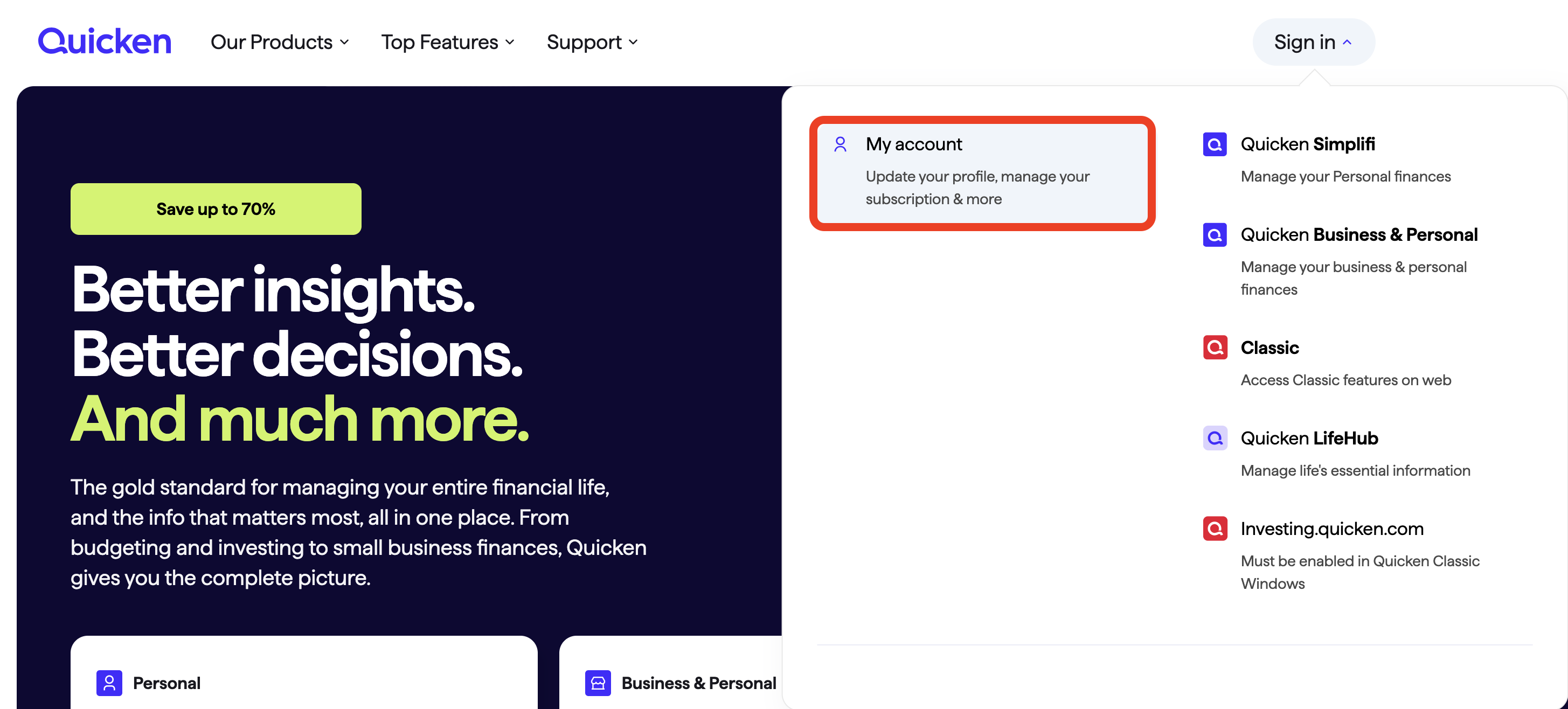
Once signed in, you can select the Quicken for Windows download.
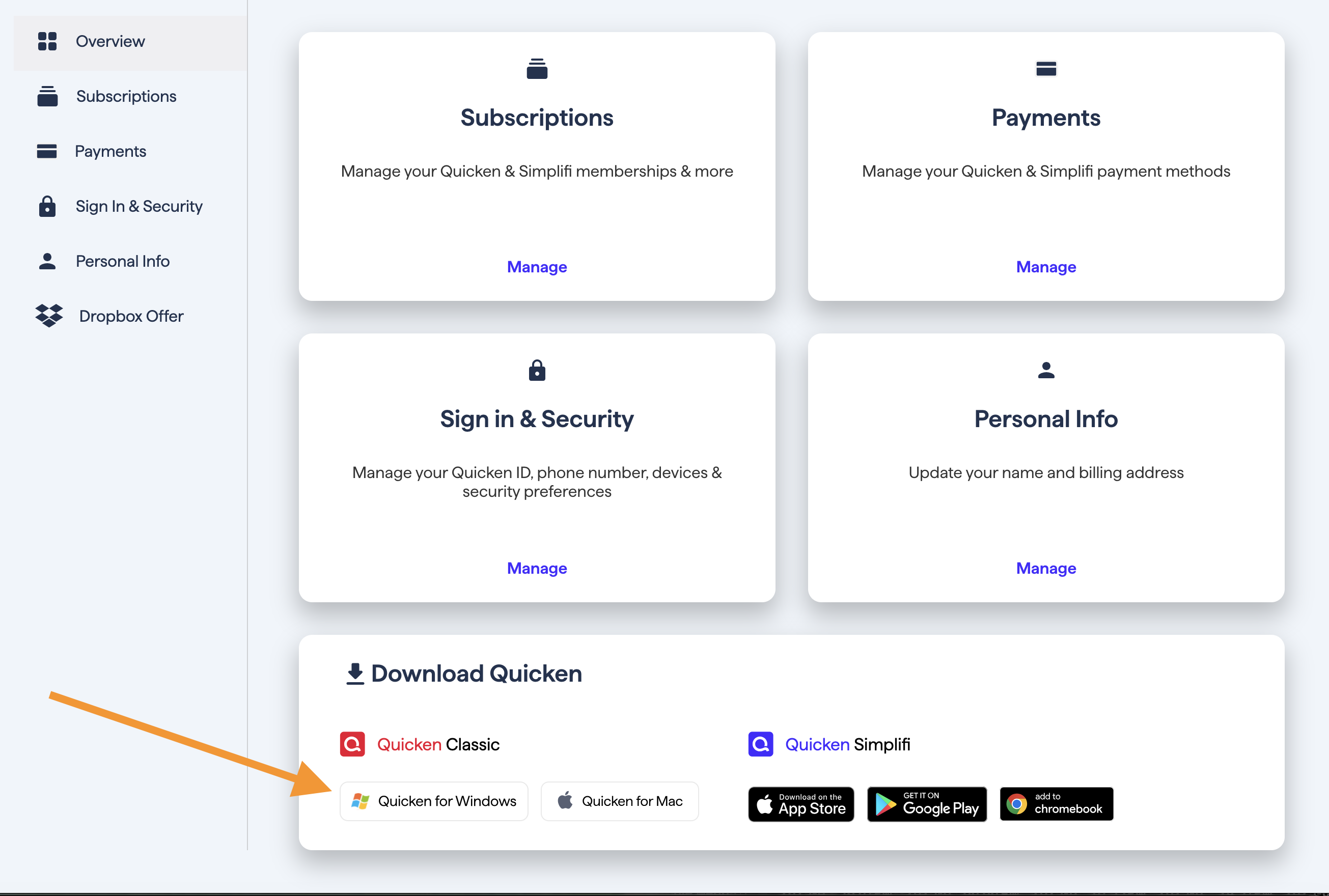
Go through the installation prompts, and once you are back in your file, try importing the file again.
Let me know how it goes!
Quicken Alyssa
Make sure to sign up for the email digest to see a round up of your top posts.
1 -
Really appreciate the response. I will probably try the reinstall over the weekend. If I uninstall and reinstall, will I need to then set up my account accesses again, or are they kept in the backup file?
I am using 1st Advantage FCU, and I can download my checking and savings from that facility with Express Web Connect. All those work perfectly.
The account I am having problems with is my credit card. A year ago, I had major problems trying to get the account to work with Express. Since then, I have been exporting transactions for that account manually and clicking on the downloaded file to update Quicken. Earlier this week, Quicken loaded an update. Since the update, everything seems to work great EXCEPT the downloaded file for the credit card.
After I click on the downloaded file, I get a message that Windows ti trying to update Quicken. I then get a message that it can't find the Quicken CD, and sometimes get the message that there are currently Quicken components open that cannot be installed.
Again. Really appreciate your help.
[Edited-Readability]
0 -
Thanks for providing additional information. Definitely a strange issue that has surfaced.
What bank is this credit card through? Is it held at 1st Advantage FCU as well?
When you uninstall and reinstall, Quicken should allow you to get right back into the file you are in now. You shouldn't have any additional work to do in the file due to uninstalling and reinstalling. In fact, during the process, Quicken should basically recognize the existing file and offer it to you.
If you get stuck or need help through the process at all, just let us know.
We're here to help!
Quicken Alyssa
Make sure to sign up for the email digest to see a round up of your top posts.
1 -
The CC is with 1st advantage FCU. its a master card.
Really appreciate your help. It seems like whenever I feel i am transitioning from newbie to novice i find myself back to newbie.
With you folks helping, i have learned many of the anomalies of the app and haven't had to go to a backup file since last SEP. I'll let you know if the uninstall / reinstall works.
Thanks again
Mike
0 -
So why is Quicken/Windows (as of 11/26) unable to automatically or otherwise import manually downloaded transactions? Even when I have the file downloaded to my local drive, quicken does not see the qfx file in the directory. I dont plan on reinstalling quicken if this is something that has occurred since the last update.
0 -
"Automatically import" could be a Windows issue … is the QFX file type associated with Quicken in your Window's settings?
re: "Manually import", you haven't provided enough info for us to diagnose. What specifically happens? What Financial Institution is this happening with? When you do TOOLS, Account List what shows in the "Transaction Download" and "Financial Institution" columns across from the particular account(s)?
And, if you're ruling out particular remedies before the reason for the problem is known, it might NOT EVER be resolved.
Q user since February, 1990. DOS Version 4
Now running Quicken Windows Subscription, Business & Personal
Retired "Certified Information Systems Auditor" & Bank Audit VP0 -
NotACPA, Thanks. Thanks for being there. Appreciate the help over the past year
Alyssa, your solution worked perfectly; however, there was a slight glitch in the installation. I received an error, and they sent me to the website and suggested I do another uninstall, and this time go to the 8x program files and delete the Quicken directory after the uninstall (I think those were the instructions). I did that and did another reinstall. Everyone went Great. It asked me to find my data file. I had it in a subfolder in the documents: Quicken folder. I verified it by checking the date of the file - it was about 30 minutes previous. The file came up and looked great. I tried the manual "update now" for the credit card. It worked perfectly, marking the transactions I had updated manually as having been downloaded.
Thanks, you guys. You probably don't realize how helpful you are. I, and I am certain, many others, would not be able to use Quicken without your help. 😀
[Edited-Readability]
0 -
Hello All,
Thank you for helping others in the thread.
Please try the steps for uninstalling and reinstalling, as that is what has worked for others.
So happy to hear the steps worked to resolve the issue, despite the snag you ran into during installation. If you need more help, don't hesitate to reach out!
This issue has been reported. If you would like to aid in the investigation, you can go to Help>Report a problem>Send to Quicken, from within your Quicken software, and send over your log files.
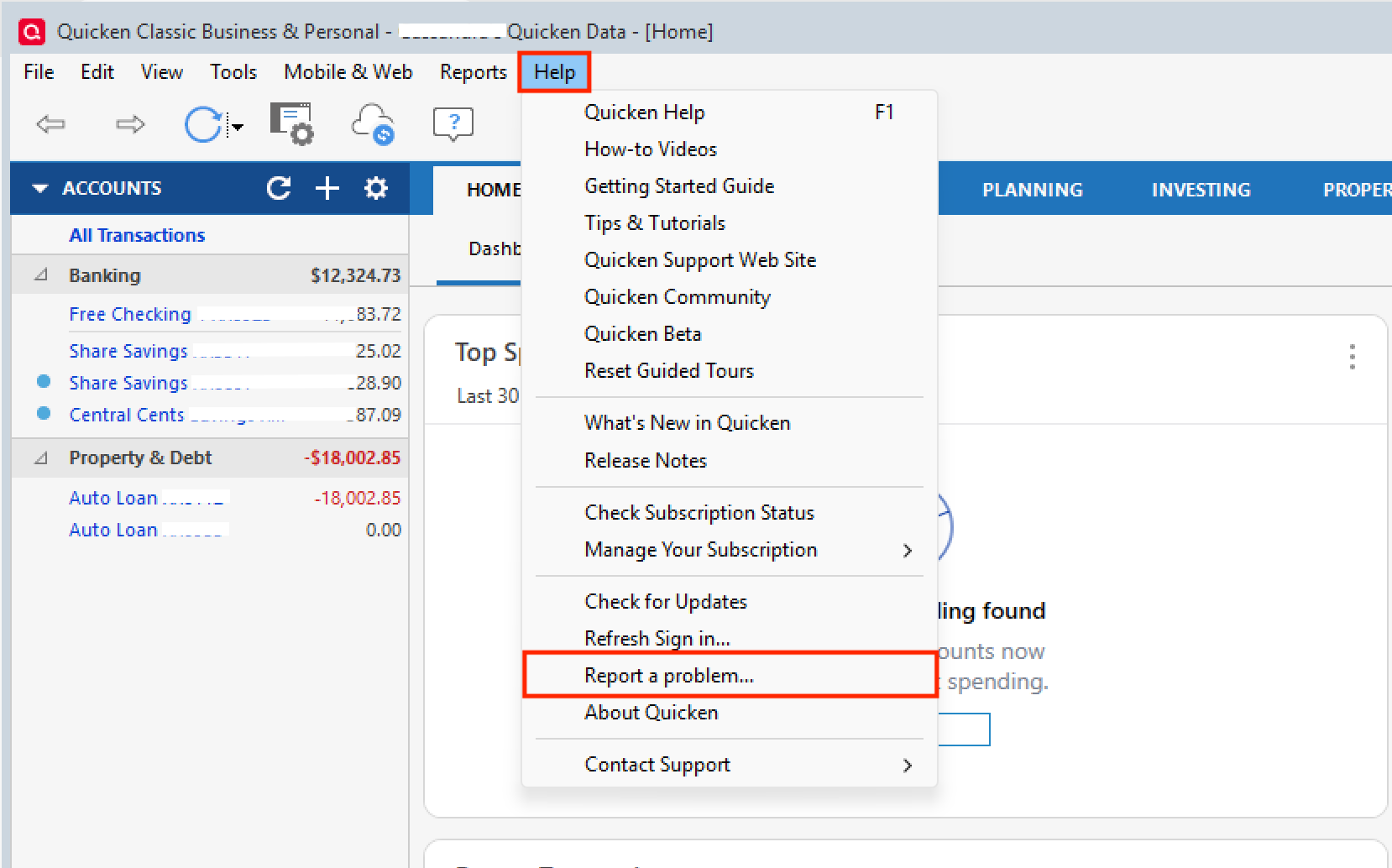
Please let me know once you have sent it so I can add it to the ticket.
Thank you.
[CTP-15434]
Quicken Alyssa
Make sure to sign up for the email digest to see a round up of your top posts.
0 -
I have the same problem with Quicken Classic Premier R65.17. I started using manual download about a year ago when updating from Quicken stopped working for 2 of 6 Vanguard accounts. With the latest revision, manual download does exactly what Mike L reported. So I was going to uninstall and reinstall but following your instructions and going to Quicken.com, it wants to sell me a new version (I am an annual subscriber) even though I logged in???
0 -
Hello @tov,
Thank you for adding to this discussion.
It sounds to me like you may have logged in with the wrong email.
Within your Quicken software, go to Help>About Quicken. There you will be able to see the email your subscription is registered to. Make sure that is the email you are signing into the website with.
Let me know if this resolves the issue.
Quicken Alyssa
Make sure to sign up for the email digest to see a round up of your top posts.
0 -
Alyssa
I just sent the log
Thanks again
0 -
Hello @Mike_L,
Thank you for following up and sending that over!
I have added you to the ticket.
Thanks again!
Quicken Alyssa
Make sure to sign up for the email digest to see a round up of your top posts.
0 -
Hello All,
The team handling this escalation has requested that we gather Event Viewer logs. For those of you who are willing to do this, you can follow the steps below.
- Search for the application "Event Viewer" and open it.
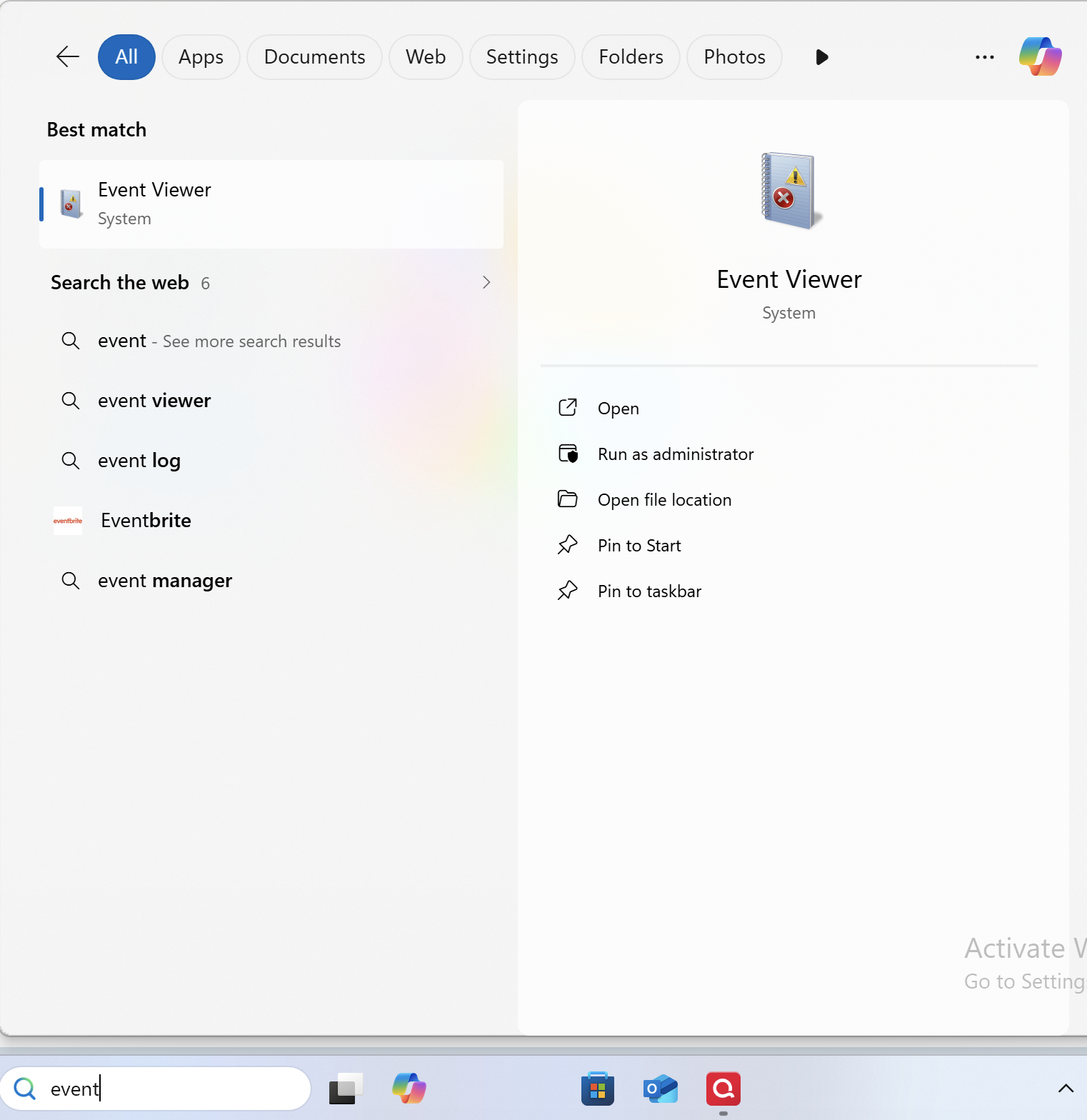
- Double-click on the "Windows Log" folder and select "Application."
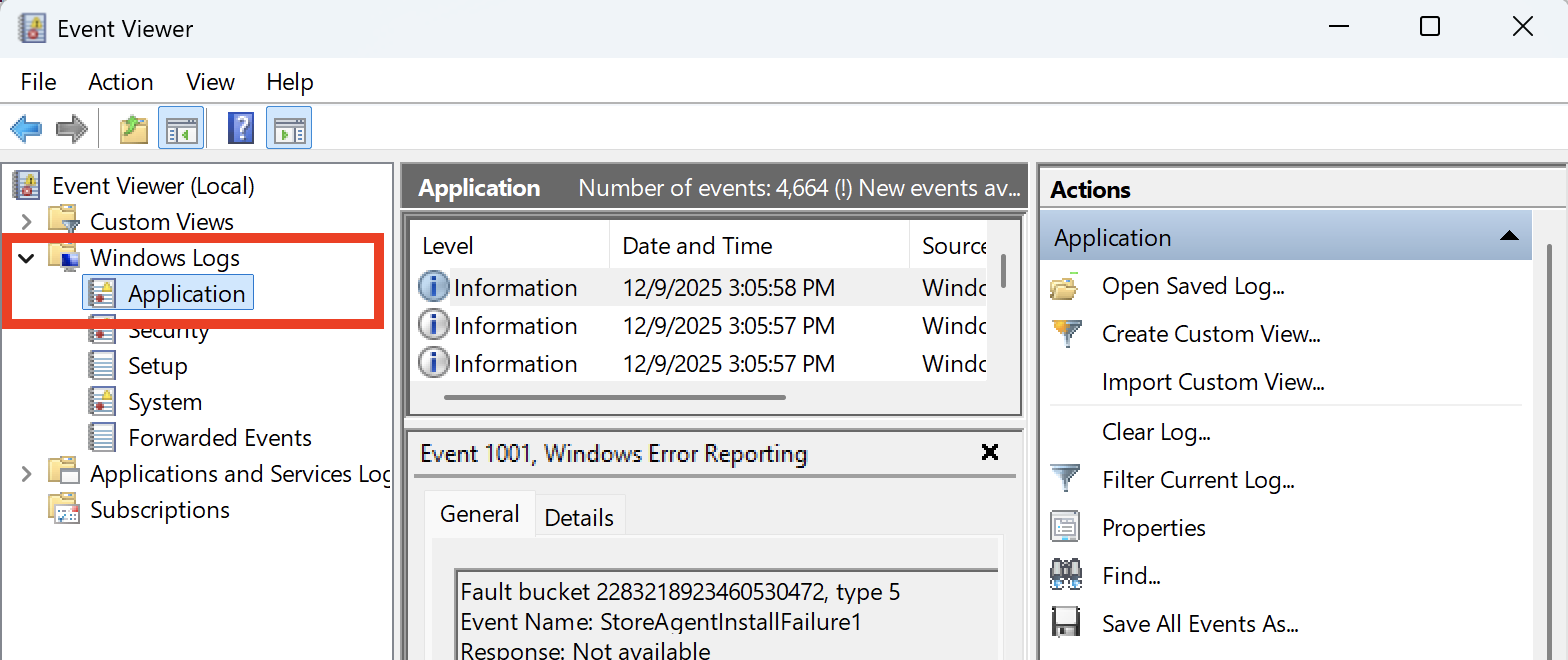
- On the right side, click on "Filter Current Log," and where it says "Logged," change the time range from "Anytime" to "Last 7 days."
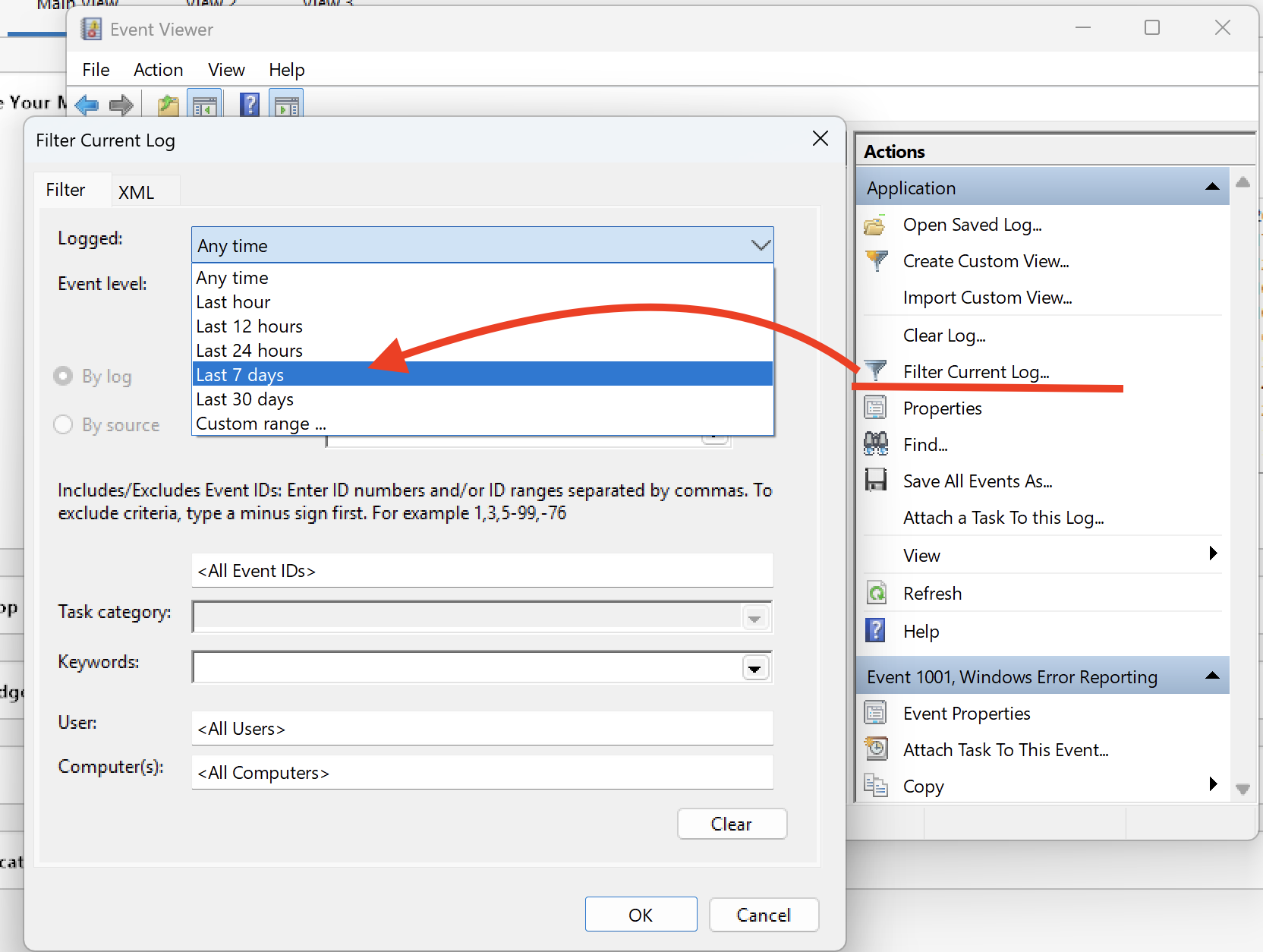
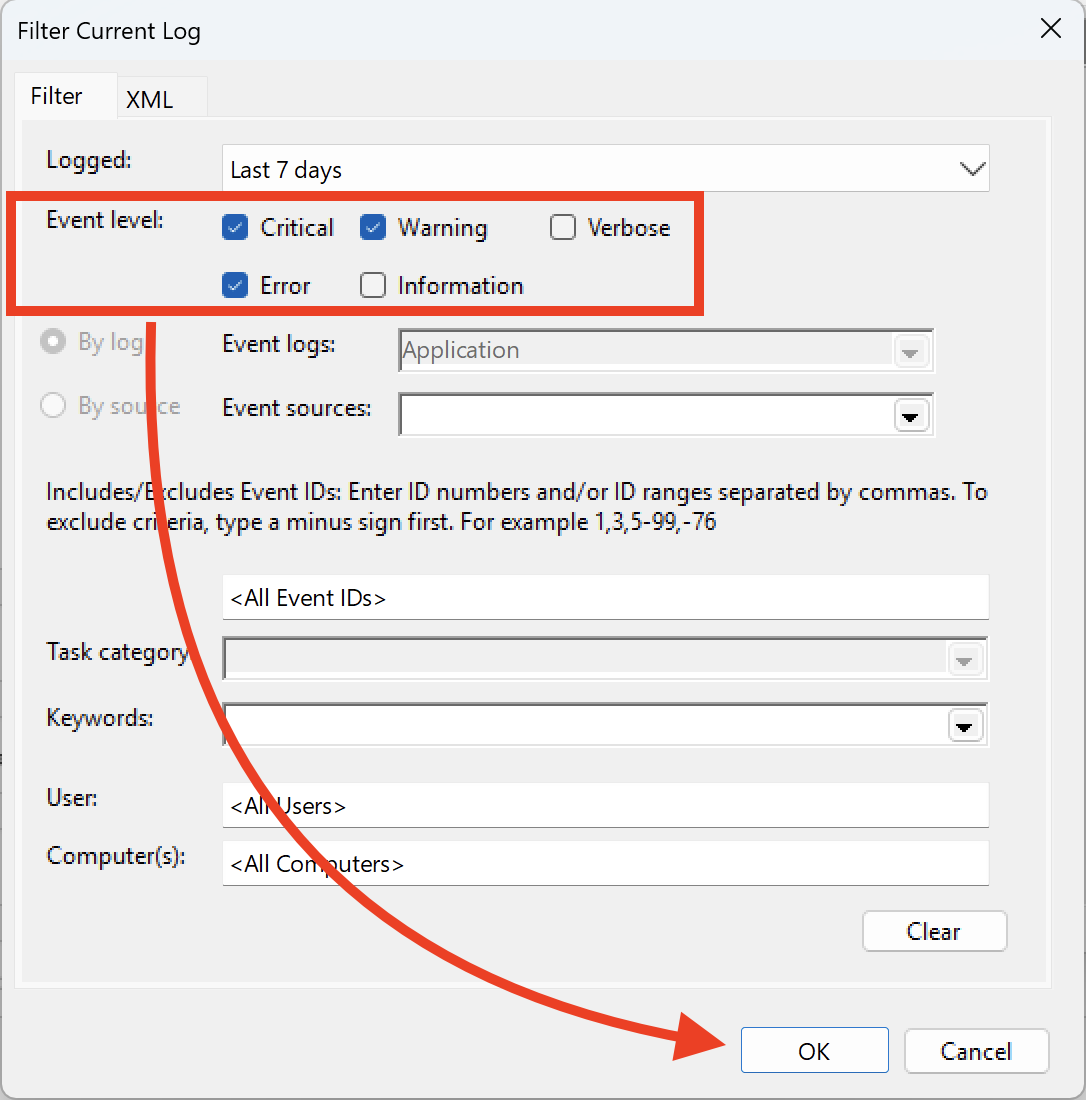
- Ensure that you select "Critical, Warning & Error," and then click OK.
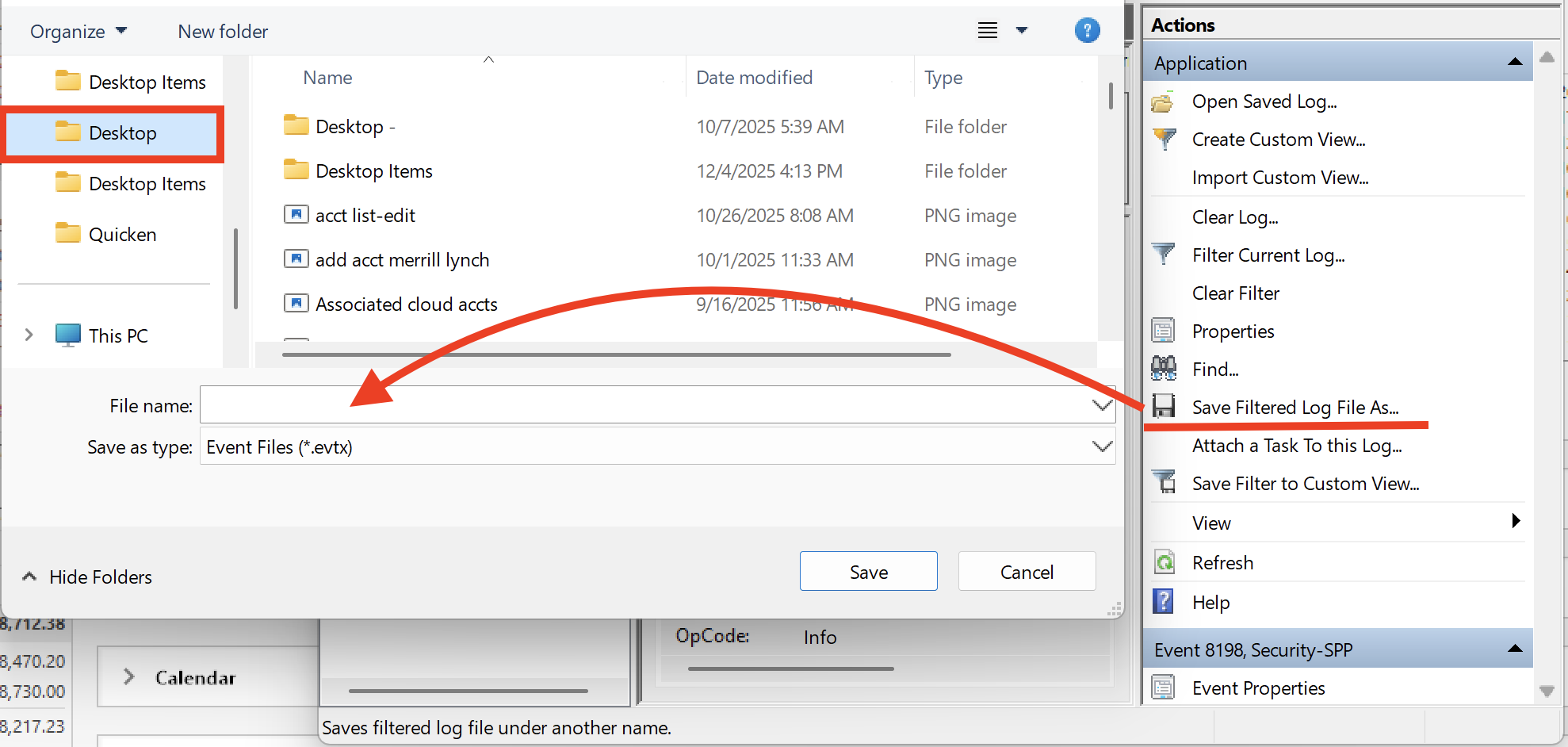
- Next, click on "Save filtered log file as" and save it to the desktop.
Let us know once you have gathered it, and we will provide guidance on how to send it over.
Thank you!
Quicken Alyssa
Make sure to sign up for the email digest to see a round up of your top posts.
0 - Search for the application "Event Viewer" and open it.
-
As a workaround, I import the QFX file from File > Import > Web Connect file. I'll go through the reinstall after I get my categories/taxes done.
1 -
Hello @preigns,
Thank you for adding to this discussion to let us know what works for you.
Let us know if you need help once you decide to do the uninstall/reinstall.
Thanks again!
Quicken Alyssa
Make sure to sign up for the email digest to see a round up of your top posts.
0

