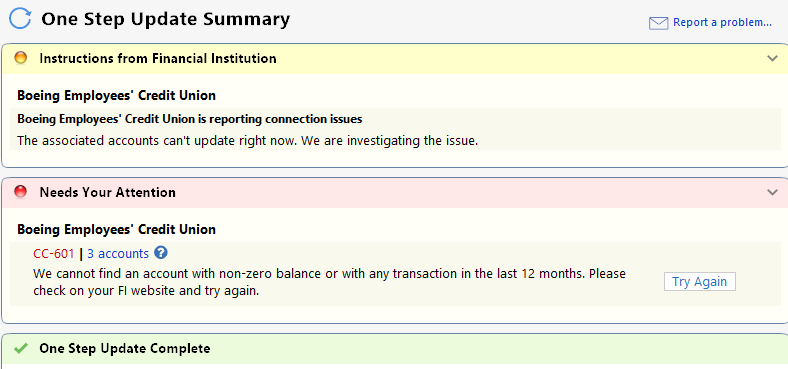
CC-601 for BECU (Boeing Employees CU)

A 601 error is not one I have encountered before. I have seen it for about three days now. Resetting the account did not help.
[Version R65.17]
Comments
-
I'm having the same issue. Started on 11/25. I've tried resetting & deactivating / reactivating without success.
1 -
Also having the same issue - same messages received when trying to update. No other accounts are having issues. Believe it started yesterday after I applied the latest update to Quicken.
1 -
Hello All,
Thanks for reaching out!
For the first error (in yellow) showing in @GermanBlueRam's screenshot, please follow the instructions below to see if that resolves the error, as several users have previously reported that the steps have resolved this error for them:
- Run One Step Update (OSU) first to see if the issue resolves.
- If the issue persists, close Quicken
- Using Windows File Manager to rename the runtime.dat file located at:
C:\ProgramData\Quicken\Inet\FILENAME\ where FILENAME is the name of your current Quicken data file, e.g. My Quicken Data 2024 as seen in the image below. There usually is an \Inet\… subfolder for each Quicken data file in existence.- (For example, add a 1 at the beginning of the file name so it reads 1runtime.dat.)

- (For example, add a 1 at the beginning of the file name so it reads 1runtime.dat.)
- Start Quicken and run One Step Update again to check if the problem is resolved.
- Close and restart Quicken to ensure changes take effect.
📌 Note: The ProgramData folder is hidden by default. If you need help accessing it, Microsoft's support site has instructions on how to unhide folders.
——Regarding the CC-601 error—this error happens when Quicken cannot establish a connection to the bank to download transactions. It may be due to a restriction or change on the bank’s side preventing the connection. In some situations, Quicken Support may need to investigate or escalate the problem.
Please review this support article regarding this error.
As advised in the article, we recommend waiting 24 hours first. However, if the error persists after that time, then please contact Quicken Support directly for further assistance and possible escalation if needed.
Thank you!
-Quicken Anja
Make sure to sign up for the email digest to see a round up of your top posts.1 -
I clicked the "Fix It" button after seeing a CC-800 message and I seem to be up and running again.
1 -
@GermanBlueRam Thanks for the update! Glad to hear things are working now.
-Quicken Anja
Make sure to sign up for the email digest to see a round up of your top posts.0

