Split Reminders corrupted

Quicken Classic Premier Windows R64.35 Build 27.1.64.35. Saturday I did a full Mondo download to ensure I had all current modules without error, and since that brought me to only R64.30, I then applied the R64.35 update.
At this stage, to keep things organized and allow our team to properly investigate, could I please ask you (and anyone else encountering issues) tostart a new separate discussion threadin the Community specifying theexact issue you’re seeing? That way, we can troubleshoot and follow up directly.
I don't know precisely when this happened (and though I have updates before the Mondo download, between the Mondo and R64.35, and after, I don't want to take the time to track down precisely when it happened unless Quicken tells me it'll be useful to them), but I suspect it was from the R64.30 update. I have a number of monthly reminders, with split transactions. For instance, family member C pays the electricity bill. Family member T pays C for a 25% share of that bill. This is represented by two monthly reminders.
- Reminder 1 reflects the bill and its payment. It has four lines, 1) 1/4 of the bill, person T utility spend, 2) 3/4 of the bill, person C utility spend, 3) 1/4 of the bill, person C "owes" person T (acts like a payment, reducing what C owes T), and 4) 1/4 of the bill, person T owes person C (what T owes C for the electricity). I post this when the bill arrives, based on the dollar armounts of the bill, with a payment date = due date (the payment is auto-pay in the utility's system).
- Reminder 2 reflects the payment of T to C. It has three lines. 1) the payment out of person T's checking account gets paid to Person C's checking account. 2&3) Reversal of lines 3&4 above, reversing the debt.
My August reminder looks like this:

The new bill arrived today, and when I went to apply the bill, this is how the reminder looks:
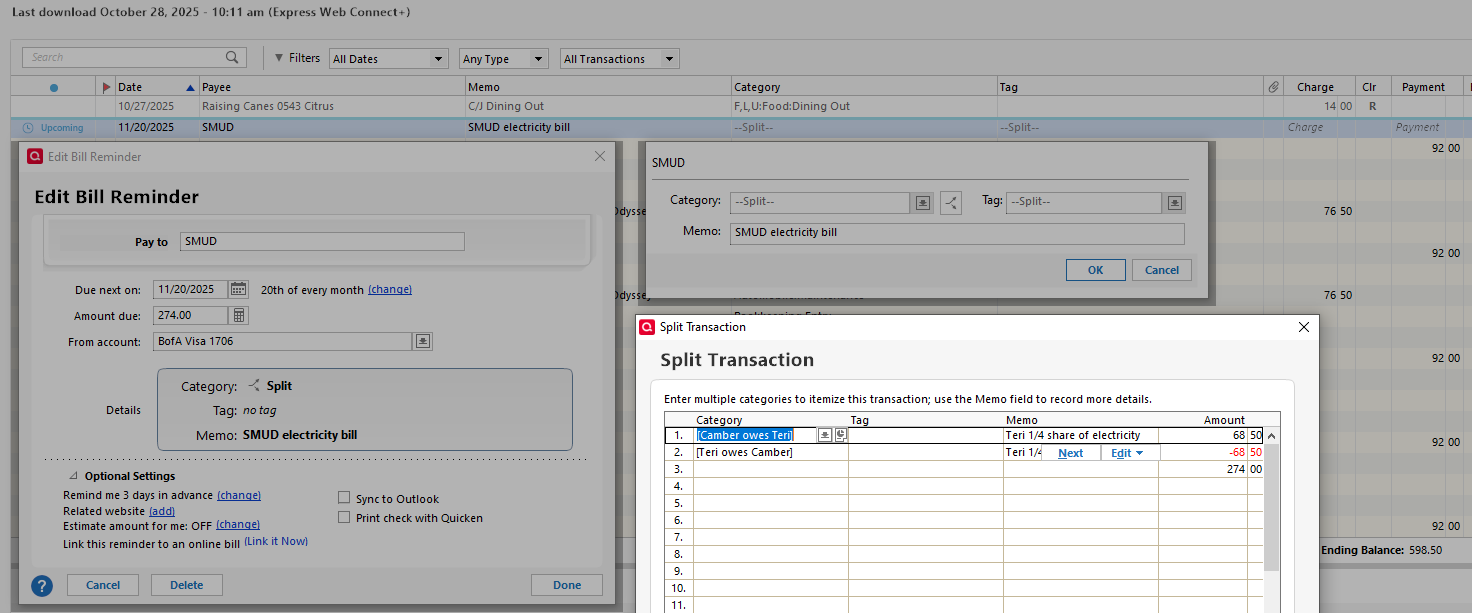
The Upcoming reminder line in my register has no dollar value. It normally has the value in the Reminder's "Amount due" field, which is correct. The two lines which contain the actual category of spend are gone. The debt lines are OK. Since the debt lines net to zero, and the amount due is $274, there is then a line with NO category and the 274 dollar amount.
I can fix these as I find them. My concern is I don't know whether these reminders will be fouled up month after month (whether this error will reoccur going forward.
In this case, I 1) deleted the bad reminder. 2) Created a new monthly manual bill reminder with the splits looking the way I want them to. 3) I entered this month's pending payment (scheduled for 11/20, correctly showing Uncleared in the credit card's register). 4) I exited Quicken, took a full backup of the file, and relaunched Quicken. 5) I did an update for this one credit card.
Of course nothing downloaded. I then went into the 12/20 reminder, edit the reminder, and everything looked OK, so I'm hoping that my fixes won't be wiped out going forward.
Bob
Comments
-
Hello @Bob@45,
Thank you for sharing your experience. If the issue does return, you may want to try this solution, posted earlier by a Super User:
I hope this helps!
Quicken Kristina
Make sure to sign up for the email digest to see a round up of your top posts.
0 -
I found out today that this impacts the Projected Balances display, which is what I use to verify future cash flow.
These reminders of future activity are displayed normally in the Tools > Manage Bill & Income Reminders list, with the correct date, payee, amount, and status. However, they are completely missing from the Bills & Income > Projected Balances display.
I don't know that this was caused by the R45.30, but I've never had this problem before that update.
I'm guessing that Projecte Balances is looking at split lines that have categories, and ignores split lines that do not. Since previously these reminders had categories on every split line, it had never been a problem. Now that these split reminders have their primary amount on a split line at the bottom with no category, they are no longer listed.
Since I need to know my cash flow, I need to fix all of these now. It's not sufficient to "wait until the next payment". Before fixing the majority of these, I've created a sanitized data file I can send to Quicken if it will help. If any that I have fixed get corrupted again, I'll generate a problem report.
0 -
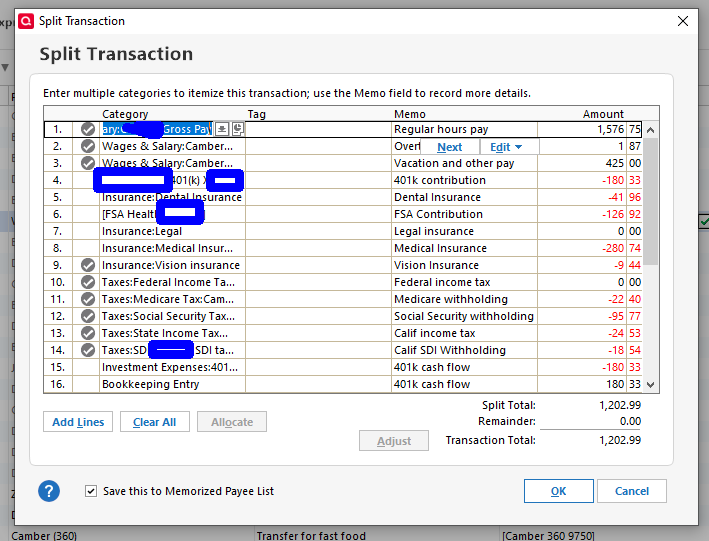
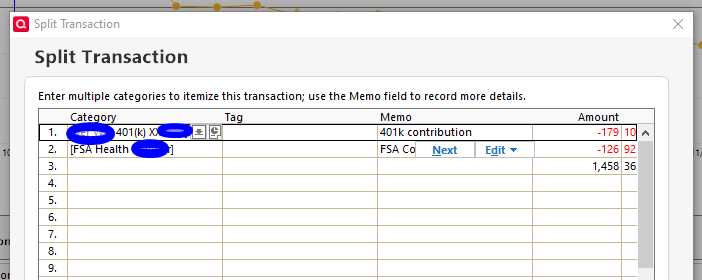
The paycheck reminder was REALLY fouled up. The reminder was set up with well over a dozen lines, with individual lines for different categories of wages (regular, overtime, vacation-sick and other), for each of the pre-tax deductions (401k, med ins, dent ins, etc), and each of the tax categories (fed inc, state inc, socsec, etc).
The new reminder has a line for the 401k contribution, for the FSA contribution, and a line which with the others nets to the total for the reminder, but a) that last line has no category or memo, and b) all the other lines I had have disappeared.
 0
0 -
Thank you for your replies,
Did you try the possible solution I shared in my earlier post? If so, did it help at all?
Thank you!
Quicken Kristina
Make sure to sign up for the email digest to see a round up of your top posts.
0 -
Did you try the possible solution I shared in my earlier post? If so, did it help at all?
No, I did not, because that solution said,
Reminders must be free of corruption before the cloud reset/delete, or an OSU so editing the reminder to correct split issues and performing the super-validate need to be done first.
And so I needed first to work my way through all of the reminders that seemed to have issued before attempting the solution. I think I've completed that, at least for all reminders in my primary accounts through the next three months. I'm going to wait a few days to see if any new corruption reveals itself before I do anything else other than cross my fingers.
0 -
Just a quick update that several weeks later, including a full payroll cycle, my split transaction reminders seem to be stable. The ones I fixed above have stayed fixed, and no new occurrences have presented themselves.
4 -
Thank you for the follow-up,
I'm glad to hear your split transaction reminders are working properly now!
If you need further assistance, please feel free to reach out!
Quicken Kristina
Make sure to sign up for the email digest to see a round up of your top posts.
0
