Transaction download issue with Navy Federal; Version R65.17, Build 27.1.65.17

After yesterday’s update to Quicken Classic Deluxe Version R65.17, Build 27.1.65.17, when downloading a *.QFX file from Navy Federal Credit Union, Quicken Launches “Please wait while Windows configures Quicken. Then a dialogue box, “There are Quicken components currently open, and can not be uninstalled. Please close Quicken and try again. After clicking OK, the following appears “ :\Users\name\Downloads\transactions.qfx user cancelled installation.”
Also, note that one step update does not work either. This problem is centered on Navy Federal; all other accounts update fine.
Answers
-
I'm having this same problem using Quicken Classic Deluxe Version R65.17, Build 27.1.65.17. If I close Quicken and have Windows 11 open the Quicken file, it wants me to use an installation CD. The only way I can get the download data into Quicken is to manually import it. Quicken, please fix this.
0 -
I am getting the same error when opening a QFX file. Anyone know where we can find the MSI file?
0 -
Hello All,
Thanks for reaching out! There is currently an open ticket tracking the issue described in this thread (CBT‑931). To contribute to the investigation, we ask that you please submit your log files, screenshots and a sanitized data file via Help > Report a problem.
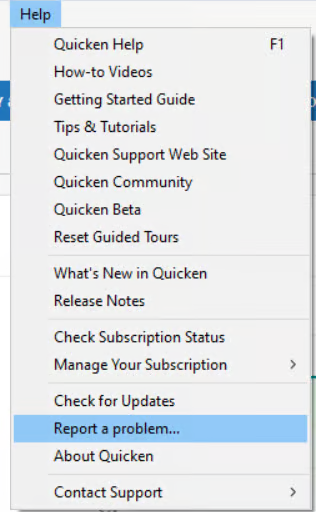
However, some users have reported that uninstalling and reinstalling Quicken has resolved the problem for them, so I suggest trying that to see if it helps in your case.
However, after you have uninstalled and before you proceed with reinstalling, please open your Windows File Explorer and navigate to This PC > C: Drive > Program Files (x86) and delete the folder titled "Quicken" (doing so does not affect your data files).

After you have deleted this folder, go ahead and try reinstalling.
Let us know how it goes!
-Quicken Anja
Make sure to sign up for the email digest to see a round up of your top posts.1 -
What is the status of trouble ticket CBT-931? I am leery about uninstalling/reinstalling Quicken as it may induce more problems. I can live with one account (Navy Federal) not updating but not the others. A problem report has been provided per your request. Thanks!
1 -
Hello @grantjl,
Thanks for following up. CBT‑931 is still an open ticket, and our teams are actively investigating. At this time, there isn’t an ETA for a resolution. Thanks for submitting your log files. We will get them added to the ticket.
The uninstall/reinstall workaround has helped many users restore functionality for accounts affected by this issue. This process should not affect your data, but if you want extra peace of mind, you can create a backup before proceeding as a “just in case.”
Thank you!
-Quicken Anja
Make sure to sign up for the email digest to see a round up of your top posts.0 -
Quicken Classic Deluxe, Windows 10:
What a jumbled mess Quicken Version R65.17, Build 27.1.65.17 has made of my record keeping. It has arbitrarily transferred data between accounts, renamed accounts, and closed some emptied accounts. Even data from my daughter’s Quicken investment account (on the same computer) is now in my NFCU checking account. My Navy Federal checking account was renamed NFCU Checking (Main) from Active Duty Checking, and it appears to have the data of some, or perhaps all of the closed accounts. I am restoring yesterday’s backup.
0 -
I am also having this problem with several banking institutions. I was able to do a workaround by importing the .qfx file from withing Quicken and had no problem. Uninstall/reinstall is not a great option. Quicken please fix this issue. Thanks!
0 -
What is the status on trouble ticket CBT-931?
0 -
Hello All,
Thank you for the continued reports and updates.
CBT-931/CTP-15415 remains an open and active ticket at this time. Our teams are still investigating, and we do not yet have an ETA to share.
To recap:
- Uninstalling and reinstalling Quicken (including deleting the Program Files (x86) > Quicken folder before reinstalling) has resolved this issue for many users. This process does not affect your Quicken data, and creating a backup beforehand is recommended if you’d like extra peace of mind.
- Some users have been able to import the QFX file directly from within Quicken as a temporary workaround.
- Issues such as renamed accounts, unexpected changes, or data appearing in the wrong accounts should be corrected by restoring from a recent backup. If you experience this behavior, please report it via Help > Report a problem so we can include those details in the investigation.
We understand the frustration and appreciate your patience while we work toward a resolution.
Thank you!
-Quicken Anja
Make sure to sign up for the email digest to see a round up of your top posts.0 -
Same problem with me, trying to import QFX files from Wealthfront in the past few days. Using Windows 11, and Quicken Deluxe, both of which are updated to the most recent released versions.
I uninstalled Quicken, deleted the Program folders on c: drive, and reinstalled Quicken. Now it seems to properly import again.
0 -
Same problem with me. I am getting the same messages when downloading from US Bank. I was able to download the file from my US Bank Account so that it appeared at the bottom of my account window in Quicken. But when I click on that file to install or populate the transactions into the file, as I have normally done for years, an error message appears that says "There are Quicken components currently open, and can not be uninstalled. Please close Quicken, and try uninstalling again." I am NOT trying to uninstall anything. I completely closed Quicken and the bank files, and tried again multiple times, but the same issues arise. We are paying substantial subscription dues and this is unacceptable. I am afraid that if I uninstall and reinstall Quicken it will only create more problems, plus I would lose all my settings and preferences, I also spent 45 minutes on the phone with an agent in the call center and that was a waste of time. We got nowhere.
1 -
Hello All,
Thanks for reporting this issue!
For those still experiencing this issue—this has been escalated internally, though we do not have an ETA available at this time. In the meantime, we now have an open Alert posted. Please refer to this Community Alert for any and all available updates and information.
Thank you!
-Quicken Anja
Make sure to sign up for the email digest to see a round up of your top posts.0 -
Same problem here. Did the workaround of Importing Web Connect QFX file for now. This happened several years ago - same exact issue after an update…
0 -
I began using Quicken many years ago and Quick Books for my Corporation. It is becoming so exhausting keeping up with the changes. The endless features are wondrous, when they work. But I may chuck the software and just monitor my financial accounts through their sites directly. Years ago I went through the "uninstall, reinstall process" and it took three months to recover from that mess. Let's let Quicken people solve the "fix" to ticket DBT-931 of 12/4/2025. Cheers!
0 -
Hello @SDHiker & @Patriot171*,
Thank you both for sharing your experiences—we understand how frustrating it is when an update disrupts workflows that have previously been reliable.
This issue remains under active investigation and has been escalated internally. While we don’t have an ETA to share yet, we’re aware of the broader impact and truly appreciate your patience. Using the QFX import workaround is a good temporary solution, and we understand the hesitation around uninstalling/reinstalling based on past experiences.
As updates become available, they’ll be shared through the existing Community Alert. We appreciate you taking the time to report what you’re seeing—it helps our teams track patterns and prioritize fixes.
Thank you!
-Quicken Anja
Make sure to sign up for the email digest to see a round up of your top posts.0 -
Hello All,
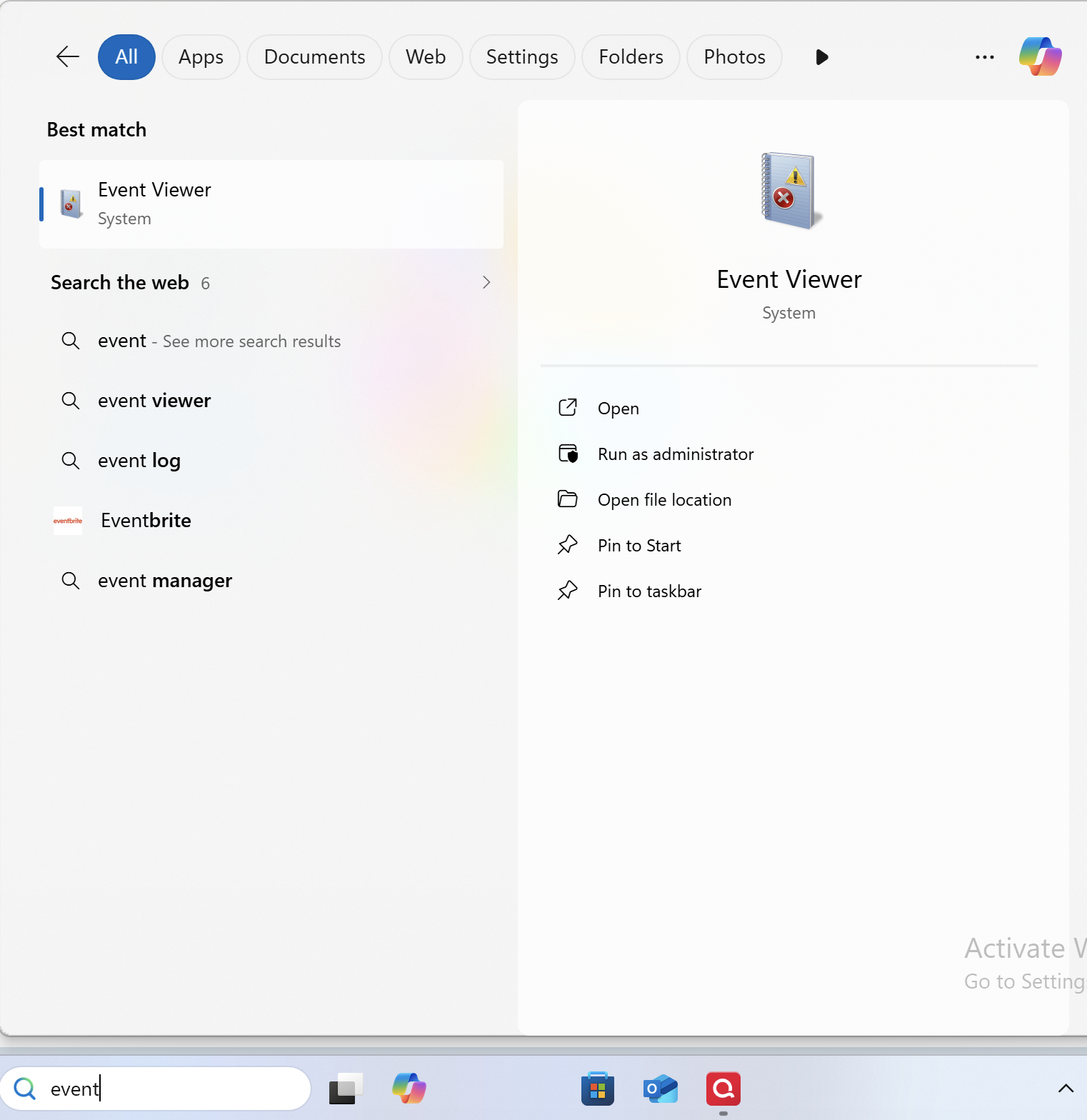
The team handling this escalation has requested that we gather Event Viewer logs. For those of you who are willing to do this, you can follow the steps below.
- Search for the application "Event Viewer" and open it.
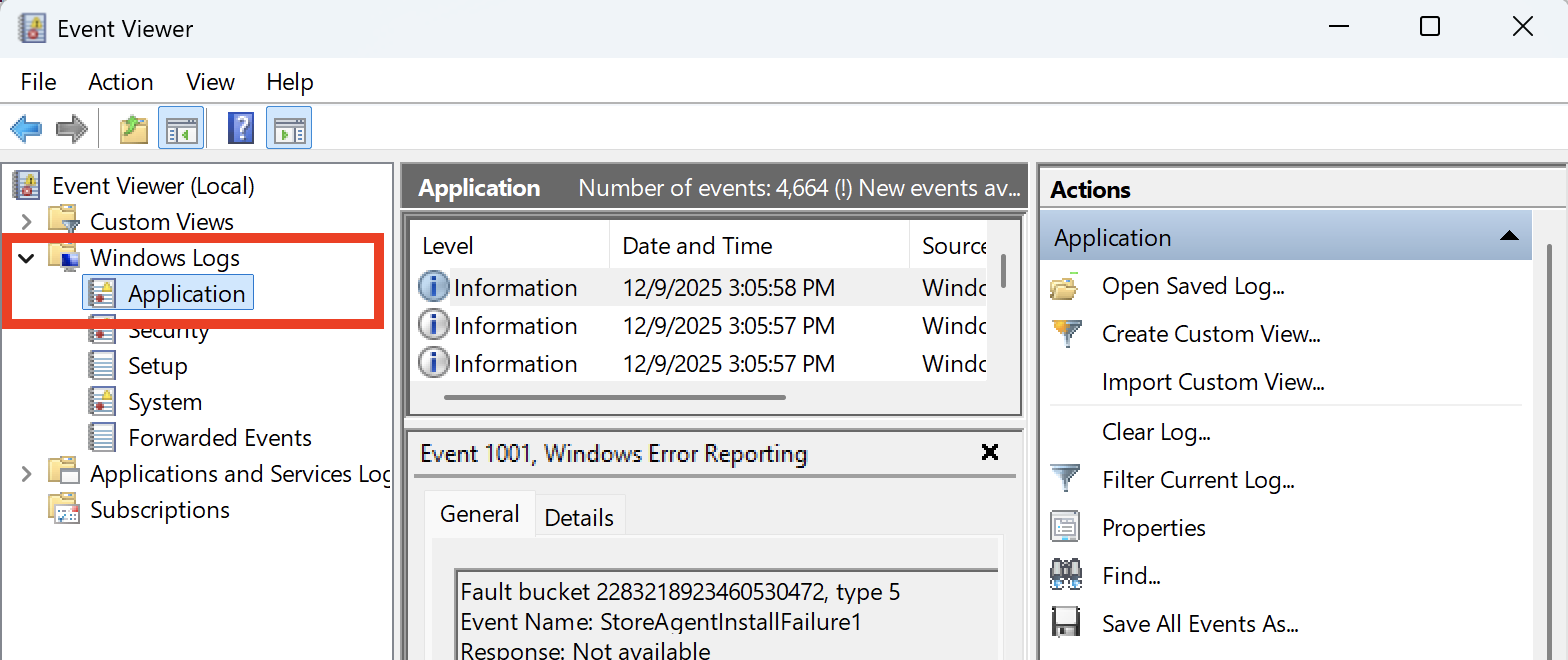
- Double-click on the "Windows Log" folder and select "Application."
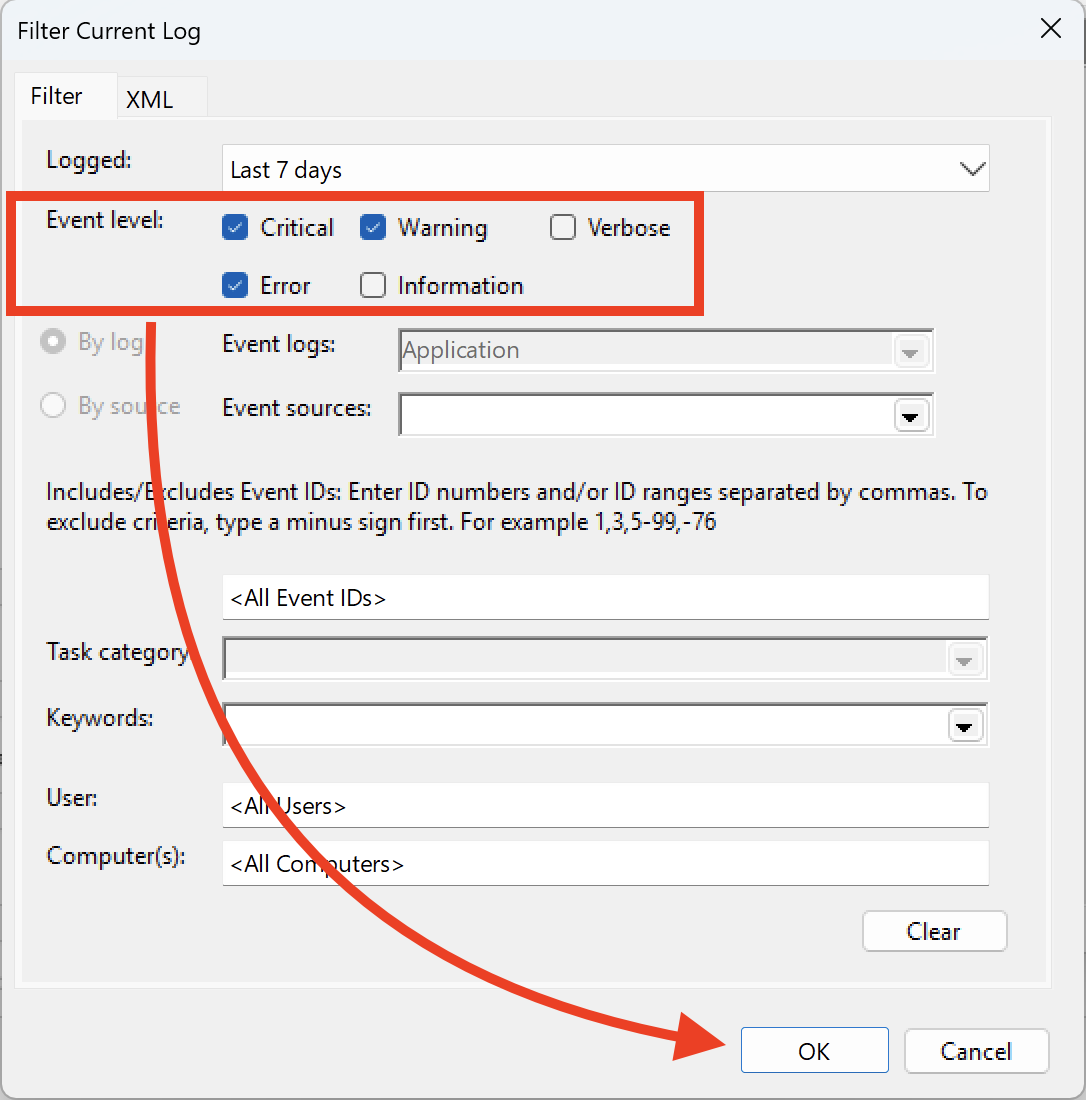
- On the right side, click on "Filter Current Log," and where it says "Logged," change the time range from "Anytime" to "Last 7 days."
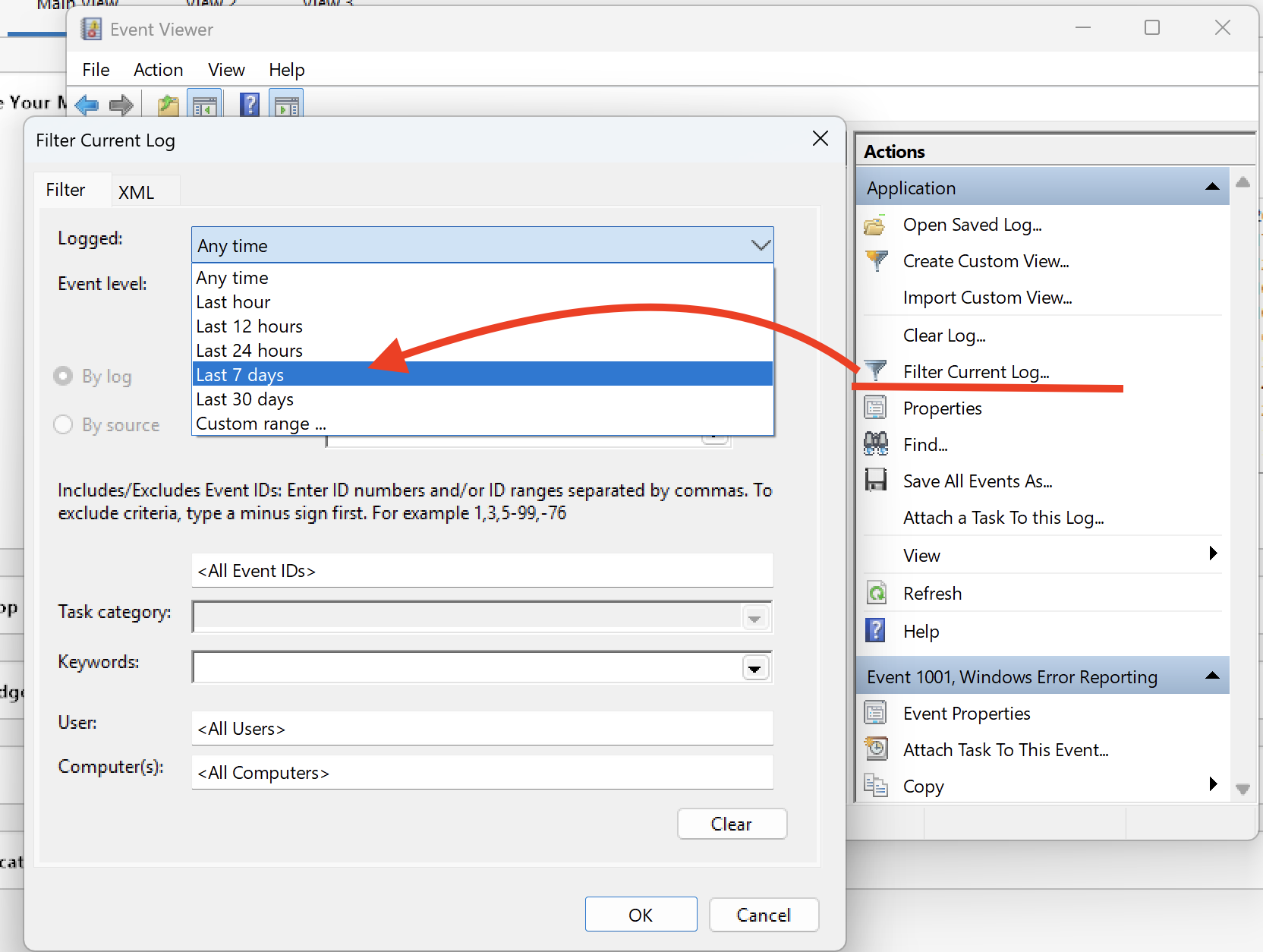
- Ensure that you select "Critical, Warning & Error," and then click OK.
- Next, click on "Save filtered log file as" and save it to the desktop.
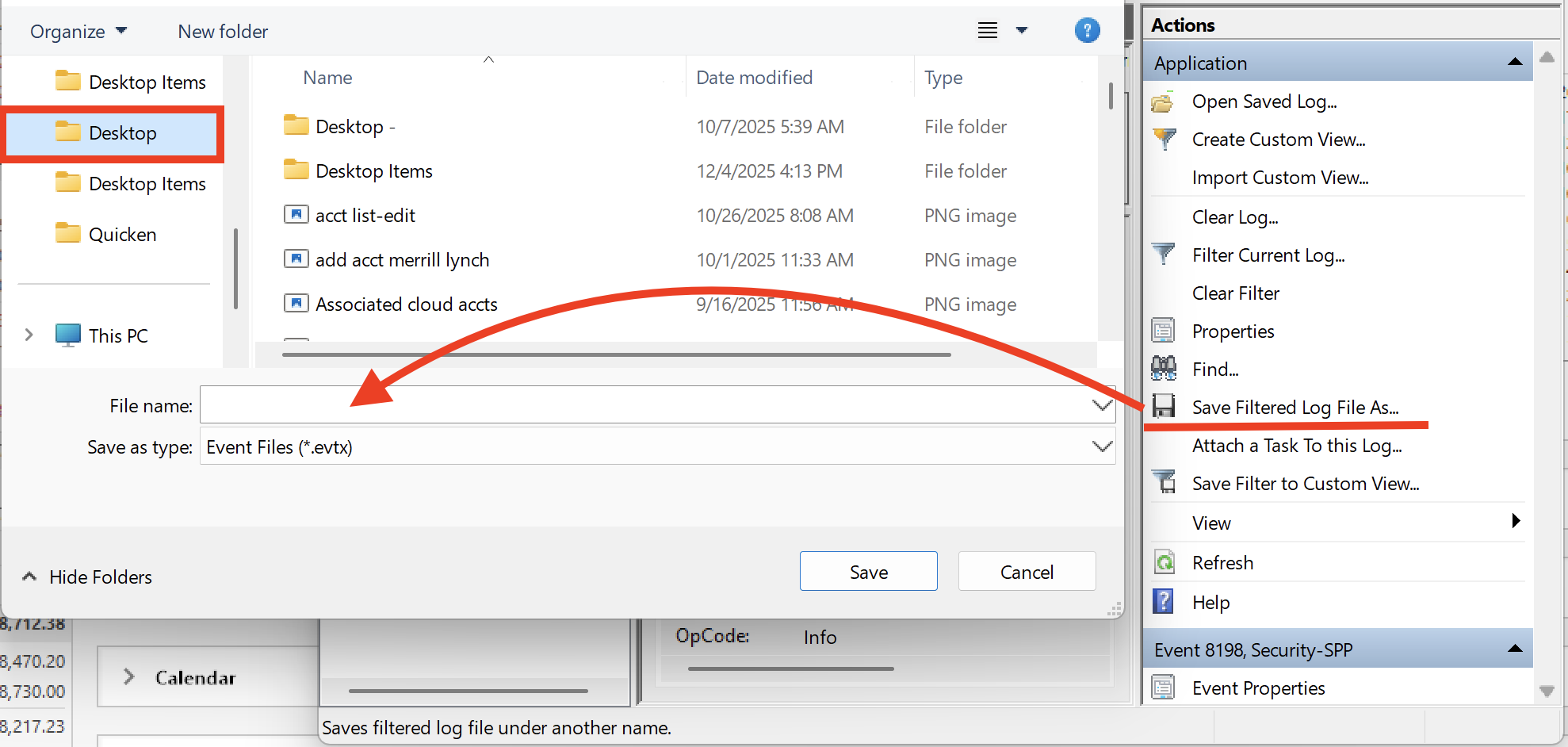
Let us know once you have gathered it, and we will provide guidance on how to send it over.
Thank you!
-Quicken Anja
Make sure to sign up for the email digest to see a round up of your top posts.0 - Search for the application "Event Viewer" and open it.
