Assigning the Fidelity Cash Account

It seems there has been a recent change with how Fidelity handles cash with downloaded transactions in investment/brokerage accounts. In the past cash would simply be treated as a balance in the register, i.e. not associated with a security. Now Quicken is trying to treat each cash transaction just like as if it was a purchase/sell of a security.
While this latter approach might be the "proper" way to handle these transactions I was hoping there would be a way to have Quicken behave the way it used to and simply treat cash as cash.
Hopefully this makes sense. Does anyone know how to have Quicken go back to treating cash the way it used to?
ps. This is different from sweep transactions that automatically move cash in and out of the account. In my case these are automatic sweep transactions that move cash in out of a MM like Fidelity Cash Reserves.
Best Answer
-
Fidelity does not hold cash. It sweeps the cash into a Core Position MMF or into a 3rd party bank sweep account. There are several different MMFs that can be designated as the Core Position. Which MMF is designated as such or whether to use a 3rd party bank sweep account is something the account owner can control (on the Fidelity website) but generally Fidelity will default to using SPAXX when the account owner does not select a different option.
Historically (for at least the last 20+ years), Fidelity generally downloaded the value of the Core Position MMF shares into Quicken as the Cash Balance. But with Fidelity's migration from DC to EWC+ they stopped doing that.
Since then they have worked with Quicken to restore the reporting of the Core Position as cash. It was pretty hit-or-miss progress on this for about 3 months but they made a big improvement in this with version R65.15: Windows R65.XX Release (US) (see the first bullet under Investments).
If you have not updated to R65.15 (or preferably to R65.17), yet, I suggest you do that. Then back up your data file before proceeding.
Go to the Online Services tab of Account Details where you should see a newly added "Set/Edit" button. Click on that button to select how you want the Core Position reported in Quicken.
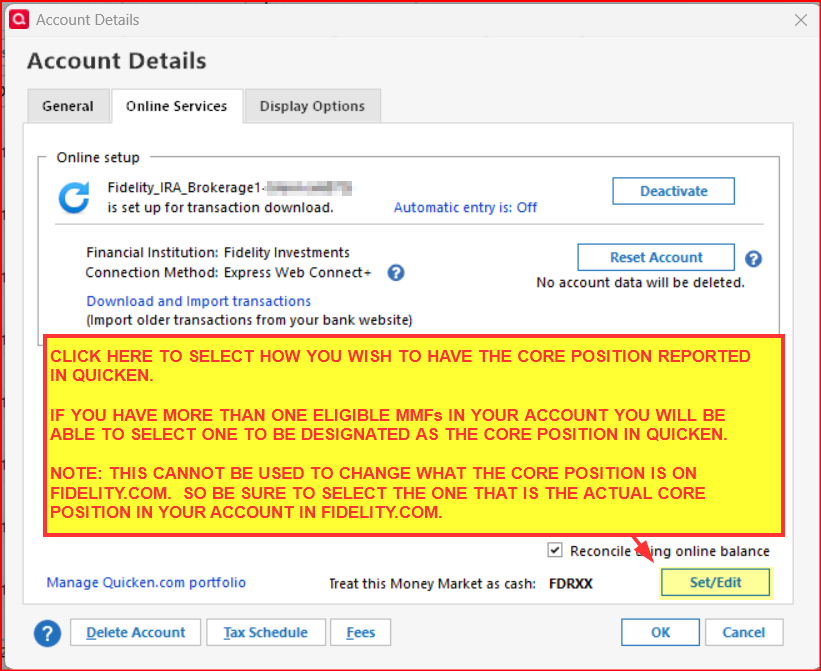
You can also make this Core Position reporting selection by going to Update Cash Balance (Account Register gear icon drop-down) and then clicking on the new "Cash Representation" button there.
Quicken will then make appropriate adjustments to your account in Quicken to reflect what you want to see reported in Quicken. A few comments regarding this when the process is completed:
- Check the Holdings to make sure the Core Position MMF is no longer listed there. If Holdings still shows shares of the Core Position MMF, enter a manual Sell transaction to sell all remaining shares of that MMF with the cash being deposited to the account balance.
- Check for Placeholders that might be listed below the register. If there are any, try to delete them. (You should be able to at this point.)
- In Holdings, does the shown Cash amount equal the value of the Core Position MMF shown on Fidelity.com?
- Click on the blue font Cash Balance below the register on the right. Does that show Quicken and Fidelity are in agreement?
- If the Cash shown in Quicken is not correct: Go to Update Cash Balance and enter what the balance should be.
At this point the account should be correctly reflecting the cash value of the Core Position going forward.
One last comment: Clicking on the blue font Cash Balance below the register on the right has been a bit buggy, yet, in that sometimes the Fidelity reported Cash Balance will show $0.00. Often, the next time OSU is run this will be corrected. But I still have 1 account (out of 9) that this is still an issue with. However, everything else looks OK.
Quicken Classic Premier (US) Subscription: R66.23 on Windows 11 Home
0

Answers
-
Fidelity does not hold cash. It sweeps the cash into a Core Position MMF or into a 3rd party bank sweep account. There are several different MMFs that can be designated as the Core Position. Which MMF is designated as such or whether to use a 3rd party bank sweep account is something the account owner can control (on the Fidelity website) but generally Fidelity will default to using SPAXX when the account owner does not select a different option.
Historically (for at least the last 20+ years), Fidelity generally downloaded the value of the Core Position MMF shares into Quicken as the Cash Balance. But with Fidelity's migration from DC to EWC+ they stopped doing that.
Since then they have worked with Quicken to restore the reporting of the Core Position as cash. It was pretty hit-or-miss progress on this for about 3 months but they made a big improvement in this with version R65.15: Windows R65.XX Release (US) (see the first bullet under Investments).
If you have not updated to R65.15 (or preferably to R65.17), yet, I suggest you do that. Then back up your data file before proceeding.
Go to the Online Services tab of Account Details where you should see a newly added "Set/Edit" button. Click on that button to select how you want the Core Position reported in Quicken.
You can also make this Core Position reporting selection by going to Update Cash Balance (Account Register gear icon drop-down) and then clicking on the new "Cash Representation" button there.
Quicken will then make appropriate adjustments to your account in Quicken to reflect what you want to see reported in Quicken. A few comments regarding this when the process is completed:
- Check the Holdings to make sure the Core Position MMF is no longer listed there. If Holdings still shows shares of the Core Position MMF, enter a manual Sell transaction to sell all remaining shares of that MMF with the cash being deposited to the account balance.
- Check for Placeholders that might be listed below the register. If there are any, try to delete them. (You should be able to at this point.)
- In Holdings, does the shown Cash amount equal the value of the Core Position MMF shown on Fidelity.com?
- Click on the blue font Cash Balance below the register on the right. Does that show Quicken and Fidelity are in agreement?
- If the Cash shown in Quicken is not correct: Go to Update Cash Balance and enter what the balance should be.
At this point the account should be correctly reflecting the cash value of the Core Position going forward.
One last comment: Clicking on the blue font Cash Balance below the register on the right has been a bit buggy, yet, in that sometimes the Fidelity reported Cash Balance will show $0.00. Often, the next time OSU is run this will be corrected. But I still have 1 account (out of 9) that this is still an issue with. However, everything else looks OK.
Quicken Classic Premier (US) Subscription: R66.23 on Windows 11 Home
0 -
@Boatnmaniac - Thank you for the detailed response. The feature you pointed out is exactly what I wanted.
After making the changes I deleted the cash MMF security as there were no transactions associated with it anymore.
I then attempted to download transactions from Fidelity and it forced me to recreate the cash MMF security again which I did. Then it gave me a message stating that the cash in the account would now be associated with the MMF however it made no changes to the cash transactions in the register and cash still reconciles with Fidelity.
There were no cash transactions to download so I will not know if the change will work until I have some cash transactions to download.
Did you encounter anything like this in your environment?
0 -
I think the cash MMF should not have been deleted. If the security is not present in Security List and linked to the account then the process will not work correctly.
So, it is good that it did download the security, again, and then correctly prompted you to select the MMF to be reflected in the account as "Cash Balance".
The reason why it did not download new/replacement MMF transactions is that those transactions had been previously downloaded into Quicken so they cannot be downloaded again into Quicken.
As long as the Cash Balance in Quicken matches the value of the MMF shares in the online account then that is good and as it should be. Quicken should not, then, be making any adjustments to the Cash Balance.
If this is the only issue you have incurred with the Fidelity migration from DC to EWC+ then you have indeed been very fortunate. There are many people who experienced many more significant issues than this. I was fortunately as well because I retained the DC connection in my primary data file until I was forced to migrate in Oct. However, I did set up my Fidelity accounts with EWC+ in test files and what an "experience" that was.
If you want, you can review the Alert that is posted here that lists many of the issues that were encountered during the migration.: UPDATED 10/28/25 Fidelity Updates . I think many of them are now resolved but there are still some significant issues with downloading HSA and NetBenefits accounts.
There were also some VERY long post threads by users over the last 3+ months. So, yeah, it's been a wild ride.
Quicken Classic Premier (US) Subscription: R66.23 on Windows 11 Home
0