QFX File Triggers Windows Installer Applications

After the recent program update for Quicken Deluxe, my system is starting the traditional Windows installer application looking for the Quicken install file. Quicken does download updates to my accounts which I can apply. But, I have one checking account NOT configured for updates. When the QFX is generated and I click on it, then the installer program starts which I have to cancel.
Steve Lowe
Comments
-
Having a similar problem. When I try to run the QFX file I get an notification box that says "Please wait while windows configures Quicken". after a few seconds a second notification pops up saying "There are Quicken components currently open, and cannot be uninstalled. Please close Quicken. and try uninstalling again." When clicking ok in this box I get a "User cancelled installation" notification listing the QFX file as being cancelled.
1 -
Same error problems here but it is all my accounts AND the due dates in the Bill and Income reminders were scrambled with everything that was paid thru 11/20 showing overdue. Seems every update causes more work to clean up but with the "cannot be uninstalled" error clean up is not possible. We need help!
0 -
Some others who have reported this problem after updating Quicken to R65.XX (including myself) were able to resolve it by uninstalling Quicken and downloading/installing a fresh copy of the program from their online Quicken.com account or from https://www.quicken.com/activate?step=initDownload&os=win&store=US .
Quicken Classic Premier (US) Subscription: R66.23 on Windows 11 Home
3 -
Uninstalling and re-installing worked for me. Actually the program works much faster now. Thanks Boatnmaniac.
2 -
Same here. Another Quicken software blunder.
Do they check these updates before they release them ?
Now I am suppose to delete and reinstall Quicken to see if it fixes the problem ?
Paying the high fee each year for this subscription is quite amazing.
2 -
I uninstalled and reinstalled Quicken and it fixed my QFX import issue that occurred after the update. It did seem to speed things up!
Before it would install properly however I had to rename my original Quicken directory to Quicken_OLD and restore my data file from there.
The only downside is I lost all my settings and had to set everything (fonts/colors etc) back up.
2 -
Will Intuit fix it soon? I have no idea how many settings I have made or will lose if I uninstall/reinstall. My Premier subscription just renewed only to hit this bug after R65.17. I did the 'Report a problem' thing.
I'm in the same situation with at least one financial institution that doesn't have a newer method.
Quicken Classic Premier R65.17 on Windows10 now. I started with MYM (Managing Your Money) on DOS
1 -
Hello All,
Thank you all for reporting this issue and then letting us know what worked to resolve it.
Please try uninstalling and reinstalling, as that is what worked for others to resolve this issue.
If needed, check out this Support Article for steps to uninstall.
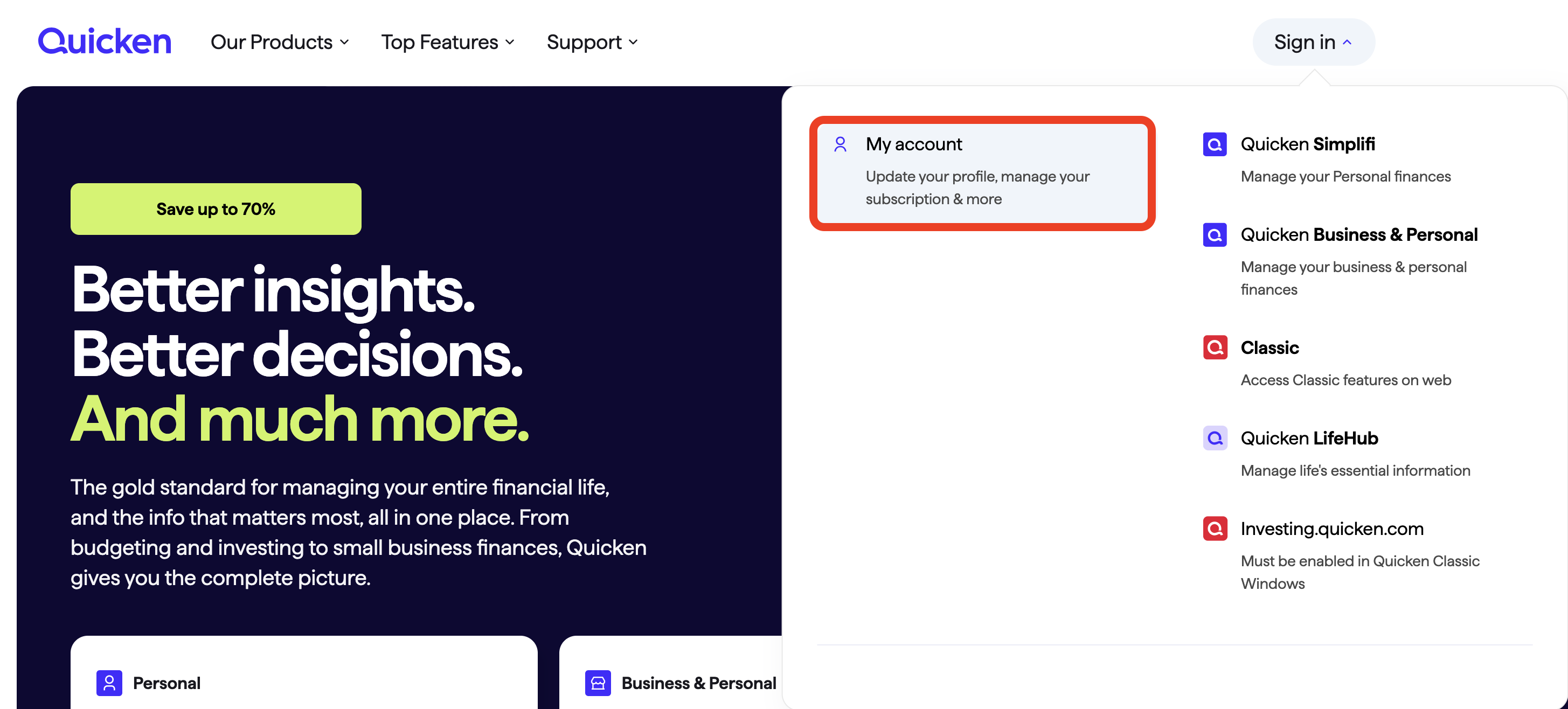
To reinstall your software, you can go to Quicken.com and sign in to the My Account section.
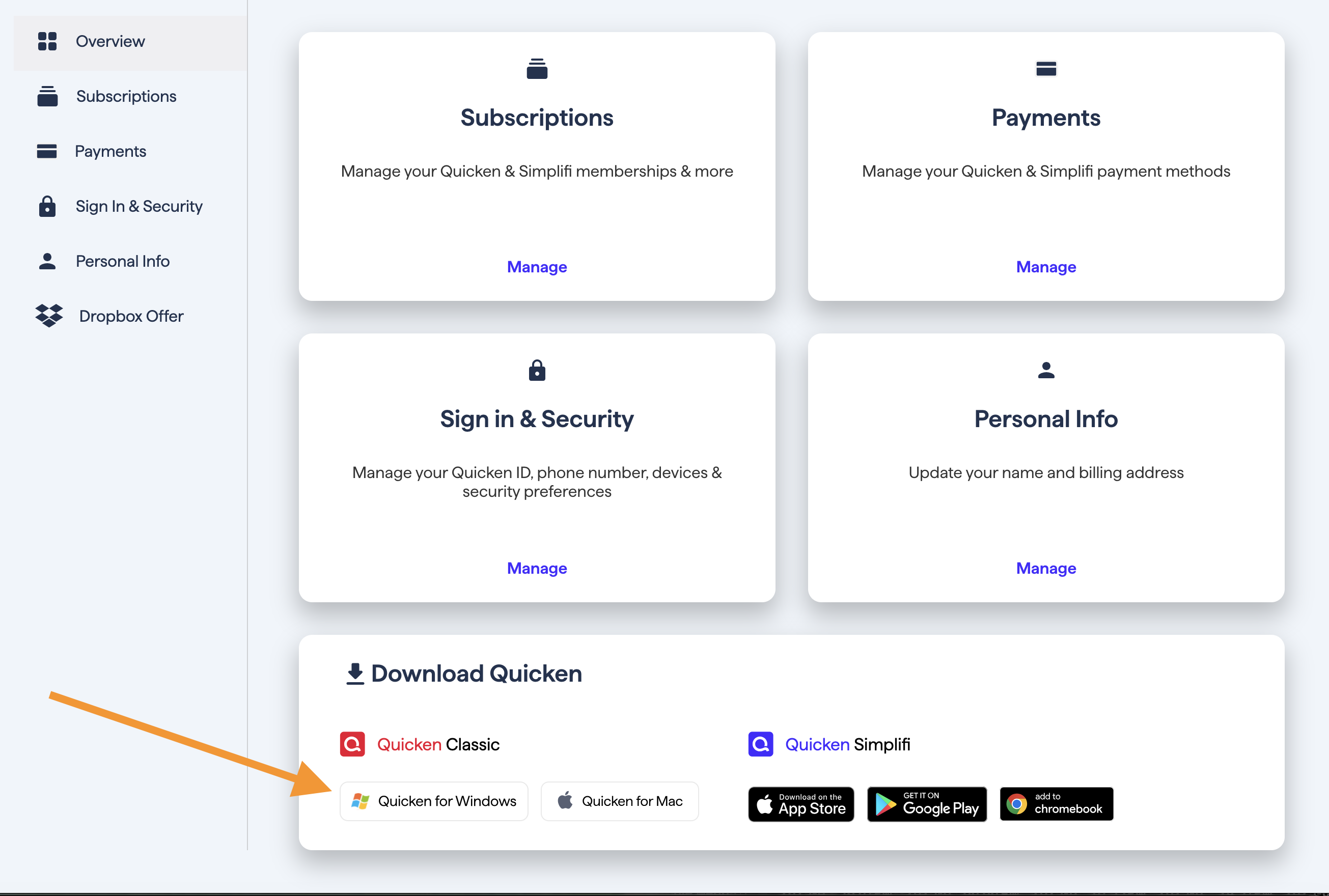
Once signed in, you can select the Quicken for Windows download.
Go through the installation prompts, and once you are back in your data file, try importing the QFX file again.
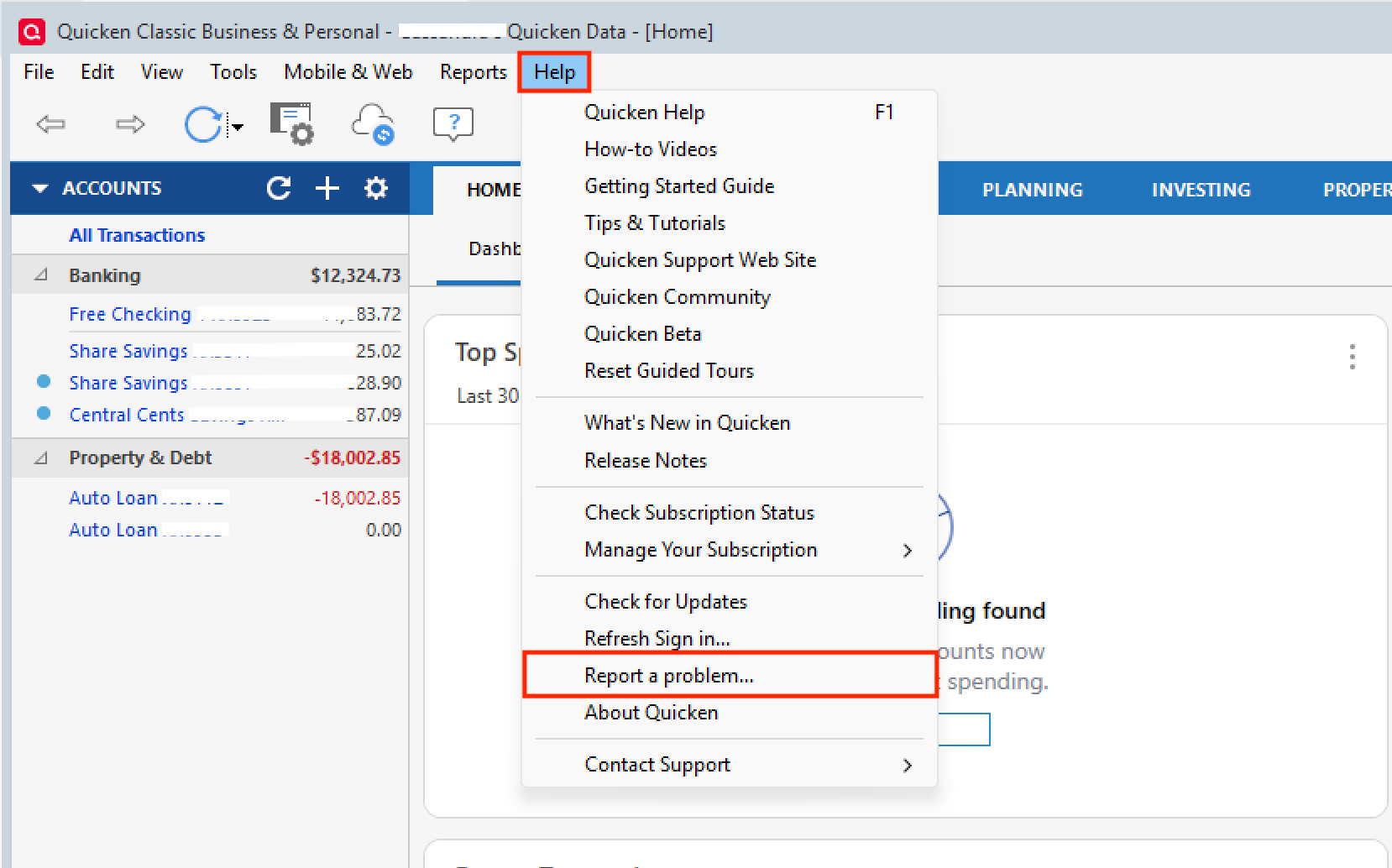
This issue has been reported. If you would like to aid in the investigation, you can go to Help>Report a problem>Send to Quicken, from within your Quicken software, and send over your log files.
Please let me know once you have sent it so I can add it to the ticket.
Thank you.
[CTP-15434]
Quicken Alyssa
Make sure to sign up for the email digest to see a round up of your top posts.
-1 -
Same here, I uninstalled and reinstalled, and I could download as usual. You have to remove the old Quicken folder or it won't install. Seems to be working now.
2 -
Hello @tolich,
Thank you for letting us know you are back in working order.
And yes, I had another person report that they had to delete the Quicken folder from Program Files x86 as well.
Thanks for the update!
Quicken Alyssa
Make sure to sign up for the email digest to see a round up of your top posts.
0 -
When I ran into the issue reported by afuller2 and others, I used File> File Import> Web Connect (QFX) file …and it worked just fine.
Might the problem be in the QFX file, rather than the Quicken program?1 -
I had the same problem after installing the latest update last week. Simply re-installing Quicken fixed this problem for me. You don't even need to do an uninstall process for your current Quicken; the download does it for you. Simply download and save the Quicken installer exe, If you have Quicken running, close it then double click the downloaded file and the installer will run. It will first uninstall your current Quicken and then install a new copy. When the installation finishes, run the new copy of Quicken and all should be OK including all of your accounts which will be where they should be. The whole process took less than 3 minutes on my Win 10 system.
I'm not a Quicken specialist or expert so take my advice with a grain of salt. But I will be more careful in the future about installing Quicken updates. I have found a lot of updates apply to banking or financial institutions that I don't have. Also to Quicken features that I don't use. So I will more carefully read the Update Information before clicking on "update". If the update doesn't apply to me or my installation or if I don't fully understand it, I will decline the update.
1 -
Thank you both for adding to this discussion with what worked for you.
I am sure other users will find it to be useful information.
Thanks again!
Quicken Alyssa
Make sure to sign up for the email digest to see a round up of your top posts.
0 -
Hello All,
The team handling this escalation has requested that we gather Event Viewer logs. For those of you who are willing to do this, you can follow the steps below.
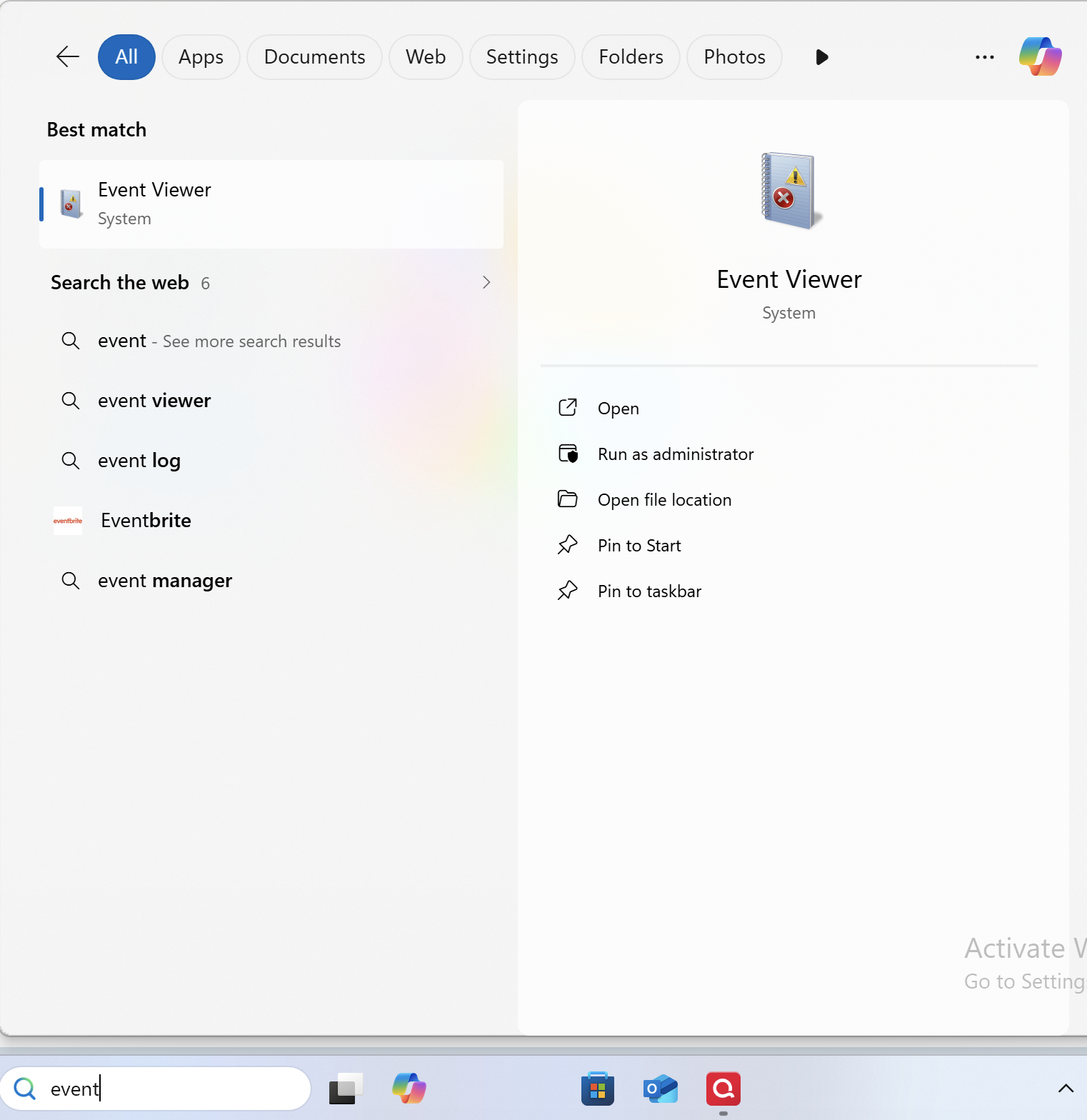
- Search for the application "Event Viewer" and open it.
- Double-click on the "Windows Log" folder and select "Application."
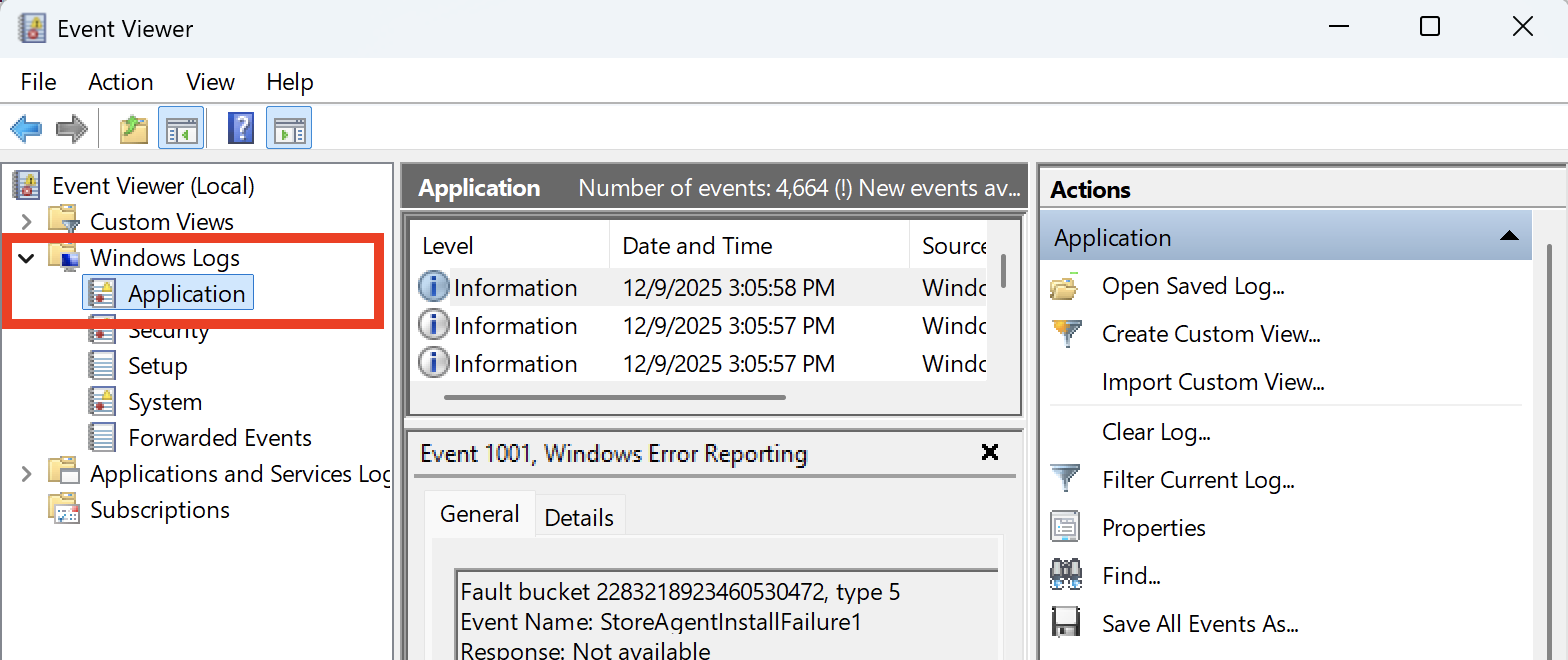
- On the right side, click on "Filter Current Log," and where it says "Logged," change the time range from "Anytime" to "Last 7 days."
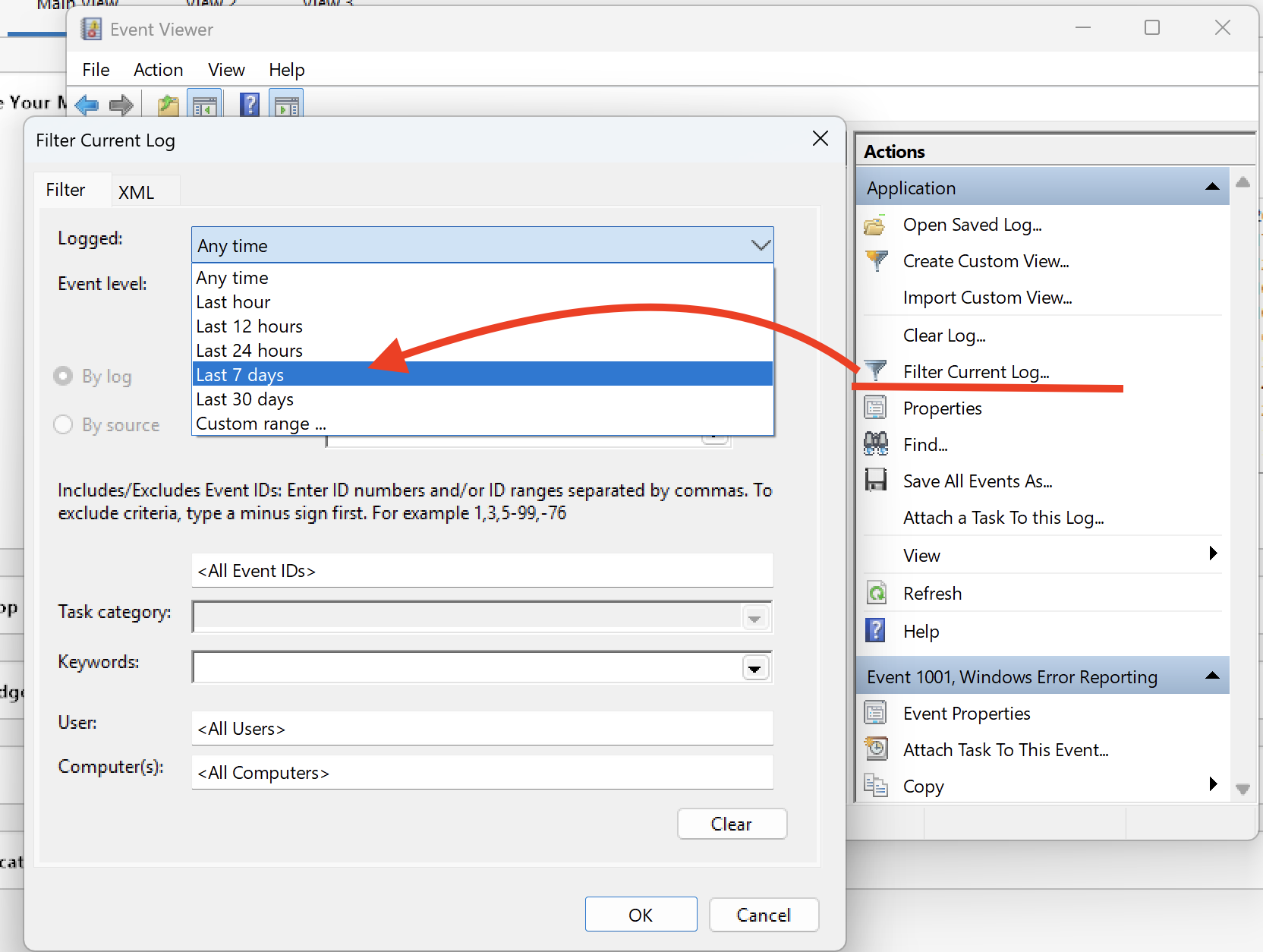
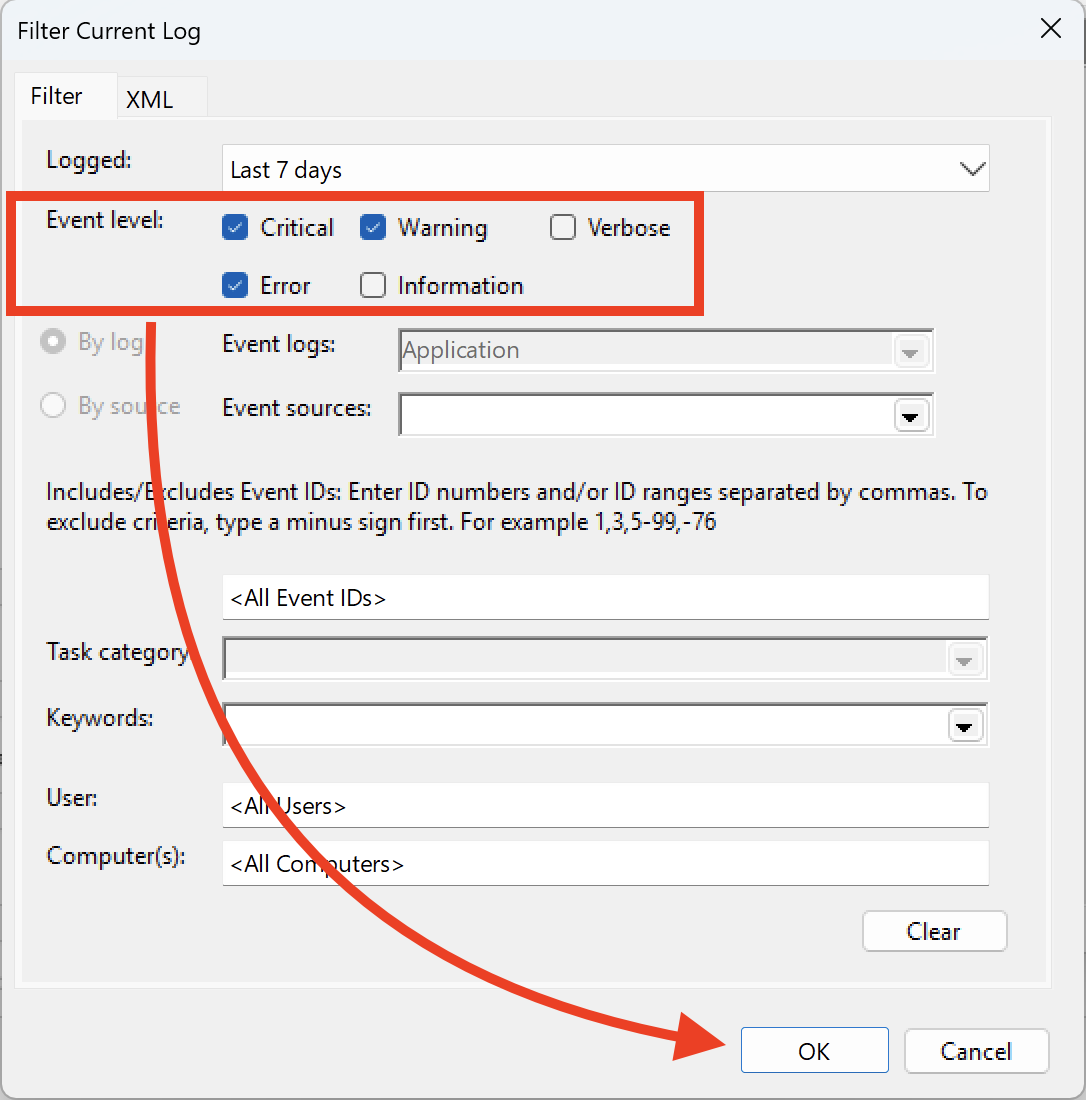
- Ensure that you select "Critical, Warning & Error," and then click OK.
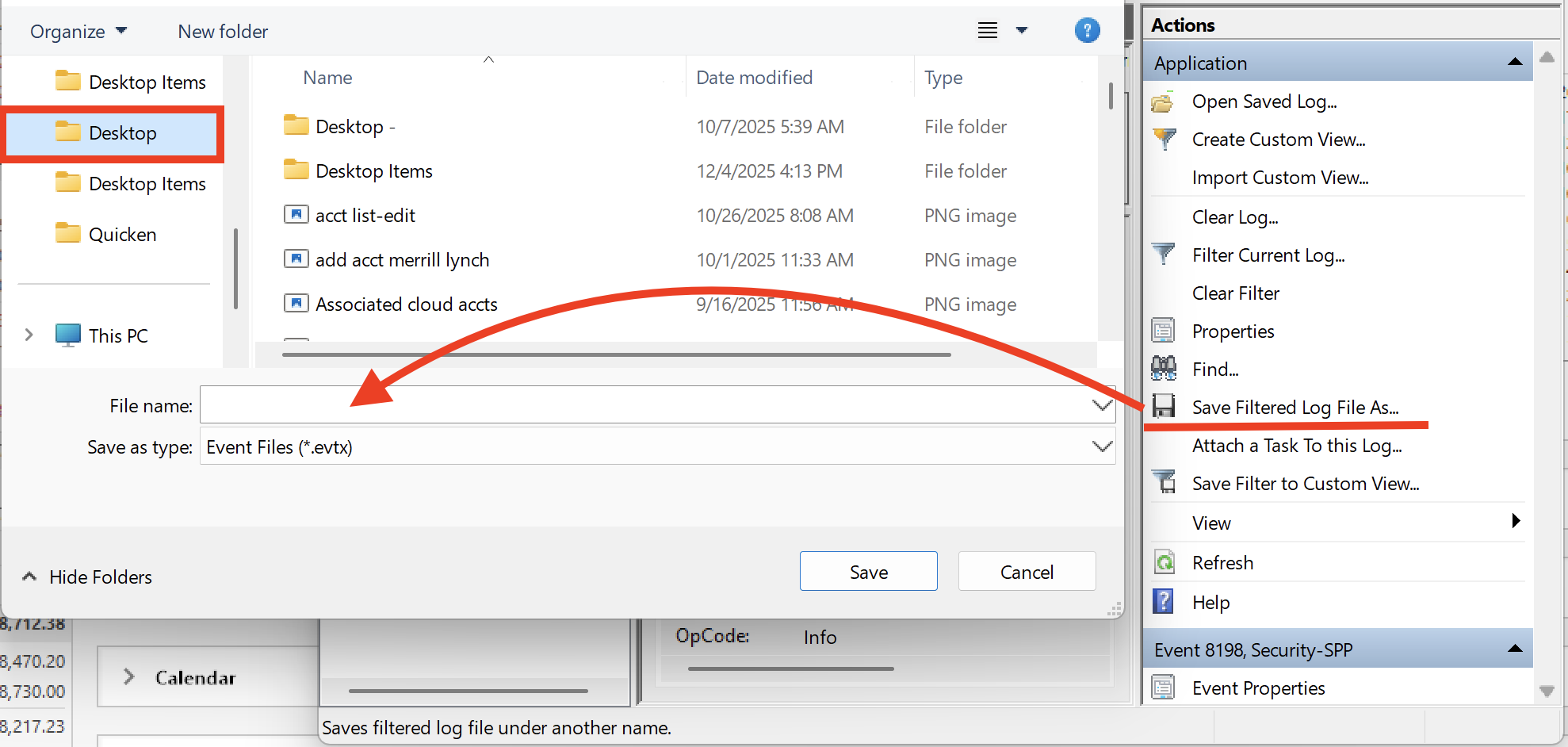
- Next, click on "Save filtered log file as" and save it to the desktop.
Let us know once you have gathered it, and we will provide guidance on how to send it over.
Thank you!
Quicken Alyssa
Make sure to sign up for the email digest to see a round up of your top posts.
0 - Search for the application "Event Viewer" and open it.
-
I see two events, for each attempt to import a QFX file. I'm not sure which occurs before the other, because they both have the same timestamp in the event log.
Source: MsiInstaller
Event ID: 1004
Level: Warning
Keywords: Classic
Detail: Detection of product '{62D93E3E-2F8E-42BD-9343-896F4F0031D3}', feature 'ProgFilesCommon', component '{69EDA83F-84A0-4811-8D5C-C76E294980F9}' failed. The resource 'C:\Program Files\Quicken\ScreenShare\locales' does not exist.Source: MsiInstaller
Event ID: 1001
Level: Warning
Keywords: Classic
Detail: Detection of product '{62D93E3E-2F8E-42BD-9343-896F4F0031D3}', feature 'ProgFilesCommon' failed during request for component '{B9EB7765-32AF-4F50-A57A-BA452070B9EE}'This issue is occurring for me on Windows 7, Quicken Classic Deluxe R65.17 version.
As someone else already mentioned earlier, to work-around this issue, you can import the QFX file through the Quicken application menu.
File > File Import > Web Connect (.QFX) File...
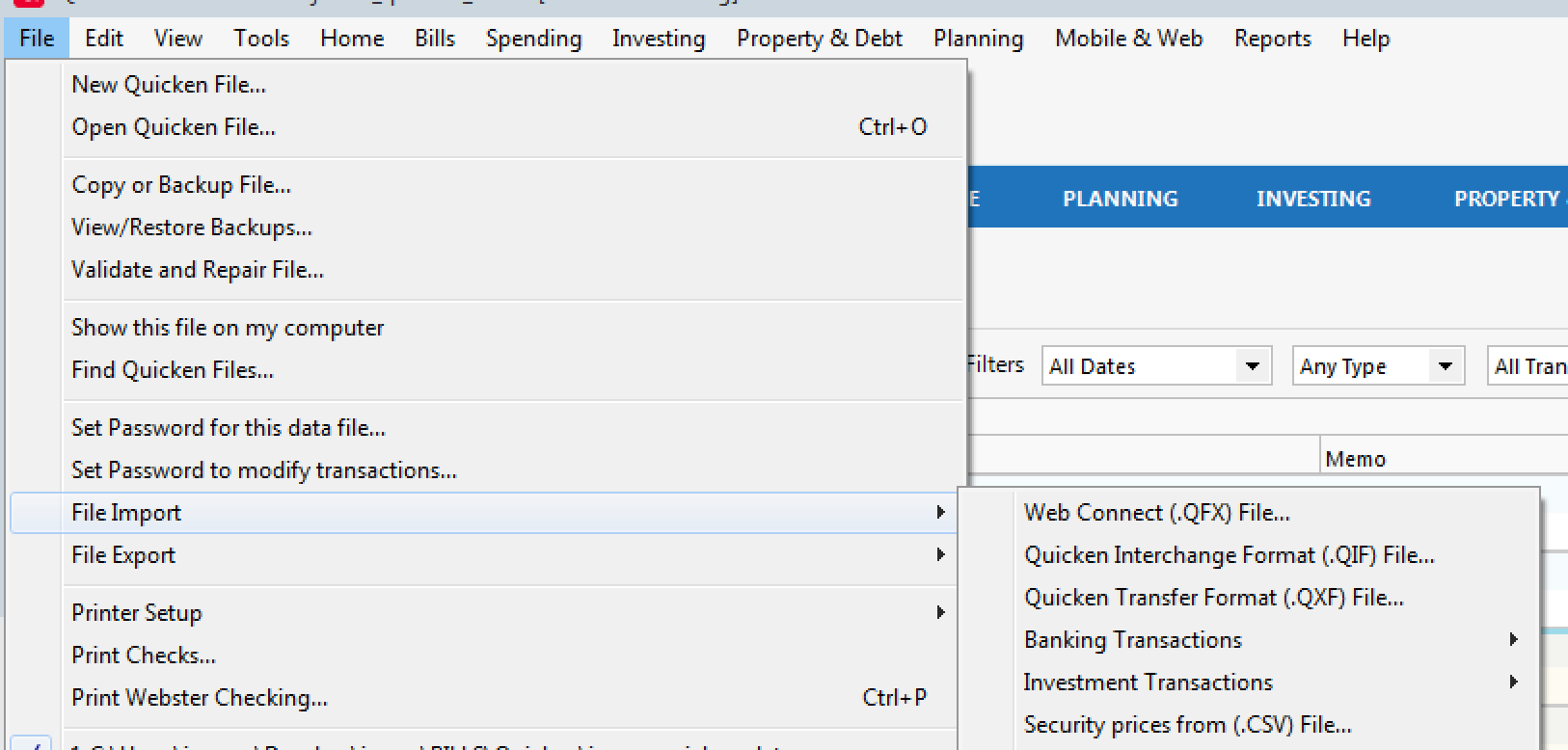 1
1 -
Thank you for following up with that information.
I have sent you a direct message. Please navigate to the inbox in the top right-hand corner of the Community page and check your inbox.

Thanks again!
Quicken Alyssa
Make sure to sign up for the email digest to see a round up of your top posts.
0 -
"File > File Import > Web Connect (QFX)" also works fine. Closing Quicken and double clicking on the QFX file also works but only sometimes. Probably have to first make sure that the Quicken executable isn't showing in Task Manager > Details (Windows 10/11).
1 -
Thank you for following up and providing that additional information.
I'm glad you were able to identify ways of getting it to work. If you need help, let us know!
Thanks again!
Quicken Alyssa
Make sure to sign up for the email digest to see a round up of your top posts.
0