Re-Installing Quicken Classic

After the last update, Quicken Classic worked fine until I wanted to print, export to a CSV file, change print settings, etc.
At that point, I would just get the blue loading circle for several hours.
I uninstalled Quicken Classic in the hopes that a new, clean installation would fix the issue.
I now get the error message that Quicken Classic cannot be installed because my PC does not meet the requirements. It does.
What now?
[Edited-Readability]
Comments
-
Hello @rlof2453,
Thank you for sharing your experience and the steps you have taken to try and resolve this.
Sometimes, what you are seeing can happen when trying to upgrade to a new version of Quicken for Windows. Please review this Support Article for the issue you are having and apply the steps therein.
Let me know how it goes!
Quicken Alyssa
Make sure to sign up for the email digest to see a round up of your top posts.
0 -
That worked for getting it re-installed. Thank you.
I still have the issue with printing, exporting etc.
Any thoughts on that problem?
0 -
To my knowledge, Quicken just uses Windows functionality to print. I would start troubleshooting Windows first and make sure the operating system is healthy. Make sure the printer driver is up to date.
0 -
Thank you. I checked. All other programs are printing normally. And it will not physically print or export to CSV.
0 -
Thank you for following up.
I have some questions that may help us narrow down the cause of this.
- Are you still getting a blue loading circle when trying to print, or has the behavior changed?
- If that has changed, what is happening now?
- Where is your data file located?
- Is your file being synced/backed up by any third-party services like OneDrive, Norton, or Dropbox?
One thing we can try is validating your file.
To do this:
- Save a backup.
- Go to File.
- Select Validate and Repair file…

- Check the first box for Validate file, and the last box for Reset all Quicken printer settings.
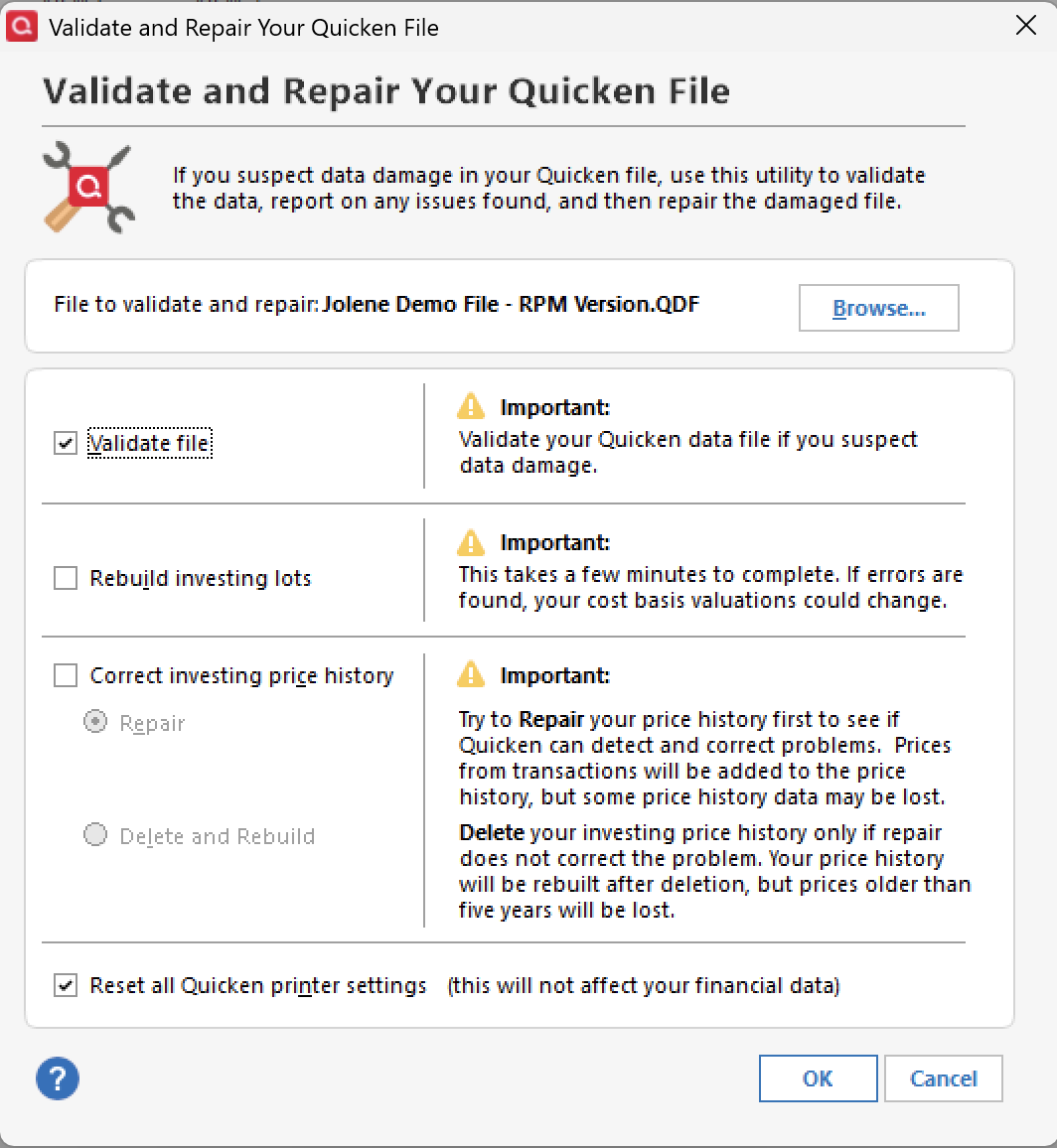
- Click Ok.
Once that is done, check to see if you can now print, and let me know how it goes.
Thank you!
Quicken Alyssa
Make sure to sign up for the email digest to see a round up of your top posts.
1 - Are you still getting a blue loading circle when trying to print, or has the behavior changed?
-
Just checking in, we haven't heard back from you in a while.
Do you still need assistance?
Thank you!
Quicken Alyssa
Make sure to sign up for the email digest to see a round up of your top posts.
1 -
Today I tried to go to the File>Printer Set Up>For Reports/Graphs.
Clicking on that link caused the blue circle that will not stop until I close the program with Task Manager.
I have uninstalled and re-installed Quicken.
I have uninstalled and re-installed all print drivers. I'm not trying to print to a printer. I'm trying to export Bill and Income Reminders to a CSV file.
0 -
Thank you for following up. I apologize for the delayed response.
Are you still experiencing this issue? If so, we can test whether these issues are file-specific by opening a new data file/copying your current data file, then repeating the same steps there.
To copy your file:
- Go to File > Copy or Backup File.
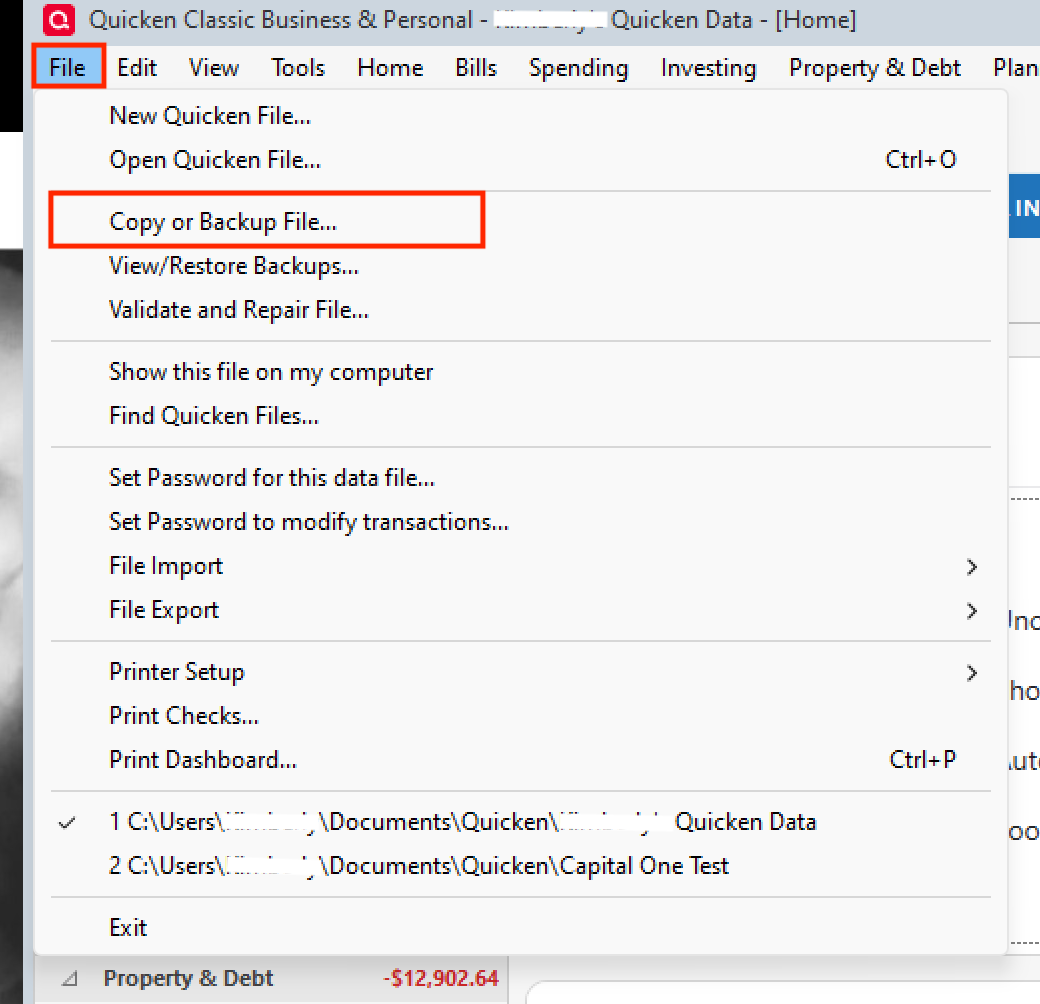
- In the Backup or Copy File window, under Advanced Options, select Create a copy or template.
- Click Next.
- Choose what you want to include in the copy.
- This is where you can set the Include transactions From and To dates to control which transactions are included.
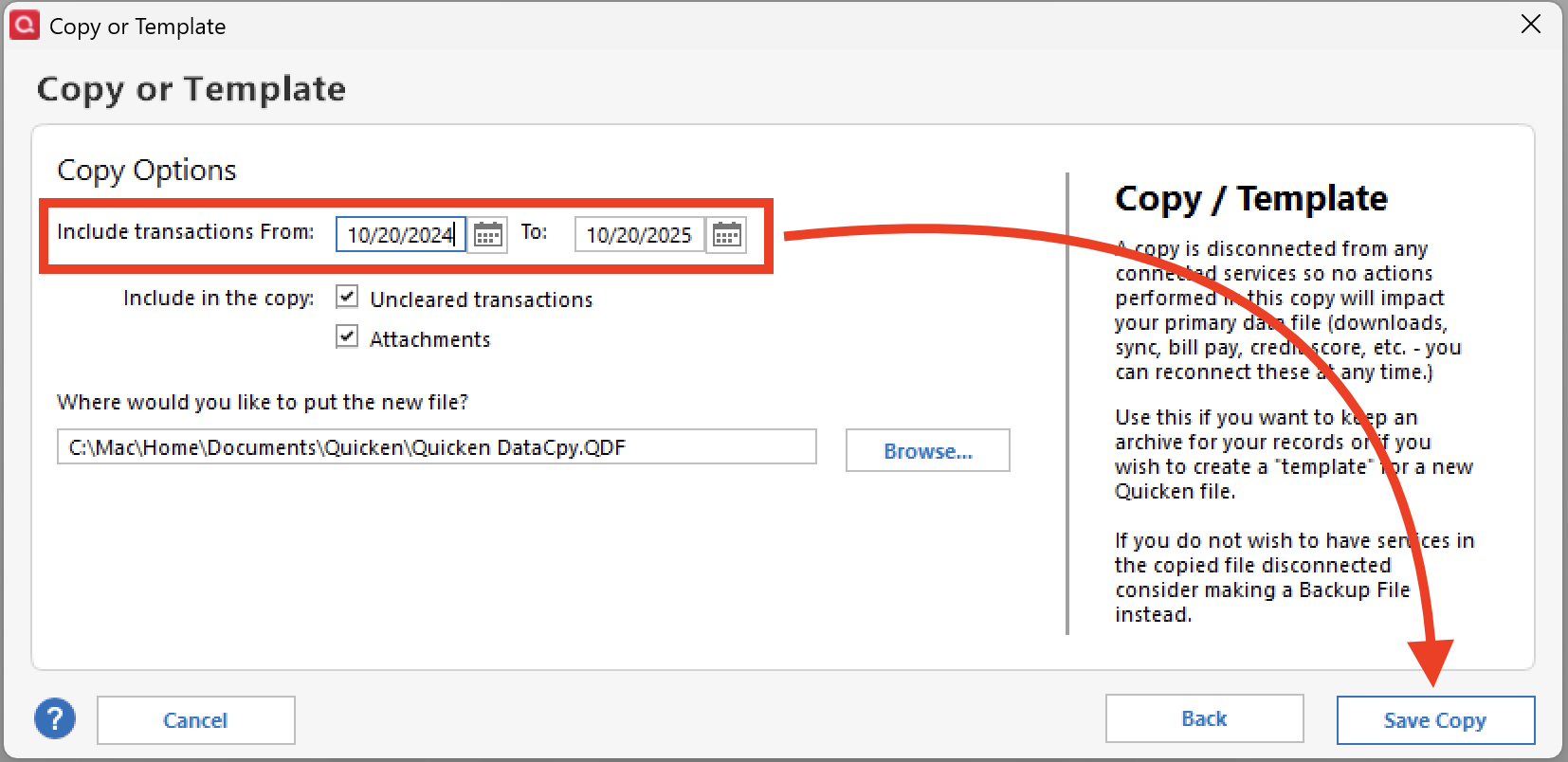
- This is where you can set the Include transactions From and To dates to control which transactions are included.
- Name and Save the copied file.
- When asked which file you would like to open, choose New Copy.
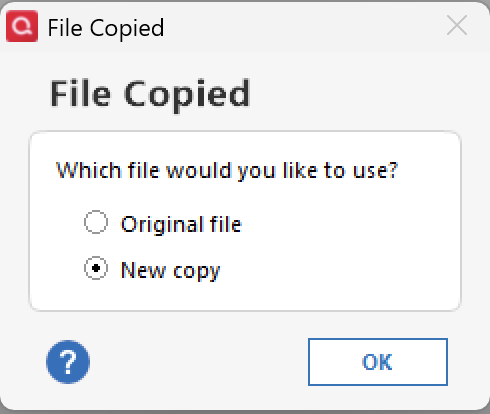
In this copy file, try performing the same actions that were causing issues in the original file. If this file does not have the same issues, it indicates a problem with the original file. If this is the case, I would suggest moving forward with the copy file.
Note: If you decide to stay in the new/copy file, you will need to reconnect all of your accounts. If at any point you want to get back to your original file, you can do so by going to File and selecting the second file listed at the bottom of the menu.
Let us know how it goes!
Quicken Alyssa
Make sure to sign up for the email digest to see a round up of your top posts.
0 - Go to File > Copy or Backup File.
-
Just checking in, we haven't heard back from you in a while.
Do you still need assistance?
Thank you!
Quicken Alyssa
Make sure to sign up for the email digest to see a round up of your top posts.
0 -
Hello again,
Checking in once more before this thread is closed.
Let us know if you still need assistance.
Thank you!
Quicken Alyssa
Make sure to sign up for the email digest to see a round up of your top posts.
0 -
Due to the lack of response, I went ahead and closed this post.
If you still require assistance, please feel free to start a new post.
Thank you!
Quicken Alyssa
Make sure to sign up for the email digest to see a round up of your top posts.
0


Categories
- All Categories
- 6 Product Ideas
- 34 Announcements
- 250 Alerts, Online Banking & Known Product Issues
- 19 Product Alerts
- 265 Welcome to the Community!
- 301 Before you Buy
- 1.5K Product Ideas
- 55.8K Quicken Classic for Windows
- 16.9K Quicken Classic for Mac
- 1K Quicken Mobile
- 834 Quicken on the Web
- 129 Quicken LifeHub