Interface bug: Connection Status window shows every time, but I checked "only if...errors" (Q Mac)

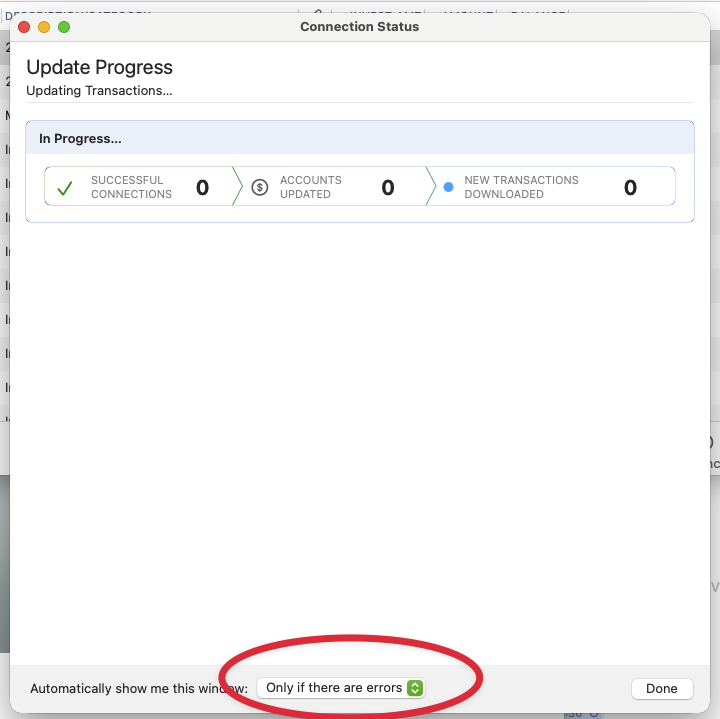
You can see that there are no errors, so why is this window being shown? Seems like a bug. This window gets shown every time regardless. It's a small thing but can it be fixed?
Answers
-
Hello @Rich Cook,
Thank you for letting us know you're seeing this issue. I attempted to replicate it in my Quicken, but could not. When did you first notice this behavior? Do you keep your Quicken file directly on your local hard drive? Is it synced with any cloud services, such as iCloud, OneDrive, or Dropbox?
I notice that in your screenshot, it shows in progress rather than a summary screen. Is this possibly coming up because you're getting a multi-factor authentication pop up from one of the financial institutions you update?
I look forward to your reply!
Quicken Kristina
Make sure to sign up for the email digest to see a round up of your top posts.
0 -
I also have this experience with the Update Status window ignoring the "only if errors" setting.
Quicken user since the DOS/ 3.5" floppy disk days; migrated to QMac in 2022 for problem-free cloud functionality.
0 -
Hello @Cooper's Dad,
Thank you for letting us know you're also seeing this issue. To help troubleshoot, please answer the questions I asked in my earlier post:
I look forward to your response!
Quicken Kristina
Make sure to sign up for the email digest to see a round up of your top posts.
0 -
The latest release, [Removed] Version 8.4.0 (Build 804.59714.100), is not exhibiting this issue.
Quicken user since the DOS/ 3.5" floppy disk days; migrated to QMac in 2022 for problem-free cloud functionality.
0 -
Thank you for your reply,
I'm glad to hear that this issue is not happening in Version 8.4.0.
If you need further assistance, please feel free to reach out!
Quicken Kristina
Make sure to sign up for the email digest to see a round up of your top posts.
0
