Windows Configuration Prompts When Opening Tax Planner

This discussion was created from comments split from:
Comments
-
I have the same pop-up when I open the tax planner
0 -
Hello @James White,
Thank you for reporting the issue you are seeing from your end.
I have split you off into your own thread, as your issue seems different. Please provide more information.
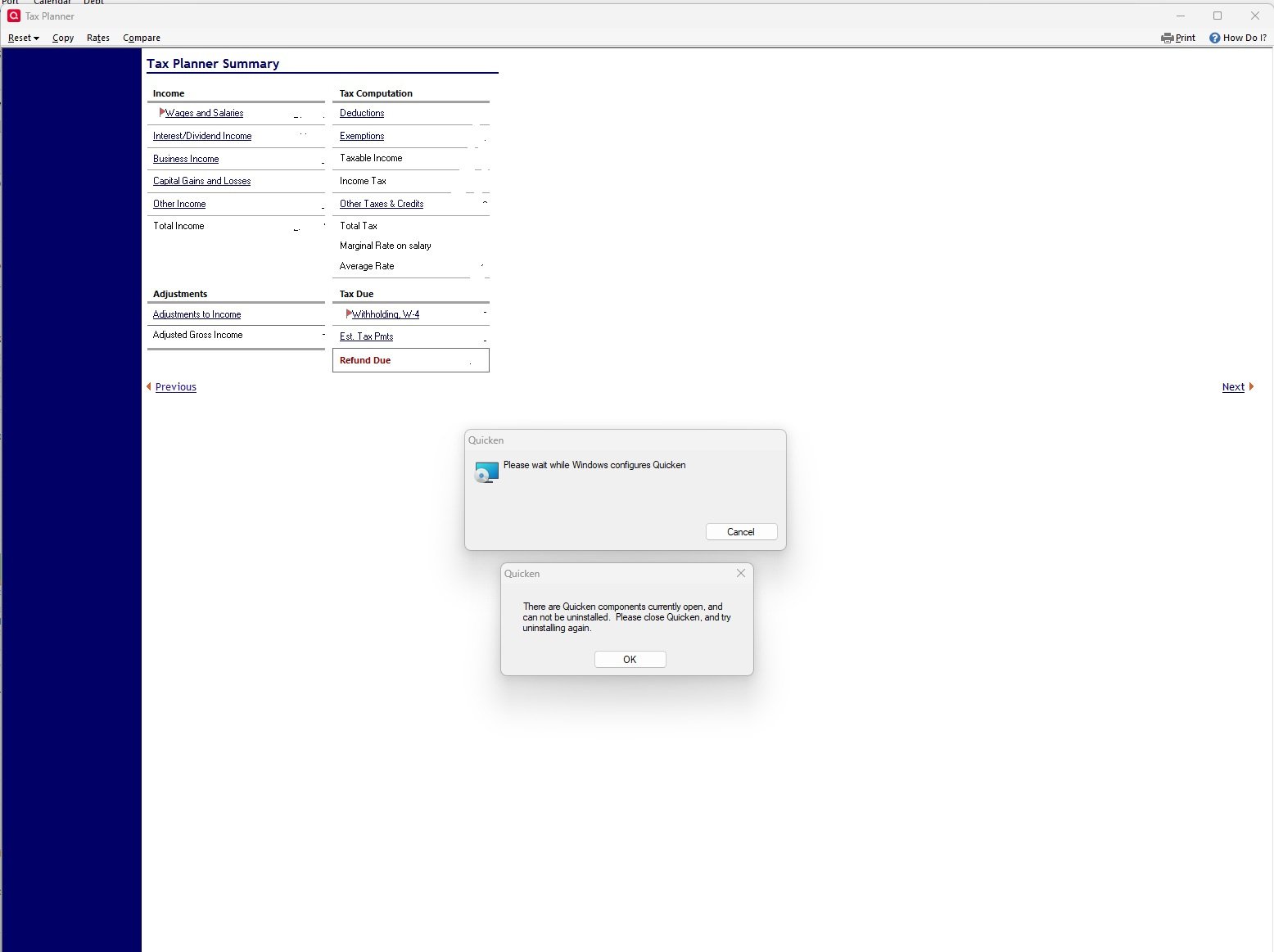
To clarify, you are getting pop-up windows that say, "Please wait while Windows configures Quicken", and "There are Quicken components currently open and cannot be uninstalled". And you are receiving these prompts when you open the Tax Planner?
Please give us the exact steps you take before receiving the prompts/pop-ups. Additionally, screenshots of what you are seeing will be helpful. If needed, please refer to this Community FAQ for instructions on how to attach a screenshot. Alternatively, you can also drag and drop screenshots to your response if you are not given the option to add attachments.
Thank you.
Quicken Alyssa
Make sure to sign up for the email digest to see a round up of your top posts.
0 -
Hi Alyssa,
That's correct. As soon as I click the "Tax Plan" on the menu bar I get the pop-ups.
Thnx!
James
 0
0 -
I get this same issue also on Tax plan
0 -
Hello @John QW & @James White,
Thank you both for adding to this discussion.
We do have a similar issue, where users are seeing these same prompts when trying to import QFX files. For that issue, uninstalling and reinstalling the software is what resolves it.
I am curious if the same steps will work here. Can I please have you both try the uninstall/reinstall and let me know if the issue persists?
Looking forward to your responses!
Quicken Alyssa
Make sure to sign up for the email digest to see a round up of your top posts.
2 -
I have the same issue. Just started a couple of weeks ago. For me these popups appear when tax planner starts and every time I select an area for more details. Correct info is displayed after cancelling out on prompts.
0 -
Hello @jimjanicki,
Thank you for adding to this discussion.
Were you able to try uninstalling and reinstalling, as suggested above, to see if it resolves the issue?
Looking forward to your response.
Quicken Alyssa
Make sure to sign up for the email digest to see a round up of your top posts.
0 -
Hello @Quicken Alyssa
Yes, uninstalling and reinstalling Quicken seems to have resolved the issue.
Thank you,
James
3 -
I uninstalled, but the full reinstall errored out. I deleted the install directory and reinstall worked , and then this issue did go away.
4 -
Thank you both for updating this discussion and letting us know you were able to resolve this issue.
If you need more help, don't hesitate to reach back out!
Thank you!
Quicken Alyssa
Make sure to sign up for the email digest to see a round up of your top posts.
0

