Bank of America Checking no longer updating in Quicken without resetting the account [Edited]

I cannot download transactions from Bank of America anymore without editing the account and doing the reset option. And then once I get some downloaded transactions, the data is wrong. The online balance is wrong so I cannot reconcile my account. Bank of America no longer allows downloading of transaction as quicken files which is absolutely nuts. I've tried download transactions as .csv files, but that is not very helpful either because it does not allow you to match transactions the way web connect does. I am at a loss of what to do. I've been using BoA and Quicken for 20+ years and now I have no way of reconciling my account any longer.
Answers
-
I am having the same issue. I spoke to BOA support this morning and was told that they no longer work with Quicken. Since I have been a Quicken user for 20 years, I am very frustrated. Quicken should have notified its customer base and offered us a resolution to the problem.
2 -
Thank you for letting us know you're having this issue. When did this problem first start? Is this impacting all Bank of America accounts, or just some? You said your online balance with Bank of America is incorrect. Is it incorrect by the amount of any pending transactions? If it is, that is a known issue, which a has already been reported to our teams (ticket number CTP-15397).
I look forward to your response!
Quicken Kristina
Make sure to sign up for the email digest to see a round up of your top posts.
-1 -
I have same issue but, only for few older accounts that were set up with "BoA-All other states" and no longer get transactions. Some accounts still work, but my most important checking account doesn't get updates anymore.
After a reset, my account removed all connection info. Also, get very weird 'status' when I reconnect to Boa: some accounts cannot be added and the many accounts do not have the correct account to link to. Due to all these resets my BoA accounts are a big mess due to transaction syncs of internal transfers. If BoA is no longer supporting Quicken, Quicken has no value for me anymore, pity because I use it for almost 20 years.
[Edited - Readability]
0 -
It is just happening to my checking account. And maybe that's because my other accounts have very few transactions so it's easy to see what can be out of place. Quicken can no longer reconcile my checking account since the change happened. I've gone through matching all my transactions for the last few months and made sure everything matched and still Quicken cannot reconcile the account. My checking account is completely messed up now and that is how I plan for bills and whatnot. I am blind now to what I will really have in my checking account before I get my next paycheck.
I have opened a brand new account file to download everything fresh. So far that is working BUT I am losing a lot and it will take me days or weeks to have the new quicken file working like I had it before. PLUS I have to categorize all transactions since 2021. This is a nightmare.
0 -
Yes, welcome to the club: Quicken made a big mess due to the BoA change of support. Even after a restore it is a mess after first updates and have to fix as much as possible. Together with the Fidelity HSA issue my Quicken overviews are uncomplete.
0 -
Thank you for your replies,
To clarify, did the issue start when you had to change your connection with Bank of America from Bank of America - All Other States to Bank of America - Quicken?
If this started after you had to change to Bank of America - Quicken, and you already verified that all the transactions match up, then the most likely problem is the opening balance. While rare, there is a known issue where sometimes changing a connection or reconnecting an account connected via Express Web Connect/Express Web Connect+ can cause the opening balance to change. For more information, please see this article:
To confirm what the correct opening balance is, so that you can tell if that is the culprit or not, you would need to restore a backup from before the issue started. Take note of that opening balance, then switch back to your original file. For instructions on switching between Quicken files, please click here. If the opening balance is the problem, you can manually correct it, then verify that your account is correct. It's also a good idea to put the correct opening balance in the Memo column, just in case the issue happens again.
Thank you for reaching out. If everything got messed up when you had to change to Bank of America - Quicken, then probably the simplest way to fix it is to restore a backup from before that change. In the newly restored backup, deactivate your Bank of America accounts, then reconnect them by navigating to Tools>Add Account, and following the prompts, making sure to carefully link the accounts to the correct nickname in Quicken.
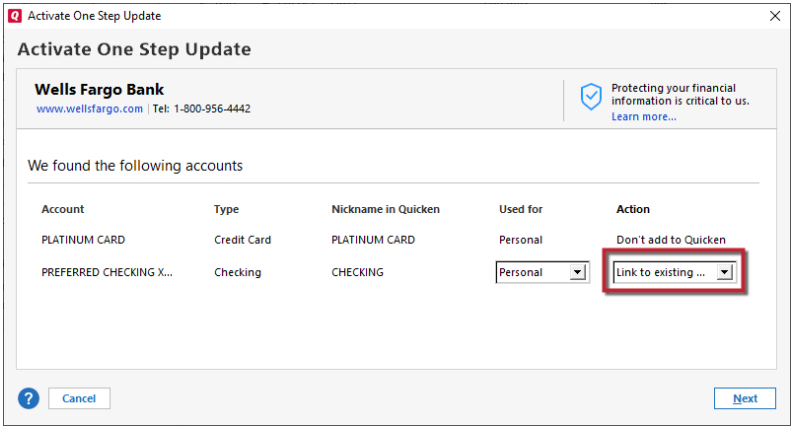
Please let me know how it goes!
Quicken Kristina
Make sure to sign up for the email digest to see a round up of your top posts.
0 -
It has nothing to do with the opening balance. Quicken is broken. And my checking account is completely messed up.
I started completely fresh with a new file and imported all my checking info from BoA. Today I just used the web connect to update my transactions and once again, quicken cannot reconcile it. The numbers are ALWAYS OFF now when trying to reconcile.
This is a complete nightmare.
0 -
And I went back to my old file and it won't even update transactions.
I am so mad at BoA and so mad at Quicken for breaking this. I am probably going to overdraw because I can't get a clear picture of what is happening to my account.
I will have to look for a new way to do my accounts. It's sad because I have used Quicken for like 30 years.
0 -
@Quicken Kristina Restoring a backup and reconnect didn't help, as Quicken didn't reconnect the troubled account. for other aacounts I couldn't match to existing. A big mess. Lucky I was already planning to close that one old account, so I did that faster than planned and it's OK for me now. But I can imagine how messy it would have been. I concur with @Sugar very bad from BoA and Quicken.
0 -
Thank you for your replies,
I recommend reaching out to Quicken Support directly for further assistance, as they have access to tools that we can't access on the Community, and they're able to escalate the issue as needed. The Quicken Support phone number can be found through this link here. Phone support is available from 5:00 am PT to 5:00 pm PT, Monday through Friday.
If I'm understanding correctly, you found a resolution that works? If that old account was inactive (no transactions, other than interest payments, in the last 90 days), that could be why there was no option to connect it. When linking, Quicken is usually fairly good about seeing the correct account to link to. Were the correct accounts to link to not showing up in the dropdown at all, or were they there, but not the default option?
Thank you!
Quicken Kristina
Make sure to sign up for the email digest to see a round up of your top posts.
0 -
Were the correct accounts to link to not showing up in the dropdown at all, or were they there, but not the default option? Not showing at all
0 -
Thank you for your reply,
If the online account isn't showing up on the add/link screen in Quicken, it is usually because the financial institution marked the account as dormant (for example, some financial institutions will mark an account dormant if there are no transactions, other than interest payments, for the past 90+ days), because it's a shared account and you're not using the login credentials belonging to the primary account holder, or because the account is serviced by a different financial institution.
If the online account is showing up, but you don't see the correct nickname in Quicken to link it to, there are a couple possible culprits:
- That specific nickname in Quicken is already connected to an online account for download into Quicken.
- That specific nickname in Quicken is associated with a different account type (for example, credit card accounts won't show up as options to link to a brokerage account).
Thank you!
Quicken Kristina
Make sure to sign up for the email digest to see a round up of your top posts.
0 -
I am also having trouble with the BoA decision to drop support of certain file types, and Quicken's failure to address the issue. The solution is supposedly to deactivate and re-connect with EWC+. However, my BoA accounts are set up today with Web Connect, and there is no way (button) to deactivate Web Connect. The forced Add Account method also doesn't work because the exisitng BoA accounts don't show up as link candidates. I have searched all over for a solution, but no luck. I am running relerase R65.17, and Quicken indicates it is the latest.
0 -
Are you looking for a button specific to deactivate Web Connect or do you not see the Deactivate button here?
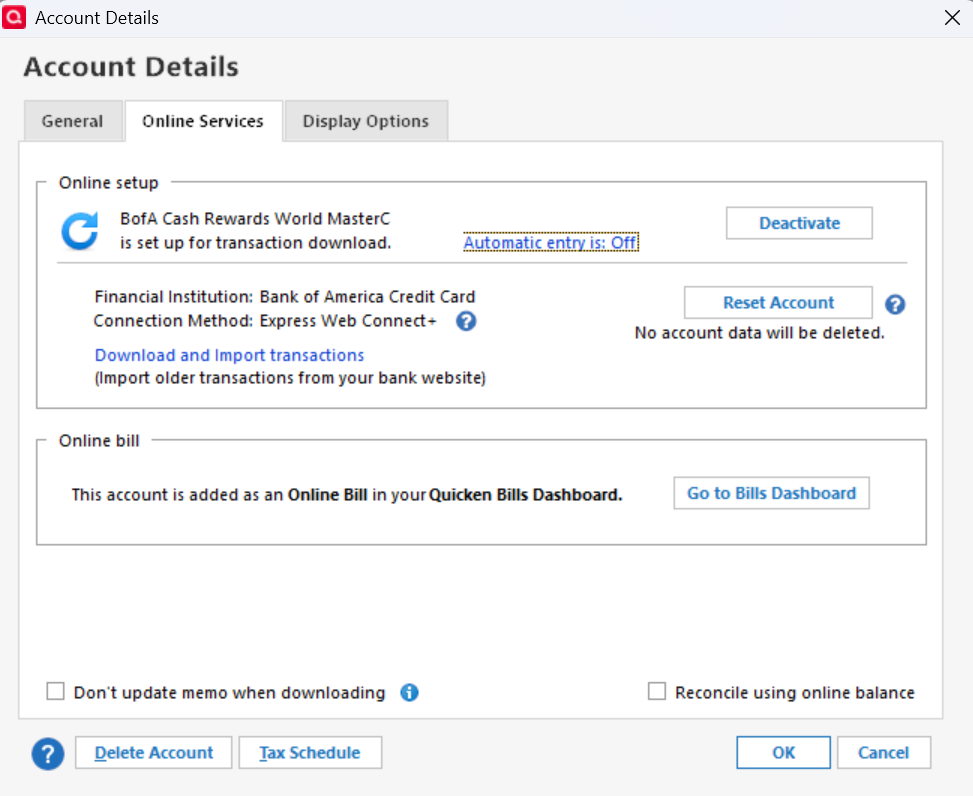
If you have more than one account at BofA, you will need to deactivate all of them and then set up online services again.
0 -
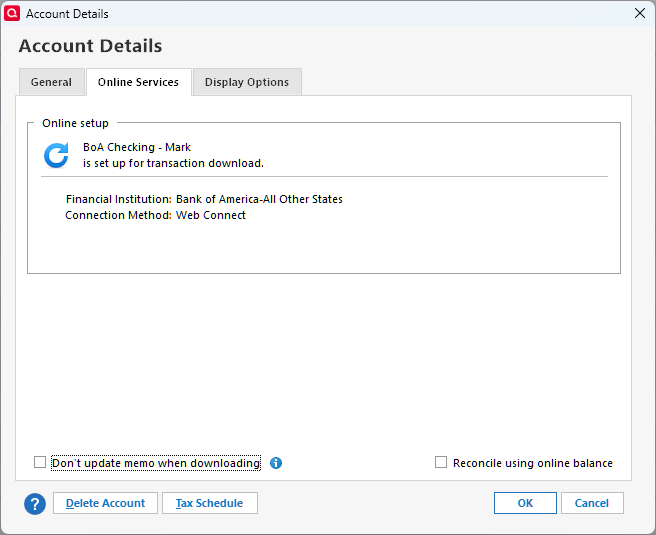
I do not see (have) the deactivate button as shown in your screenshot. I do have multiple BoA accounts and plan to deactivate all of them and reconnect. But, without the button, which I note in your case is related to EWC+, I cannot deactivate anything.
0 -
Here is a shot of my dialog box:
 0
0 -
Thank you for your replies @mweg34,
If you're not getting an option to deactivate the accounts and you also can't link to them, then there are a couple options.
- Backup your Quicken file. Navigate to Accounts>Add Account and follow the prompts. Add the problem accounts as new, since it won't let you link to the existing accounts.
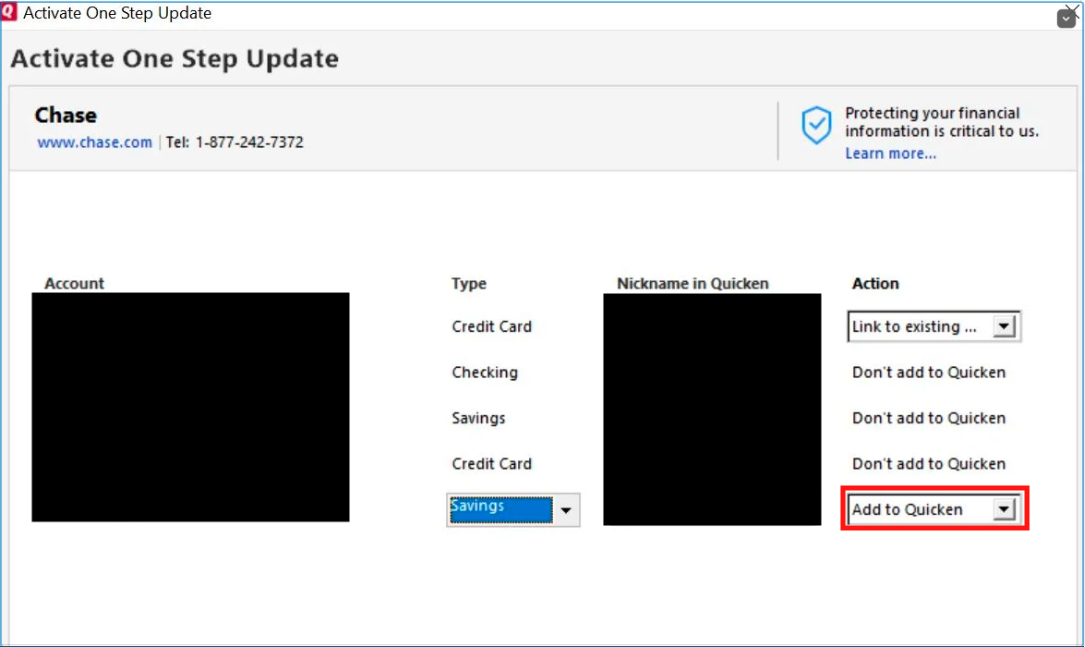 Then, to fill in any history that doesn't download into the new accounts, copy/paste that history from the original accounts to the new ones. You may need to close or delete the original accounts to prevent duplicate transactions in reports and to keep the duplication from throwing off your net worth.
 - Create a copy of your file by navigating to File>Copy or Backup File, then select Create a copy or template.
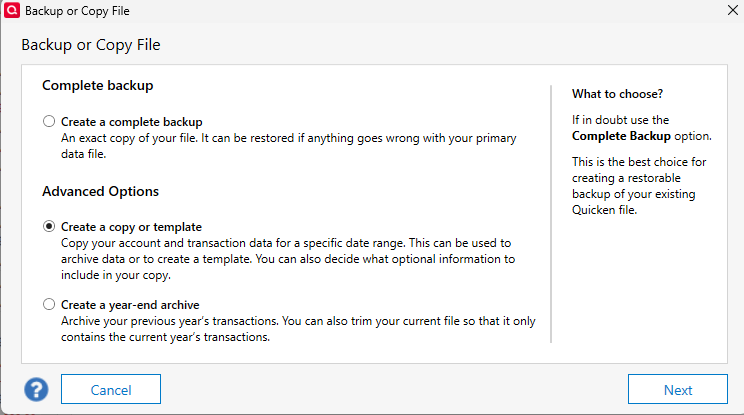 Creating a copy of your file will disconnect all connected services. In the copied file, test to see if you're able to link your Bank of America accounts to the existing ones in your Quicken file. If you are, then reconnect any other connected services, and use the copied file as your main file.
I hope this helps!
Quicken Kristina
Make sure to sign up for the email digest to see a round up of your top posts.
0 - Backup your Quicken file. Navigate to Accounts>Add Account and follow the prompts. Add the problem accounts as new, since it won't let you link to the existing accounts.
-
@mweg34 Did this work for you? I have the same problem. I have 3 Bank Of American accounts, two had the deactivate button and I could do that , set up again and get them downloading again. But the 3rd is web connect (this account is a 2 year old credit card, the others were much older accounts), and has no deactivate or reset button. Apparently this is the old way to get it working ? Make a new account and copy past the old transactions in ?
0 -
[Removed - Duplicate Post]
0 -
This problem is extremely frustrating. Chat is no help. Left work early to call and get assistance and they said they couldn't help me because it was too close to quitting time. So now I have to take a day off of work to call? This is awful customer service.
0
