RBC Wealth Mgmnt Error OL-294-A

Quicken cannot connect (Error OL-294-A); Not connecting for last two days
Answers
-
Will not connect
0 -
same problem here
0 -
Thanks for reporting this. OL-294-A indicates that Quicken isn’t receiving the expected response from RBC’s server during the connection attempt. This can happen even if you’re able to sign in normally on the bank’s website.
Please refer to this support article for guidance.
If the error continues after following the guidance outlined in the support article, it typically points to a temporary server issue or an outage on RBC’s end. In that case, you will need to contact the financial institution directly, as they will need to resolve the connection issue. When contacting them, sometimes asking for a supervisor or Tier 2 can be helpful, since front-line agents are often not familiar with 3rd-party softwares such as Quicken.
Thank you!
-Quicken Anja
Make sure to sign up for the email digest to see a round up of your top posts.0 -
My RBC accounts will not connect this has been for about 5 days now I am unable to connect to financial institution
[Merged Post]
0 -
This is recurring and there has been no connection for the last several days. Others with issue, please comment so that we can get RBC's attention on this problem. Thank you.
0 -
Hello @Robert Alexander,
Thanks for reaching out!
To help us understand what’s going on, can you please elaborate and provide more details about the issue? Specifically, tell us exactly what’s happening on your end and what you’re seeing when you try to connect your RBC Wealth Management accounts.
Are you receiving any error messages or codes? Please also provide any troubleshooting steps you’ve already tried.
Thank you!
[Merged Post]
-Quicken Anja
Make sure to sign up for the email digest to see a round up of your top posts.0 -
I am having the same issue and spoke to RBC tech support on 12/3/25. The tech support agent said that they are aware of the issue and that it will take them a few days to correct the problem. The agent I spoke to did not know why it would take so long and that they are still investigating the problem.
[Merged Post]
0 -
I'm seeing the same thing with my account. Issue has been going on since Wednesday 12/3/2025.
0 -
Hello @Larry10,
Thanks for sharing what RBC support told you. That’s helpful context!
Additionally, please answer the questions I asked the OP so we can get a clearer picture of what’s happening on your end as well.
Thank you!
[Merged Post]
-Quicken Anja
Make sure to sign up for the email digest to see a round up of your top posts.0 -
Thanks for sharing your updates. As advised previously, it’s important to let RBC know so they can investigate. Even if you can log in on their website, the issue appears to be with how Quicken connects to their servers.
Please also review the support article I linked earlier for more details on the OL‑294‑A error, as it provides further information about the error. When contacting RBC, asking for Tier 2 support or a supervisor can sometimes help, as they’re more familiar with third-party connections like Quicken.
Thank you!
-Quicken Anja
Make sure to sign up for the email digest to see a round up of your top posts.0 -
I am seeing the same thing and submitted an error report, I also verified I can sign in at their site and have quicken enabled. After a rather long time trying to update I get an OL-294-A error unable to complete request please try again later
[Merged Post]
0 -
Hello @lmbeck65,
Thank you for chiming in and confirming what you are seeing. I have merged the prior thread with this thread here reporting OL-294 with RBC Wealth Management.
Please review this support article regarding this error for more information. As stated at the bottom of the article, you will need to contact the financial institution directly for further assistance:
If the issue is not resolved after following the steps above, you will need to contact your financial institution to resolve this issue. Quicken does not have access to the financial institution's servers to correct the problem. This may require you ask to speak with an online services specialist that handles transaction download issues at the financial institution. If your financial institution states they can't assist, an escalation with the financial institution may be necessary.
However, I have also passed this along internally so the proper channels can be aware of it as well.
Thank you!
-Quicken Anja
Make sure to sign up for the email digest to see a round up of your top posts.0 -
I am experiencing same issue with RBC. I asked windows co-pilot about issues, and this was response. Not sure how accurate it is:
Yes — Quicken’s Direct Connect services with RBC (Royal Bank of Canada) are experiencing issues this week.
🛠️ What’s Happening
• Quicken’s OFX/online banking provider is rolling out a system update on December 8, 2025.
• RBC is among the institutions flagged as potentially affected.
• Users may see failed transaction downloads, sync errors, or inability to refresh accounts after the update.
• RBC also appears on lists of banks with ongoing connection problems via Yodlee and Direct Investing feeds as of December 3, 2025.0 -
Quicken Anja and all,
I submitted a ticket to RBC tech support and received this reply:
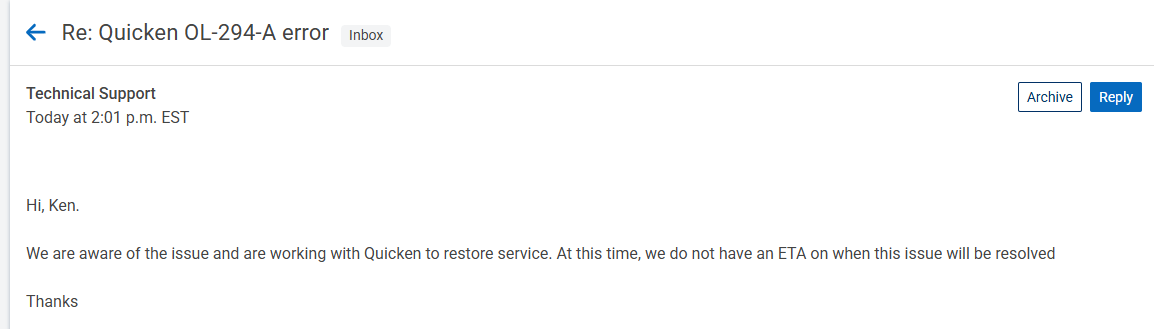
So, they know about it and are working with Quicken.
Just an FYI for everyone.
KenW
0 -
@kwheeley Thanks for sharing this update! Glad to hear they're working on it.
-Quicken Anja
Make sure to sign up for the email digest to see a round up of your top posts.0 -
I just spoke to their support line and was told they are restarting the servers and expect things to be back working on Monday
0 -
Thanks for this helpful info!
0 -
Happy to say it is working for me now
0 -
@lmbeck65 Thanks for sharing this information, and I'm happy to hear that it is working for you now.
Thank you!
-Quicken Anja
Make sure to sign up for the email digest to see a round up of your top posts.0

Categories
- All Categories
- 6 Product Ideas
- 34 Announcements
- 249 Alerts, Online Banking & Known Product Issues
- 19 Product Alerts
- 266 Welcome to the Community!
- 301 Before you Buy
- 1.5K Product Ideas
- 55.8K Quicken Classic for Windows
- 16.9K Quicken Classic for Mac
- 1K Quicken Mobile
- 834 Quicken on the Web
- 129 Quicken LifeHub