Unable to add Raymond James Accounts where the last 4 characters contain a letter

I have been attempting to connect my Raymond James Brokerage accounts to Quicken Classic. I have successfully added most of the accounts via the Online Services tab in the Online Services. However, two of my accounts are not listed. These two accounts both have both have a Letter in the last 4 characters of their account numbers (e.g. xxxxWxxx and xxxxNxxx). This definitely appears to be a bug. How do I report this to the Quicken devs?
[Edit - Removed partial account numbers]
Comments
-
Hello @mlurie,
Thank you for reaching out! To answer your question, there are a couple ways to report this to the devs.
If you want a response to your report, then I recommend that you contact Quicken Support directly by phone or by chat. Quicken Support's contact information can be found through this link here. Phone support is available from 5:00 am PT to 5:00 pm PT, Monday through Friday. Chat support is available from 5:00 am PT to 5:00 pm PT, 7 days a week.
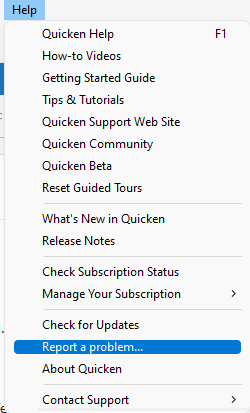
If you don't need a response, then you can report the issue by navigating to Help>Report a Problem and sending a problem report with log files attached. Please make sure to include a description of the issue.
When multiple reports of the same issue are received, those reports are also investigated further. Reports that can be replicated or verified are then submitted as tickets to the proper channels.
I hope this helps!
Quicken Kristina
Make sure to sign up for the email digest to see a round up of your top posts.
0
