Invoice Payment Form - Add Enter/New button & change existing to Enter/Done [Edited]

1) The Payment form allows Enter or Cancel . It would be helpful to add the option for Enter/New , and also change existing Enter to Enter/Done . The `New` option is already part of Invoice entry and Investment transactions.
2) The invoice Payment form seems to open in the center of the monitor screen, rather than the the center of the Quicken window. As a result, it's always covering up part of my source file, requiring me to reposition it every time. It would be better to center on the Quicken window and/or remember where the form was moved in the previous payment entry.
[Request already exists, to view the Idea, click here]
Thank you for your consideration
Comments
-
Hello @QuestionJEM,
Thank you for coming to the Community to share your feedback! There is already an existing Idea post requesting the 2nd part of your idea. To view that existing Idea, please click "View Post" below:
Please add your vote and a comment. Ideas that get enough votes may be implemented in the future!
Thank you!
Quicken Kristina
Make sure to sign up for the email digest to see a round up of your top posts.
0 -
1) The Payment form allows
EnterorCancel. It would be helpful to add the option forEnter/New, and also change existing Enter toEnter/Done. The `New` option is already part of Invoice entry and Investment transactions.You're talking about this dialog, aren't you?
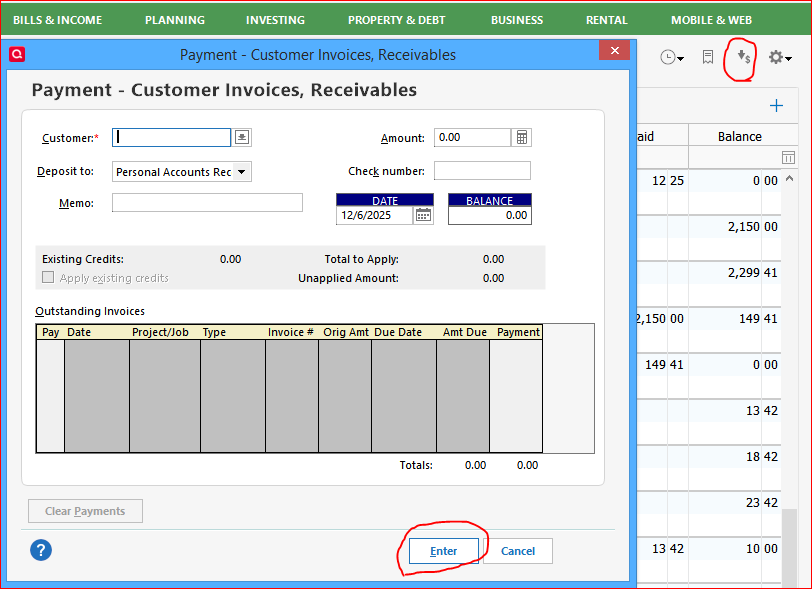
I agree. "Enter/New" and "Enter/Done" buttons would be helpful.
If you haven't done so already, I would suggest you add this workaround to save a mouse click or two:
- Add the "New Customer Payment" icon to the Action Bar, next to the Actions gear icon in the upper right-hand corner of the Customer Invoice account register.
To do so, click the Actions gear icon and select "Customize action bar".
Until the programmers can implement this change request, this workaround will give you a one-click icon to open a new dialog window.
Feel free to add other Action bar icons like "New Customer Invoice" and other frequently used actions.0 - Add the "New Customer Payment" icon to the Action Bar, next to the Actions gear icon in the upper right-hand corner of the Customer Invoice account register.

