Bitcoin and Crypto Price wrong Coinbase

I was finally able to connect coinbase Quicken Mac classic has the "shares correct" but prices are wrong
For example Quicken Mac shows Bitcoin at $40.17 rather than 90,602.21How can I fix this - and have prices update automatically

Comments
-
Hello @DPW-CT,
Thank you for letting us know you're encountering this issue. This is a known issue. The ticker symbol is incorrect, which can result in incorrect prices. To correct the issue, you would want to navigate to Window>Security List, and edit the ticker to the correct symbol.
I hope this helps!
Quicken Kristina
Make sure to sign up for the email digest to see a round up of your top posts.
0 -
which is ???
0 -
Agree "which is????". Quicken seems to have assumed the name of the "wallet" is the ticker symbol. I have the following (what is shown in Coinbase)
Bitcoin (BTC), Ampleforth Governance (FORTH), Clover Finance (CLV), Artificial Superintelligence Alliance (FET), and The Graph (GRT).
The security listing in Quicken, after I connected to Coinbase, just showed BTC Wallet, Forth Wallet, CLV Wallet, FET Wallet, and GRT Wallet. The number of "shares" was correct and in some cases the price as I saw it in Coinbase was correct — until I tried to get historic prices. But when trying to look for those "tickers", they didn't exist. Quicken also had them as Type of "Other". Shouldn't they be crypto? And if crypto, do I then have to manually enter unit prices?
0 -
Kristina
what symbols should we use?0 -
Thank you for your reply,
Our documentation says to use the indexed version of BTCUSD and ETHUSD.

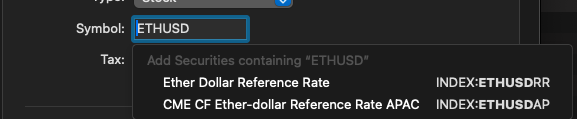
If those do not give you correct prices, then I recommend reaching out to Quicken Support directly for further assistance, as they have access to tools that we can't access on the Community and they're able to escalate the issue as needed. Quicken Support's phone number can be found through this link here. Phone support is available from 5:00 am PT to 5:00 pm PT, Monday through Friday. Chat support is available from 5:00 am PT to 5:00 pm PT, 7 days a week.
I hope this helps!
Quicken Kristina
Make sure to sign up for the email digest to see a round up of your top posts.
0 -
Kristina, those ticker symbols are not available in quicken Mac.
This has been going on for over a year, obviously not a high priority for quicken. For some reason Quicken associates Bitcoin and Ethereum with the Grayscale Bitcoin and Ethereum Mini Trust ETFs. You can click on the symbol (BTC Vault) and choose security overview from the drop down menu to see what is being used.
0 -
Hello @Patrick T Williams,
If the indexes in my earlier post do not give you the correct prices, then I recommend reaching out to Quicken Support directly for further assistance, as they have access to tools that we can't access on the Community and they're able to escalate the issue as needed. Quicken Support's phone number can be found through this link here. Phone support is available from 5:00 am PT to 5:00 pm PT, Monday through Friday. Chat support is available from 5:00 am PT to 5:00 pm PT, 7 days a week.
Thank you!
Quicken Kristina
Make sure to sign up for the email digest to see a round up of your top posts.
0 -
FWIW, by going into the Security Detail page in Quicken Mac I was able to get Bitcoin and Etereum prices to update correctly. Note, this is the Security Detail page by clicking on the security and selecting Security Detail then editing the security. For Bitcoin I used Symbol: BTCUSD, Type: Other, Asset Class: Index and for Ethereum I used Symbol: NDEX:ETHUSD100, Type: Other, Asset Class: Index.
0 -
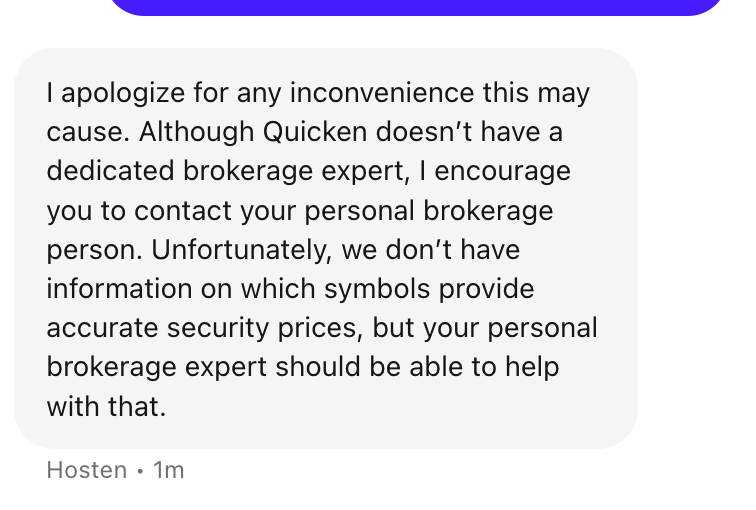
Any update here? I contacted support and this is what they said, unfortunately no help
"While we don’t have that specific information, I recommend reaching out to a brokerage expert who will be able to assist you further."
"We understand your concern. Currently, we don’t have the information needed to provide accurate security prices with symbols. We recommend reaching out to a brokerage expert who can assist you further. I sincerely apologize for the inconvenience."Frustrating
 0
0 -
Thank you for your reply @DPW-CT,
I sent you a DM. To view it, please click the envelope icon near the upper right.
Thank you!
Quicken Kristina
Make sure to sign up for the email digest to see a round up of your top posts.
0 -
any plans eta to link
To kraken crypto accounts ?
0
