Error cc-505 when attempting to connect with Sallie Mae bank

Well, this error is back. Not connecting all week. Tried Quicken Copy of my database. Same error. Can log into Sallie Mae website with the same credentials.
This has been ongoing for the last week and on and off for the last 2 months. When will it be fixed? I uploaded all info. Quicken 27.1.64.65, latest Windows 11 25H2 all patches. I am reticent to update to latest Quicken, because every time I update, Quicken breaks another account download.
😡
Comments
-
Hello @Rick8,
Thanks for sharing the details. The CC-505 error occurs when Quicken is unable to communicate with your bank’s servers. Even if you can log into Sallie Mae directly, this error usually indicates a temporary issue on their side or a block on the server that Quicken uses to download transactions.
Here’s what you can try:
- Wait one business day – many CC-505 issues resolve on their own after a short delay.
- Refresh your online account information:
- In your account register, click the Actions (gear) icon at the top right (or press Ctrl + Shift + N).
- Select Update Now and follow the prompts.
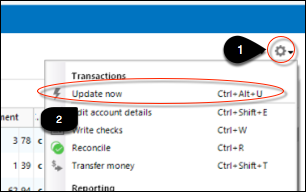
- Repeat for each affected account.
- Try again the next business day if the problem persists.
If this continues for more than 48 hours despite following these steps, it’s best to contact Quicken Support so they can assist further or escalate the issue.
You can also review the full guidance in this support article.
-Quicken Anja
Make sure to sign up for the email digest to see a round up of your top posts.0 -
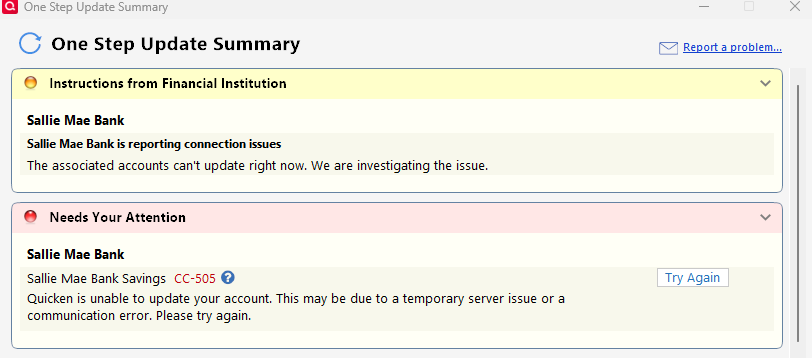
Sallie Mae Bank won't connect for the past 4 or 5 days using One Step Update. Returning error CC-505. Tried refreshing account by updating inside the register. Validation does not fix the connection problem, and I still get came error and no connection. Anyone else having this issue?
Windows 11 Home 25H2. Quicken R65.17. Build 27.1.165.17.
 0
0 -
Update (Dec 15):
Sallie Mae is still not connecting via One Step Update (Express Web Connect). In my case, the last successful update was December 10, and it has failed every day since. Suggested troubleshooting has not resolved this issue.
Other users are reporting the same ongoing connection problem, with CC-503, CC-505, and CC-507 errors. My login credentials continue to work on the Sallie Mae website, so this does not appear to be a user login issue.
Could this be related to any recent changes on Sallie Mae’s side in how account data is collected and shared with Quicken, or perhaps a Sallie Mae security update?
Windows 11 Home 25H2. Quicken version R65.17. Build 27.1.65.17.
0 -
Quicken says:
"This error message will be presented when the financial institution is blocking access to their servers, preventing Quicken from retrieving data to download to your file. In some cases, this block is permanent.
Note: You may be able to log in to the bank's website successfully and still receive this error in Quicken. This is because the error is typically caused by an issue on the bank's servers that Quicken uses to download transactions.
To resolve this issue
Check the Quicken Community for alerts and a possible resolution."
Unfortunately, there are none listed. Quicken needs to fix this, not the Quicken Community.
0 -
This content has been removed.
-
Quicken's home page describes this product as “the gold standard of personal finance apps.”
Right now, that’s hard to square with what’s happening with on-going Sallie Mae connection failures. Multiple users are reporting ongoing Sallie Mae update failures (CC-503, CC-505, CC-507) for days. What’s frustrating is that there’s no Alert posted, no acknowledgment that this might be a Quicken-side problem and no fix. Instead, users get Quicken's standard playbook responses:
- Refresh your online account information…
- Wait a business day…
- Contact Sallie Mae about third-party access…
- The financial institution may be blocking access…
- Contact Quicken Support…
- Check the Community for updates…
- Review the full support article…
Those steps might make sense for one-off problems, but when users are seeing the same errors at the same time, it starts to look like something systemic.
Is this really the "gold standard of personal finance"?
2 -
So I went through Quicken Support and we re-tried everything I had plus using a completely new Quicken Database. Same response CC-505. Quicken is able to import a QIF file downloaded from Sallie Mae, but will not update through OSU. I was told to contact Sallie Mae and ask for an IT Online Specialist for 3rd party access (Q) to check for security updates, settings, MFA procedures, etc. I called Sallie Mae - Response was "Sallie Mae had no IT Department to deal with downloading and 3rd party access" and "Sallie Mae and Quicken have been incompatible since 2018" and "if it was working, Quicken must have updated something" What a lot of BS! It has been working fine for the last 5 years at least! Not sure where we go from here, but I think Quicken IT should work with Sallie Mae IT (at a much higher level) and fix this, or at least tell us the truth.
1 -
Hello All,
The Community Alert for this issue has been reopened, and our teams are working on it, though we do not have an ETA on resolution at this time. While this remains ongoing, please refer to the Community Alert for any and all updates and information.
We apologize for the inconvenience in the meantime! Thank you.
-Quicken Anja
Make sure to sign up for the email digest to see a round up of your top posts.0 -
Having same problem (CC-505) when attempting to download Sallie Mae transactions. 'Wait' and 'Try Again' are not acceptable solutions!
1 -
Hello @Joe_Mo37,
Thanks for adding your voice here—I understand why this ongoing issue is frustrating.
This is a known, active issue with Sallie Mae connections that is currently being tracked and worked by our teams. The Community Alert for this problem has been reopened, as multiple users are impacted by the same CC-505 behavior, and it’s no longer being treated as an isolated or user-specific case.
At this point, there isn’t a workaround we can offer that will reliably restore One Step Update while the underlying connection issue remains unresolved. The repeated CC-505 errors indicate a server-level block affecting Quicken’s ability to retrieve data from Sallie Mae, even though website logins continue to work.
For now, the best way to stay informed is to follow/bookmark the Community Alert, as that’s where updates will be posted as soon as they’re available. We sincerely appreciate everyone’s patience while this is being addressed.
Thank you for reporting that you’re also affected—it helps ensure the scope and impact of the issue is fully understood.
-Quicken Anja
Make sure to sign up for the email digest to see a round up of your top posts.0 -
Same problem with Sallie Mae unable to download since November. I just called and non-tech person said it is a problem ever since Quicken updated the version. He will try to find out more about the status and said he will get back to me ASAP. He told me to check with Quicken, so adding my voice to needing this problem solved.
0
