All my split transactions are scrambled constantly

When is this going to be fixed? I keep correcting my many split transactions, and quicken keeps scrambling them up every time I use one step update. I am on version R65.17
Comments
-
Hello @vasicekpr,
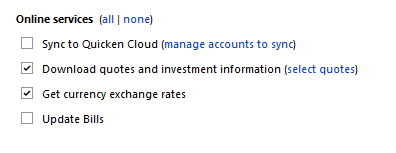
Thank you for reaching out! To help troubleshoot, please provide more information. When did you first notice this issue? Is this happening to all transactions with split transactions? Is this happening to bill reminders? Is this happening in only one account, multiple accounts, or all accounts? Do you sync to the Quicken Cloud during One Step Update? If you do, does turning that sync off prevent this issue?
I look forward to your reply!
Quicken Kristina
Make sure to sign up for the email digest to see a round up of your top posts.
0 -
I too have had this issue, mainly on payroll split transactions. It has been happening for a long time.
0 -
It happens to all split transactions, including payroll transactions. It happens no matter what I do to my settings, including when I turn off sync to the cloud. It is random and it perfectly scrambles all my split transactions so that my budgets and all future projections are incorrect. It has been doing this for months. I will not be able to do critical projections using quicken unless this is solved.
0 -
It is acting as though you are experimenting with AI technology, as this behavior is much like what I have experienced on other platforms, including high-end modeling software. If it is an AI do loop, please inform me on how to deactivate it, as I do that on all other platforms. AI is never helpful, and probably never will be helpful, for these purposes, and will keep making the same infantile changes even though I have edited them and recreated them dozens of times.
I have tried deleting and rebuilding memorized payee lists, deleting paychecks and bills and then rebuilding the bills and paychecks from scratch after waiting for a month of syncing with the cloud, and I have checked all options under preferences and other menus to see if there is some setting that could be causing this, I have stopped syncing for a month, and I have not found anything to stop this persistent error.
0 -
Thank you for your replies,
If you haven't already done so, I recommend following the steps in this post, since it sounds like a similar issue:
Please let me know how it goes!
Quicken Kristina
Make sure to sign up for the email digest to see a round up of your top posts.
0 -
I back up to an external drive and a laptop. I have never wanted the cloud involved as it messes up other programs too. How do I turn it off?
Besides reports, scrambling the splits makes the tax planner module useless.
0 -
Hello @Wayne Daren,
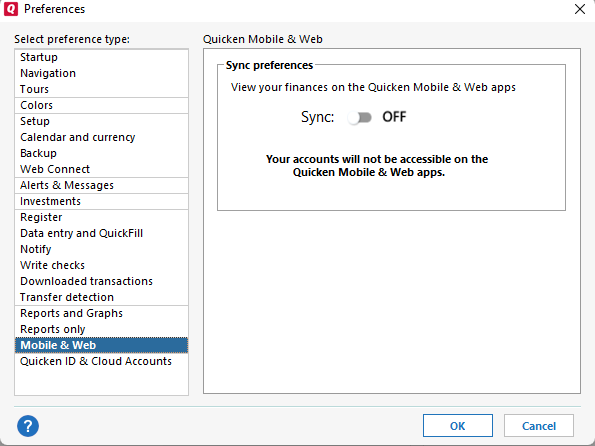
If you're asking about turning of syncing with the Quicken Cloud, you can turn it off by navigating to Edit>Preferences>Mobile & Web and turning the Sync off.
I hope this helps!
Quicken Kristina
Make sure to sign up for the email digest to see a round up of your top posts.
0 -
I hope the process put forth by markus1957 works - I have been battling this issue for a LONG time - as in years. Spent about an hour on the phone with tech support once to no avail. Been using Quicken for over 30 years, just about ready to give up on it due to the poor quality of the product for about the last 5 years.
0 -
Hello @mwesterman,
Thank you for sharing your experience!
Please let us know if the issue persists after you've tried markus1957's work around!
Quicken Kristina
Make sure to sign up for the email digest to see a round up of your top posts.
0
