Ongoing Sallie Mae Banking issue with Fields reversed and Password vault exposed

I have reviewed the posts regarding this issue going back to May with no resolve.
The issues are that the setup connectivity for Sallie Mae back has the Password and User name fields reversed in the dialog box. You would think this is no issue, so you just put in your fields the opposite of every other dialog in Quicken banking setup (R65.17 - 27.1.165.17) and the connection will work BUT if you go to the password vault the User name displays the password instead and it can readily be seen in password vault instead of the user name. Will this ever be fixed?
You can refer to this closed thread about another user reporting this issue with no resolve.
Comments
-
Hello @JMP-NY,
Thank you for bringing this back to our attention.
Our teams are aware of the reversed Username/Password fields for Sallie Mae Banking and are actively working to address it. At this time, we do not have an ETA for when the fix will be released, but this issue is not forgotten and is still in progress.
We appreciate your patience while our teams continue to work toward a resolution.
Thank you!
(CTP-13028)-Quicken Anja
Make sure to sign up for the email digest to see a round up of your top posts.0 -
This content has been removed.
-
When will this be fixed? I was OK until maybe a few weeks ago - which might've been an unrelated problem with SallieMae. But today when I tried to deactivate and reactivate my online access to SM, the username and password fields were reversed and the username was asterisked out which the password was always plain text. I entered it that messed up way but it failed to find my SM accts. That reversed username/password fields was afflicting other banks in the past. Can't you guys use the same fix?
0 -
Hello @pmfenton3,
Thank you for following up and for detailing what you’re experiencing.
Our teams are aware of the reversed Username and Password fields for Sallie Mae, and this issue is still actively being worked on. At this time, there is no ETA for when a fix will be released.
However, even though the fields appear reversed, credentials must still be entered based on the field labels, not their on-screen position:
- Enter your username in the field labeled Username
- Enter your password in the field labeled Password
While unintuitive, some users have reported that the connection can still succeed when entered this way.
Additionally, I took the liberty of reviewing your account internally, and I can see you’re encountering an internal FDP-105 error, which presents in-product as a CC-505 error.
The CC-505 error occurs when Quicken is unable to communicate with your bank’s servers. Even if you can log into Sallie Mae directly, this typically indicates a temporary issue on the bank’s side or a server block affecting Quicken’s connection.
Recommended steps:
- Wait one business day – many CC-505 issues resolve on their own after a short delay.
- Refresh your online account information:
- In your account register, click the Actions (gear) icon at the top right (or press Ctrl + Shift + N).
- Select Update Now and follow the prompts.
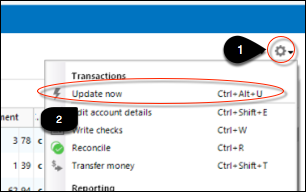
- Repeat for each affected account.
- Try again the next business day if the problem persists.
If the error continues for more than 48 hours after following these steps, we recommend contacting Quicken Support so the issue can be further reviewed or escalated.
You can also review the full guidance in this support article for CC-505 errors.
We understand how frustrating this is and appreciate your patience while both issues continue to be addressed.
Thank you!
-Quicken Anja
Make sure to sign up for the email digest to see a round up of your top posts.0 -
This content has been removed.
