Sallie Mae Bank Not Connecting or Downloading - Error CC-507

Sallie Mae Bank Not Downloading Transactions. Error CC-507. Started tonight, 11/22/25.
States that "the financial Institution you selected does not support the account type your are trying to add. Note that some institutions, such as MOHELA or Lending Club, do not support loan downloads.
My accounts are a money market and 2 CD accounts. No loans.
I am also not trying to add an account. Just trying to download transactions and update account. When is Quicken going to finally fix all these download transactions issues. It just revolves from one account not working to another account not working. NEVER, and I mean NEVER have I had 1 week in the last year that all accounts worked for downloads!!!!!!!!!!!! 😡
Comments
-
Hello @Rick8,
Thank you for sharing your experience and reporting the issue you are seeing with Sallie Mae. I am sorry to hear you have had continued issues. That is not the experience we want our customers to have.
This CC-507 error occurs when the wrong instance of your financial institution is selected while adding an account to Quicken, or if something is changed in the account while updating it.
After reviewing your connections internally, it looks like the CC-507 has been resolved. Is that correct?
If not, please contact Quicken Support for further assistance. They can collect log files from you and process an escalation if needed.
Thank you.
Quicken Alyssa
Make sure to sign up for the email digest to see a round up of your top posts.
0 -
Works now - thanks!
0 -
Quicken Alyssa
Make sure to sign up for the email digest to see a round up of your top posts.
0 -
This is happening again 12-9-2025
0 -
Thank you for reporting that the issue returned.
After reviewing your connections internally, it appears you were briefly receiving this error for part of yesterday, and it has resolved since then. Is that correct?
If not, let me know what you are seeing from your end. If it's no longer the CC-507, screenshots of what you are seeing will be helpful. If needed, please refer to this Community FAQ for instructions on how to attach a screenshot. Alternatively, you can also drag and drop screenshots to your response if you are not given the option to add attachments.
Thanks again!
Quicken Alyssa
Make sure to sign up for the email digest to see a round up of your top posts.
0 -
Thanks Alyssa, It continued through last night. Working OK today. I report issues when they occur. Maybe I should wait a day. I feel Quicken should know about things ASAP so they can check and see if it is indeed a problem on their end or the provider. If I had reported the vault/password issue with PNC a month before everyone started having a problem, it might have been fixed earlier. I did not because I was having no issues, just noticed the vault/password/user id reversal discrepancy. Thanks again for all you do! I would not have the patience you have!
1 -
Worked yesterday 12-10-25. Not so much today. Again not downloading, this time CC505
0 -
Thank you for following up with these additional details.
I can see that you are still getting the CC-505 today. Definitely seems like there is something going on with this financial institution.
To resolve the CC-505:
Try refreshing your online account information:
- From your account register, select the Actions gear icon at the very top right of your register (Ctrl + Shift + N).
- 2. Select Update Now.
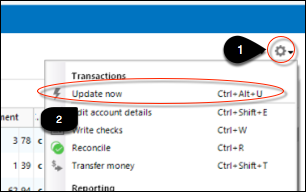
3. Follow the on-screen instructions to complete the update.
If the issue persists, you will need to contact Quicken Support so they can investigate this issue further.
Thank you, and sorry for the continued issues!
Quicken Alyssa
Make sure to sign up for the email digest to see a round up of your top posts.
0 -
Quicken Alyssa, thanks for the reply. I have already done all that after the first 24 hours. Nothing helps and support has been no help either.
0 -
Thank you for following up and letting me know that you have already followed the recommended steps.
Did you contact support recently for this issue? If so, what was the end result of that interaction? I am unable to locate a ticket to determine the best next steps.
If you have not contacted them for this specific issue, that will be a necessary step.
Thanks again!
Quicken Alyssa
Make sure to sign up for the email digest to see a round up of your top posts.
0 -
Quicken Alyssa,
So I went through Quicken Support and we re-tried everything I had plus using a completely new Quicken Database. Same response CC-505. Quicken is able to import a QIF file downloaded from Sallie Mae, but will not update through OSU. I was told to contact Sallie Mae and ask for an IT Online Specialist for 3rd party access (Q) to check for security updates, settings, MFA procedures, etc. I called Sallie Mae - Response was "Sallie Mae had no IT Department to deal with downloading and 3rd party access" and "Sallie Mae and Quicken have been incompatible since 2018" and "if it was working, Quicken must have updated something". [Removed-Profanity] It has been working fine for the last 5 years at least! Not sure where we go from here, but I think Quicken IT should work with Sallie Mae IT (at a much higher level) and fix this, or at least tell us the truth.
1 -
This content has been removed.
-
This content has been removed.
-
Totally agree with Rick8's last comment, especially the last sentence.
0 -
Hello All,
Thank you for the updates, and I apologize for the delayed response.
Are you still having this issue?
Looking forward to your responses.
Quicken Alyssa
Make sure to sign up for the email digest to see a round up of your top posts.
0 -
Yes, this has not changed. Send a report every day via "Something is Broken" link in download errors. Does this actually help? How many is enough? Same stuff: can't add as a new account, can't reset, can't add as an account in new database, can't connect, can't download - anything related to a connection at Sallie Mae / Quicken does not work!
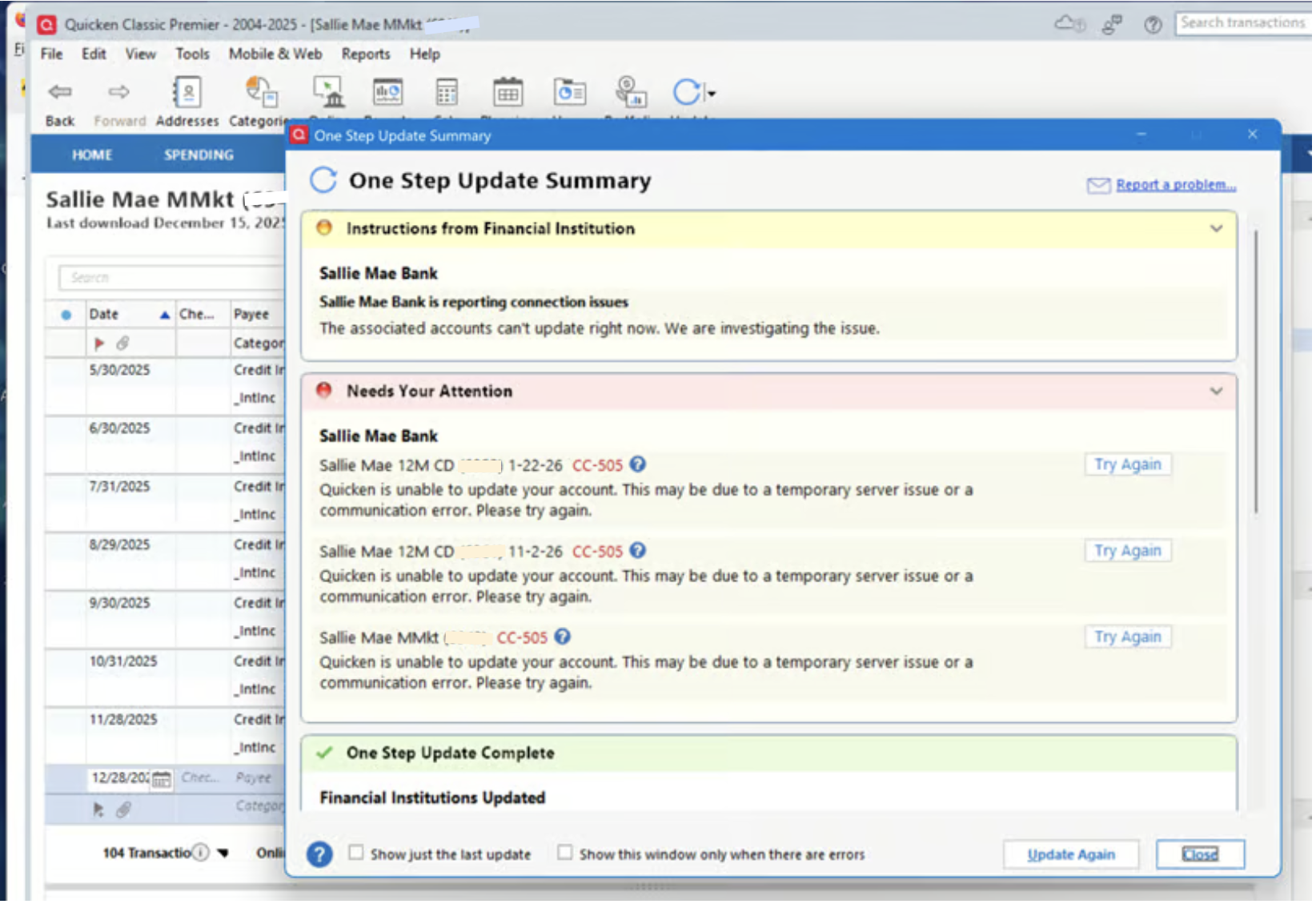
[Edited-Screenshot]
2 -
This content has been removed.
-
Hello All,
Thank you for following up and adding to the discussion.
This is now a Known Issue. Our teams are aware and working toward a solution. No ETA is available at this time.
Bookmark the linked alert to be notified of any updates/changes as they occur.
Thanks again!
Quicken Alyssa
Make sure to sign up for the email digest to see a round up of your top posts.
0 -
Joining in this conversation.
Same connection problems at Sallie Mae Bank for me and it has been ongoing for months now after it worked (most of the time) for years. Very frustrating as these are recurring issues. This swapped password / username issue is obviously NOT a Sallie Mae problem! Please make it work soon.
2 -
Hello @Aresuu,
Thank you for adding to this discussion! We apologize for the inconvenience this issue is causing you.
Please refer to the Alert and bookmark it to stay updated on progress as it occurs.
Thanks again!
Quicken Alyssa
Make sure to sign up for the email digest to see a round up of your top posts.
1 -
It's 1/7/26 and I am having the identical issues as all those noted previously in this chain. Sallie Mae bank accounts worked properly for years (on Quicken for Mac, currently on v8.4.1), but have been unable to connect since November. I have been following these posts waiting to hear some good news from Quicken. How long till proper connectivity is finally restored?
1 -
Hello @ASE,
Thank you for adding to this discussion!
Unfortunately, we are unable to provide an ETA for resolution of this issue. Please refer to the Alert and bookmark it to stay updated on progress as it occurs.
Thanks again!
Quicken Alyssa
Make sure to sign up for the email digest to see a round up of your top posts.
0 -
1/11/26 - Sallie Mae update is broken for me as well. Two savings accounts and one CD. Worked fine for years but stopped working 2-3 weeks ago.
0 -
Thank you for chiming in!
This is an ongoing Known Issue. Please continue to refer to the linked alert. Bookmark it to be notified of progress/changes as they occur.
Thanks again!
Quicken Alyssa
Make sure to sign up for the email digest to see a round up of your top posts.
0 -
This content has been removed.
-
I have also been having this problem for quite some time with the same message displayed when I start the process of reconnecting my account.
Can Quicken let this group know if Sallie Mae is cooperating with Quicken in its attempt to resolve this issue?1 -
Hello @robert W,
Thank you for adding to this discussion!
Yes, I can confirm this is actively being worked on, and our teams are working with the financial institution toward resolution.
We do not have an ETA, but you can bookmark the Alert to be notified of changes as they occur.
Hope this helps!
Quicken Alyssa
Make sure to sign up for the email digest to see a round up of your top posts.
0 -
Since this is an issue that is well known, and since all parties seem to be aware of the issue, there must be more information you can provide on the fix and the timeline for restoring this service. Sallie Mae has been unable to connect for too long and simply saying 'we're working on it' is getting tiresome. Please provide tangible information on this. Seems to me this could be resolved very quickly if Quicken and Sallie Mae picked up the phone and talked it through. Thank you for your help!
0 -
I hadn't updated quicken or tried to download transactions for a month or two, and I experienced this problem today. Now I'm unable to download transactions from Sallie Mae. This is not reassuring that it's been 3 months since report of the issue and the other issue with username and password fields reversed when trying to re-link Sallie Mae accounts. What are our subscription fees going towards?
1 -
Hello @ASE & @frugal-guy,
Thank you both for adding to this discussion.
Unfortunately, we do not provide ETAs as to when issues will be resolved. The best way to be notified of updates/changes as they occur is to bookmark the Open Alert.
We apologize for the inconvenience and appreciate your patience as we work through this issue.
Thanks again!
Quicken Alyssa
Make sure to sign up for the email digest to see a round up of your top posts.
0
