Reauthorize/download issues with Fidelity [Edited]

I'm having the same reauthorization/download issues as many other issues. Is there a common resolution to all of these problems yet? Has quicken made any statements about it?
I have an issue that I don't see anyone else mentioned. The update process for fidelity forced me to add another account. It is labeled as an account that I don't have at fidelity? The account populated with the transactions that are in my company 401k plan. The data goes back to 2023. Now my investments are almost doubled because I have an existing account with my 401k transactions.
The new account has downloaded current transactions and back to 2023. The existing 401k account has no transactions after 10/3/25 even after downloading for the account.
The same transactions are still in my 401k plan. But the amounts like share balance and cash balance are not the same.
How can I get this right. Should I delete the existing account. Is it possible to compare the transactions between the two accounts.
Answers
-
Hello @watsonda1,
Thank you for reaching out! To help troubleshoot these issues, please provide additional information. What specific reauthorization/download issues are you encountering? You mentioned that you were forced to add an account that's already in your file. What exactly happened that forced you to add the account? Usually, on the Add/Link screen, you should be able to specify "Don't add to Quicken" if you don't want the account connected in your file.
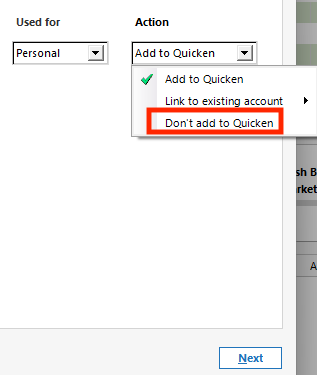
If that account is a duplicate account, then there are a couple options. Since it sounds like the duplicate account is connected/updating and the original account isn't, you can copy any historical transactions you need from the original account to the new one.
To do that, backup your Quicken file, then click the gear icon near the upper right and select Move Transactions.
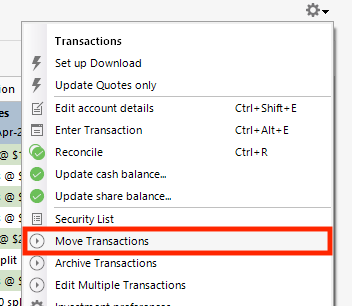
Select the transactions to move and the account to move to. Then, verify that all the history you needed is moved before deleting the original account.
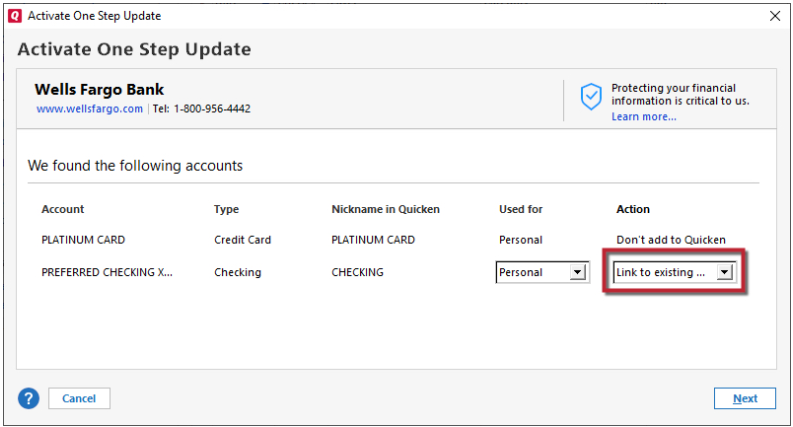
Alternatively, if you prefer to keep the original account and get rid of the newer one, backup your Quicken file, delete the newer, duplicate account, then reconnect the original account by navigating to Tools>Add Account and following the prompts, making sure to carefully link the account to the correct nickname in Quicken.
I look forward to your response!
Quicken Kristina
Make sure to sign up for the email digest to see a round up of your top posts.
0 -
I tried several attempts to download fidelity transactions. Each time a message was displayed to reauthorize the accounts. I went through that process several times. Each time I declined to add the new account. When I tried to download the transactions again, the same message to add an account. I eventually clicked to add the account. After that, I no longer saw the reauthorization message. And I ended up with two accounts for my company 401K dat.
I'm not sure what I'm going to do with the two different accounts. I want to compare the two accounts to see if any differences. Is there a process to do that in quicken?
0 -
Thank you for your reply,
If I'm understanding correctly, there was no option to link to the existing account, so it was add as new or nothing. Is that correct?
To answer your question about comparing the accounts side by side, I'm not aware of any way to view two account registers simultaneously, but what you can do is run an investment transaction report, by navigating to Reports>Investing>Investment Transactions. In the report that comes up, click the gear icon near the upper right to customize it.

Set the date range to the appropriate range for your comparison, then navigate to the Accounts tab and select the investment account you want to compare to.

Once you have the report customized, you can open the account register for the other investment account, and compare the two side by side, using the register for one and the report for the other.
I hope this helps!
Quicken Kristina
Make sure to sign up for the email digest to see a round up of your top posts.
0 -
Thanks for the response Kristina. Time for a rant.
However, I gave up on it. I just let quicken update the accounts as it does.
The larger problem with it is I can't get a valid overall financial view because the investment accounts balances are not valid. I have this happen at least once a year for the past 5-10 years with quicken. But other problems not just investments can cause the issue. Having to rebuild one or more accounts at least once a year is overwhelming.
At the beginning of 2024 I had to start over with no history other than what quicken would download when creating a new account. Usually about 3 months. I keep the other file just in case. That is 30+ years of financial data.
For the past three years, I create a new file at the beginning of the year. I'm doing that again this year and skipping the investment accounts. I plan on no longer using quicken for the investment accounts for the coming year.
After doing that I still can't depend on quicken to handle banking accounts without issues. Each year at renewal I review other options and can't find anything. I would drop quicken in a heart beat if I could find anything else. The other desktop financial software is even worse. Especially with downloading activity. Unless I can find something better, I'm stuck with quicken.
Sorry about the rant. I've been at the point where I hate quicken.0 -
[Removed - Rant/No Soliciting]
0 -
Thank you for your reply,
What specific issues are you encountering with your banking accounts? Which financial institutions are the problem accounts with?
I look forward to your reply!
Quicken Kristina
Make sure to sign up for the email digest to see a round up of your top posts.
0
