Quicken File Downloads Merrill Lynch / Bank of America

This discussion was created from comments split from:
Merrill Lynch / Bank of America transaction downloads have stopped working.
Comments
-
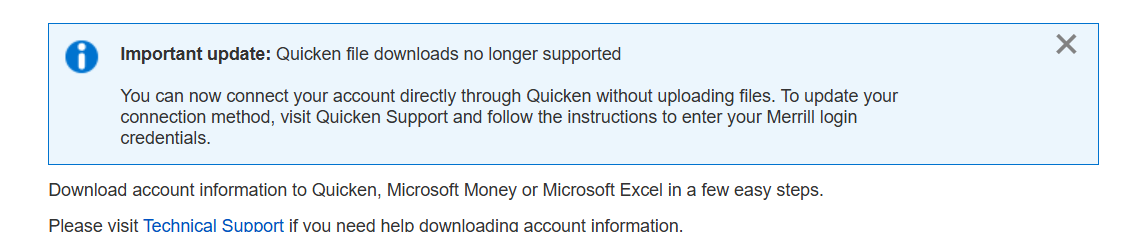
I am getting this today and need help on work arounds.
0 -
Also getting this.
0 -
Thank you both for reporting this issue.
Is this happening when you try downloading a QFX file from Bank of America? If so, this is a known change that has taken place, and we do have this Community Announcement posted about it.
If that is not the issue you are having, please provide more information so I can do my best to get to the bottom of it.
Thank you.
Quicken Alyssa
Make sure to sign up for the email digest to see a round up of your top posts.
0 -
Thanks for the reply. I updated my Quicken to the EWC+ with my Merrill Lynch accounts. It seems to work OK for now after some tweaking, but every time I open my Quicken for the OSU, it keeps asking me to log into the EWC+ with Merrill Lynch again. It's an extra step, but I don't think it should work like this. Can you help?
0 -
Hello @hsu888,
Thank you for following up.
You are correct, you should not be prompted to authorize these accounts every time you update them. Please try the following steps to resolve this issue:
- Create a backup of your Quicken file first.
- Deactivate all Merrill Lynch accounts in Quicken.
- Select the Tools menu and select Account List....
- In the Account List, select the account you want to deactivate, and then click Edit.
- In the Account Details window, click the Online Services tab.
- Click Deactivate next to the service you want to disable.

- Click Yes to the message confirming if you want to disable this service. Note: If you do not receive this message, additional information is available below.
- Click OK to the confirmation message.
- If you have an investment account that is linked to a cash account, you need to deactivate the online services from the investment account which will automatically deactivate the linked cash account.
- Important: If you are deactivating/reactivating an account to fix an issue, you'll need to deactivate all the accounts with the affected financial institution that you have activated in Quicken (including hidden ones). Once they're all deactivated, then you can follow the steps to reactivate.
- Check for any old/hidden accounts that could still be connected to Merrill Lynch. If you find any, disconnect those as well.
- Revoke Quicken’s third-party access from your Merrill Lynch account on their website.
- Reactivate the accounts in Quicken.
- Go to Tools > Add Account.

- Select the bank for the deactivated account(s). If prompted, select the connection method.
- Enter your credentials and click Connect.
- When the list of located accounts appears, choose LINK next to each account you want to reactivate.
- Click Next, then Done on the last prompt.
- Go to Tools > Add Account.
Let us know how it goes!
Quicken Alyssa
Make sure to sign up for the email digest to see a round up of your top posts.
0 -
Well, I still get this message…did exactly as instructed. Maybe I'll wait a day to retry.
 0
0 -
I tried again and OSU still brings me to reset my Merrill Lynch account. Not sure why this keeps happening but any other suggestions you may have would be greatly appreciated.
0 -
Good morning Quicken Alyssa, I did everything you and Quicken notes suggested for this particular issue and I still have to go through the reset process every time I use the OSU. Although it works accurately after I reset the account, I have to go through this extra step every time I use OSU. I hope Quicken can help resolve this with Merrill Lynch soon. I don't have this issue with Fidelity or E*Trade EWC+ access. Thank you.
0 -
Hello @hsu888,
Thanks for following up and providing all the details.
Since you’re still being prompted to reset your Merrill Lynch account each time you use One Step Update despite following the reactivation steps, we advise that you please contact Quicken Support directly for further assistance and possible escalation if needed.
Thank you!
-Quicken Anja
Make sure to sign up for the email digest to see a round up of your top posts.0


