I need to know why Quicken is corrupting my balances, and how to stop it

Answers
-
Hello @cindag,
Thank you for reporting the issues you are seeing.
I do have some follow-up questions for you, to help us narrow down what might be causing this, hopefully.
- How long has this issue been happening?
- Is there any specific action that kind of triggers this to happen?
- Like closing & opening Quicken, or running the One Step update.
- Are the affected accounts all held at one bank?
- If so, which bank?
- Where is your file located?
- Is your file being synced/backed up by any third-party services like OneDrive, Dropbox, or Norton?
Looking forward to your response.
Quicken Alyssa
Make sure to sign up for the email digest to see a round up of your top posts.
0 -
- How long has this issue been happening?
Months… sometimes it corrects itself. the last clean backup was in Aug.
- Is there any specific action that kind of triggers this to happen?
- Like closing & opening Quicken, or running the One Step update.
I don't close quicken often. Once it's up, I'm in and out to other things. I've had problems with one step and my bank(or quicken not sure which is the problem). It places qfx's dls into a new account, and i had to physically move all of them to the correct one. i've complained to the bank. unfortunately they just went through a total change of the website/app in december. they're swamped now.
- Are the affected accounts all held at one bank?
- If so, which bank?
No, it's happened in credit card accts, bank(a credit union), and especially the savings acct.
I do have one that works with one step, the rest make so many problems, it's not worth it.
- Where is your file located?
that one is under banking. in fact all of them are under the banking list.
- Is your file being synced/backed up by any third-party services like OneDrive, Dropbox, or Norton?
no. I back up to different hard drives. They were on onedrive at one time. I dont like sending out financial info into the internet. just posting what I did here gave me nightmares.
0 -
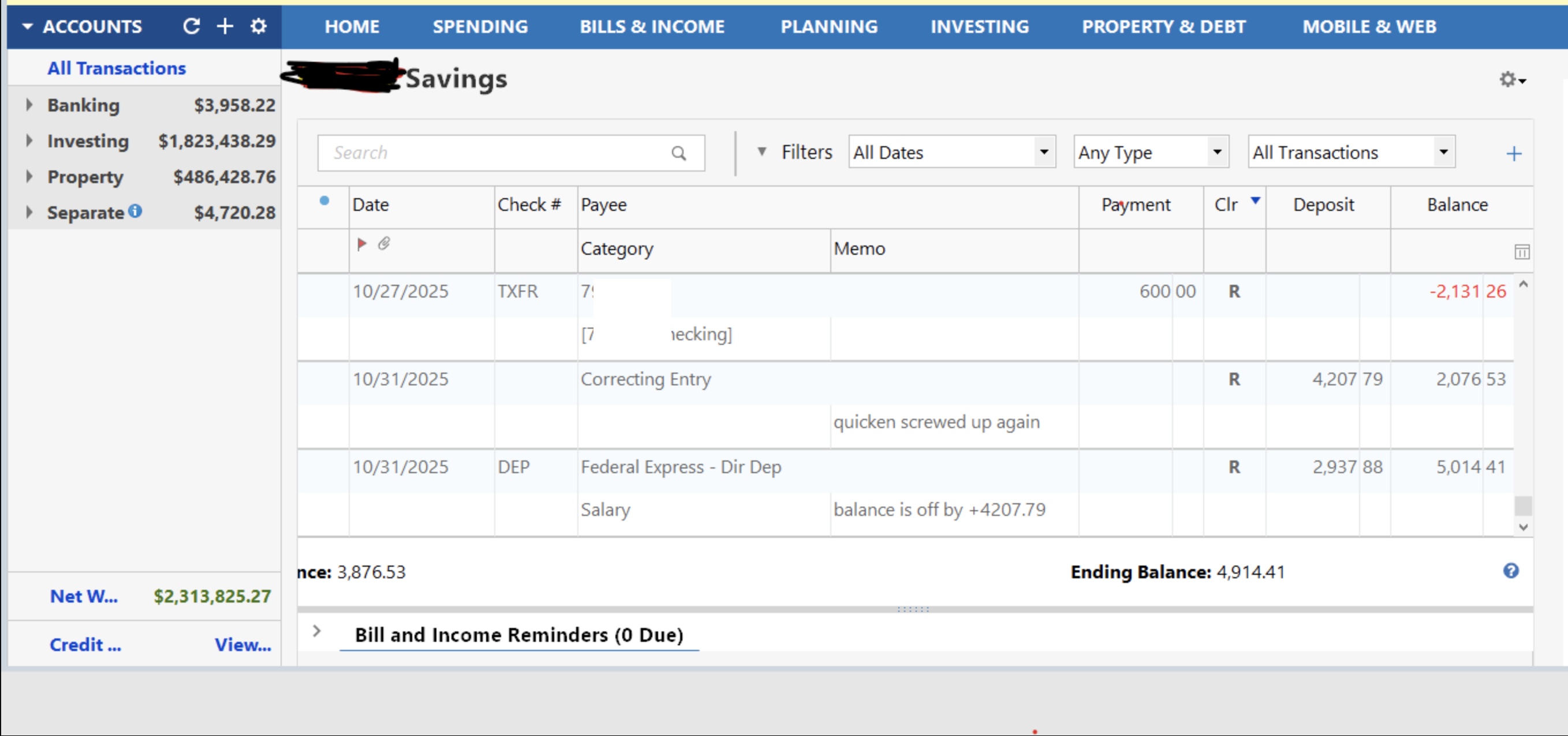
Looking at the register image you provided, I just noticed that your account register is sorted by the Clr column. That means that your Balance column is meaningless. It's a top-down addition of all transactions displayed in the register.
Only when the register is sorted by the Date column in ascending order, newest transaction by Date at the bottom of the register, and not filtered to only show a limited number of transactions, will the Running Balance be correct.
To sort the register by the Date column click on the "Date" column header. A small triangle next to the column header indicates the sort order: "▲" pointing up for ascending or "▼" pointing down for descending sort order.
0 -
Just checking in to see if correcting the sort order fixed the issue you were having.
@UKR,
Nice catch!
Thank you!
Quicken Alyssa
Make sure to sign up for the email digest to see a round up of your top posts.
0 -
Just checking in, we haven't heard back from you in a while.
Do you still need assistance?
Thank you!
Quicken Alyssa
Make sure to sign up for the email digest to see a round up of your top posts.
0 -
Hello again,
Checking in once more before this thread is closed.
Let us know if you still need assistance.
Thank you!
Quicken Alyssa
Make sure to sign up for the email digest to see a round up of your top posts.
0 -
Due to the lack of response, I went ahead and closed this post.
If you still require assistance, please feel free to start a new post.
Thank you!
Quicken Alyssa
Make sure to sign up for the email digest to see a round up of your top posts.
0

