E*Trade issue with Direct Connect

Similar to other posters from last year about this time (2024), recently, I can no longer connect to E*Trade via Direct Connect and thus cannot get transactions to download. I verified the third party sharing is enabled at E*Trade. I have not found a resolution. Today is day 4 without being able to connect.
[Edited-Readability]
Comments
-
Hello @Scott Hearan,
Thank you for sharing your experience and reporting the issues you are seeing with E*Trade.
After reviewing your connections internally, it appears that you are connecting to E*Trade via Express Web Connect. Does using this method not bring in transactions? How long have these accounts not been updating?
This would be considered missing transactions.
If this is the first time this has happened
Review this list of reasons; if the issue has only happened once, one of the scenarios below is the likely cause:
1. Has the sort order been changed in the register? Confirm that the Sort Order in your account register is by Date; just click the top of the Date column in your account register. It's likely the transactions are in your register, just not where you thought they'd be.

2. Click the Reset button at the top of the register. This will confirm that there's no filtering in your account register.
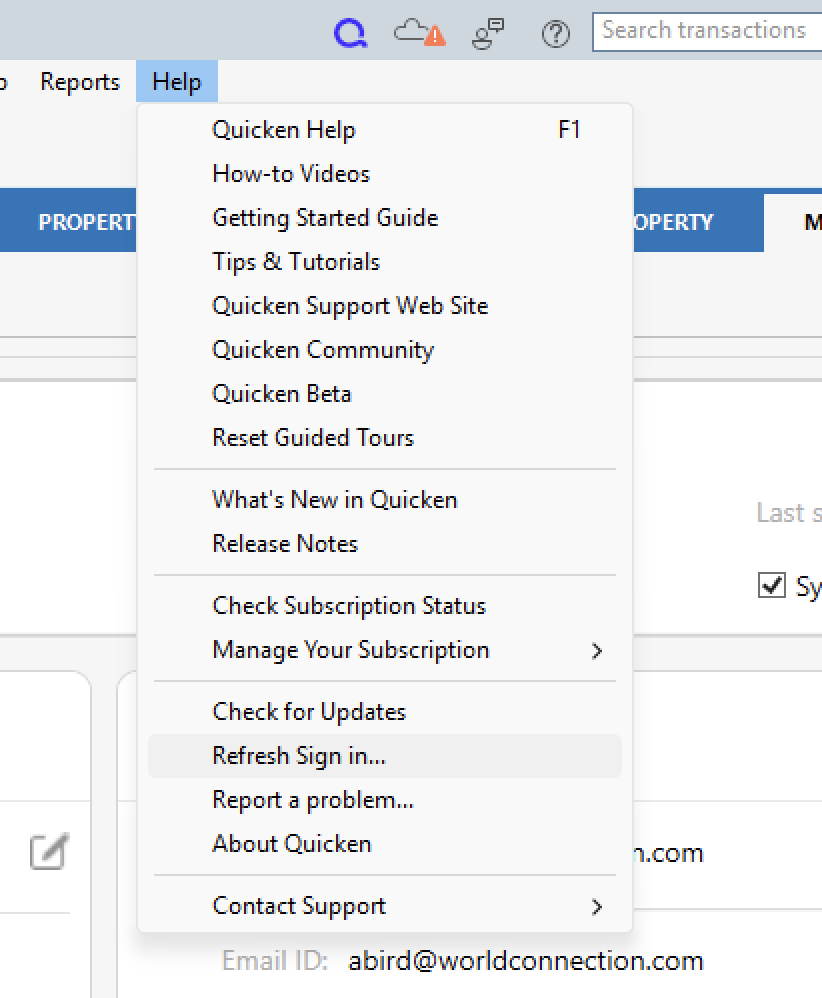
3. Try refreshing your login session: To do this, go to Help > Refresh Sign in. After completing the log-in process, trying running a One Step Update again.
4. Are these missing transactions over 90 days old? Transaction download is typically limited to the last 90 to 200 days, depending on the financial institution. If you need transaction history older than what the download contains, many banks will make this available on their website via Web Connect. To use Web Connect, you can find information here, or contact your bank.
5. Are these transactions still marked as "pending" on your bank's website? Pending transactions have been authorized by your bank, but not cleared and paid from your account yet. Most banks don't allow transactions to download until the transaction clears the bank.
6. Was the missing transaction incorrectly matched to another transaction in the register? This is common with repeating payments made to the same payee for the same amount.
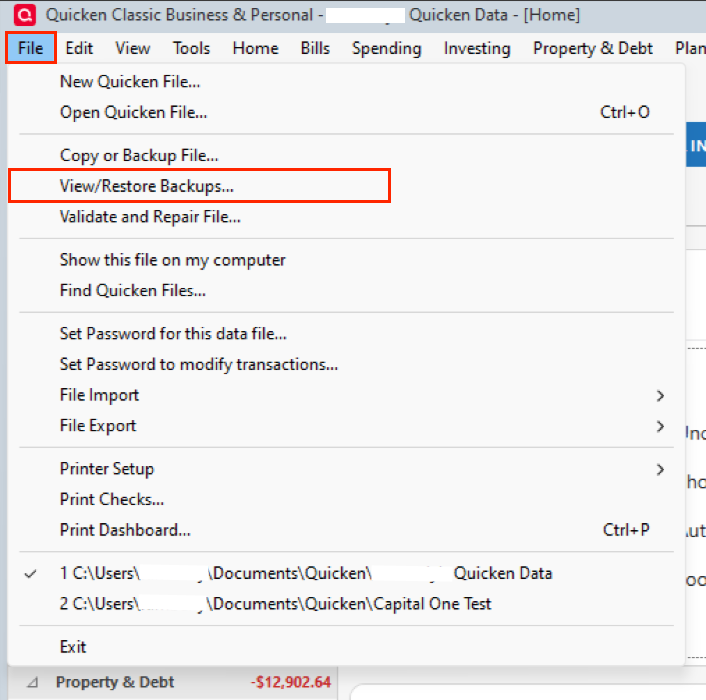
7. Have any transactions been deleted recently? Transactions won't download again after being deleted. If a transaction was deleted in error, you can re-enter it manually (if there's a large group of deleted transactions, it may also be easier to restore a backup).
8. Was the transaction moved from one account register to another? Click on All Transactions in your account bar and search for the missing transaction. If you find the transactions in an incorrect account, you can move the transactions to the correct account: just select the transaction(s), right-click, and select Move transaction(s). Select the correct account and click OK.
9. Was an older backup restored after you accepted the downloaded transaction(s)? The backup file will restore account information up to the date it was created, which may be before the missing transactions were downloaded.
If your issue is not resolved after answering these questions, please follow the rest of the steps in the linked article above.
Note: The step that walks you through Checking Downloaded Payee in the account register does not apply to investment accounts.
Let me know how it goes!
Quicken Alyssa
Make sure to sign up for the email digest to see a round up of your top posts.
0 -
This is a brokerage account. Message states that the connection method only works with simple investing. I was using Direct Connect for many years. I cannot get that to work any longer. Even when selecting that method, it still will only use Express Web Connect.
0 -
Thank you for your reply,
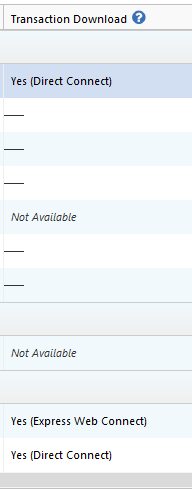
Usually, being connected via Direct Connect should allow you to use Complete investment tracking, unless the financial institution no longer supports it. Please check to make sure your account is connected using direct connect. You can do this by navigating to Tools>Account List and looking in the Transaction Download column for the problem account(s). That column will say "Yes" if the account is connected, and will show the connection method.
Thank you!
Quicken Kristina
Make sure to sign up for the email digest to see a round up of your top posts.
0 -
In the first message I stated that I can no longer get Direct Connect to work…even when forced (by selecting that on the Advanced tab). Today (Saturday), however, this is working as expected.
0 -
Thank you for the follow-up,
I'm glad to hear that it's working again!
If you need further assistance, please feel free to reach out!
Quicken Kristina
Make sure to sign up for the email digest to see a round up of your top posts.
0

