Transactions in Triplicate

Hello, I had syncing problems with my bank for about a month, which just resolved yesterday. But while the values in the accounts are correct, when it pulled in the most recent transactions it did it all in triplicate (so one time in Personal, one time in Business and one time in Savings, when the transaction only took place in one of these accounts), in addition to pulling in my kids' transactions, whose accounts I had unchecked because I do not want to include them. What is the best way to resolve this?
I did not add anything manually.
Thanks, Chris
Answers
-
I have been experiencing similar issues myself but have just dismissed them, made the needed corrections and moved on just thinking I did something wrong. I'll be more diligent observing what is going on going forward and post what I find.
1 -
Hello All,
Thank you both for sharing your experiences.
If this issue just recently happened, the easiest solution would be restoring a backup from before the issue happened.
To do this:
- Choose File menu > Backup and Restore > Restore from Backup File. The Restore from Backup File screen will appear.
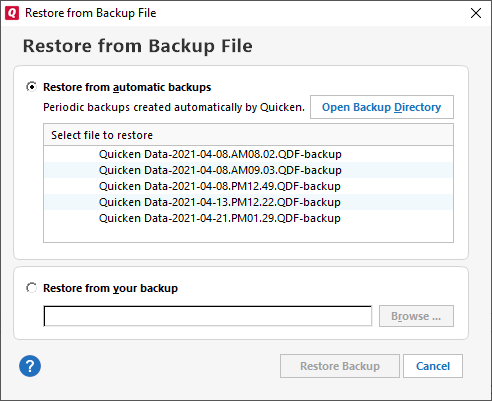
- If you want to restore a backup file that Quicken created automatically for you, choose Restore from automatic backups, and then select one of the backup files listed.
- If you want to restore a backup file that you created yourself, choose Restore from your backup, and then click Browse to locate your backup.
- Select Restore Backup. This will overwrite your current file.
Once you have restored the backup, check to make sure your accounts are connected/linked properly. You will want to make sure that each one is displaying the correct account number. You can do this by checking the Account Settings for each account.
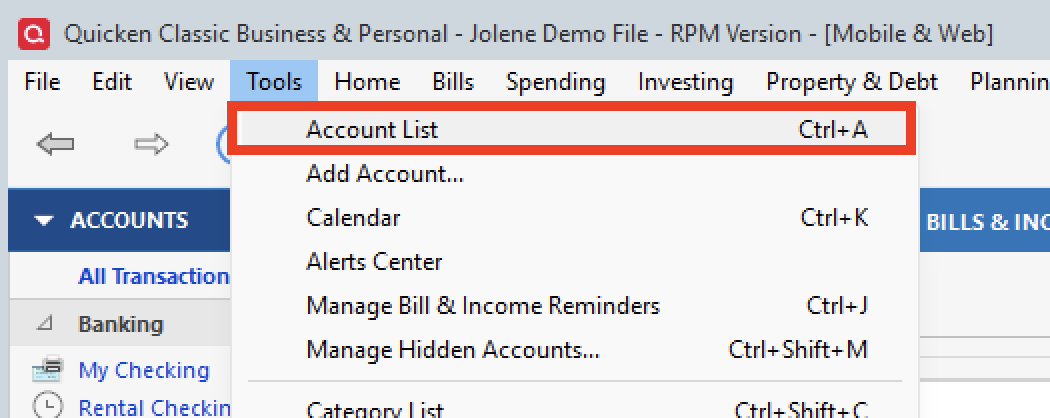
- Go to Tools.
- Select Account List.
- Click Edit on one of the affected accounts.
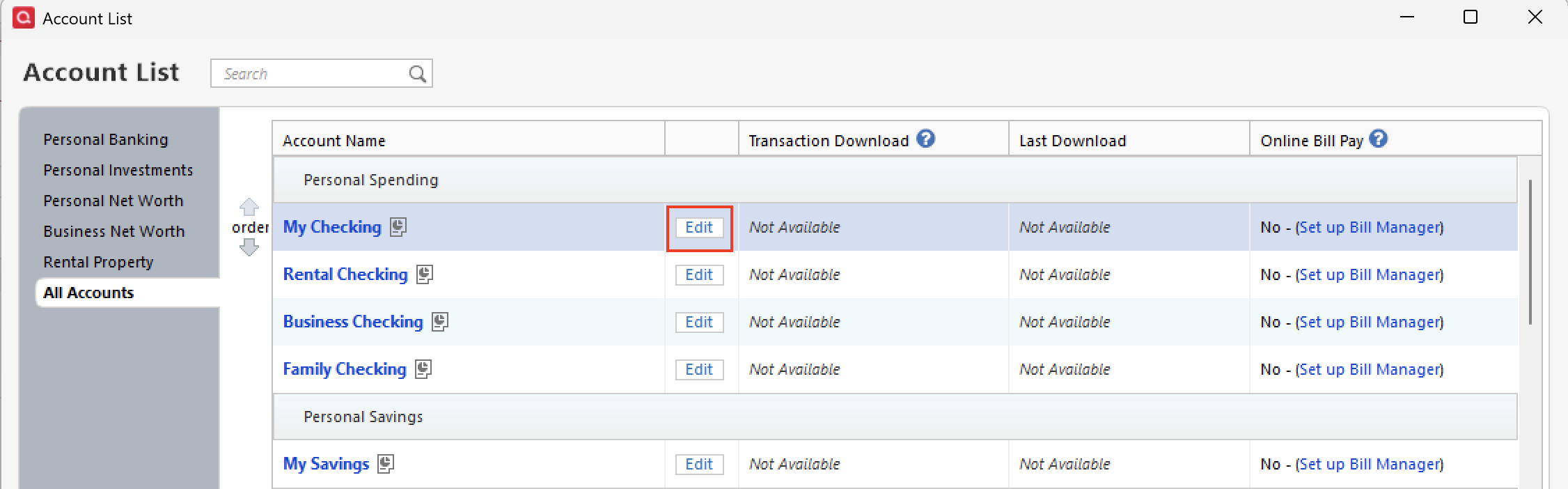
- Under the General tab, you can see the account numbers.
If any of these accounts are displaying incorrect information, you will want to disconnect/reconnect them. When you have multiple accounts with one bank, it's best to disconnect them all and then reconnect them all together. Let me know how it goes.
Let us know what you find!
Thank you both!
Quicken Alyssa
Make sure to sign up for the email digest to see a round up of your top posts.
0 - Choose File menu > Backup and Restore > Restore from Backup File. The Restore from Backup File screen will appear.
-
My bank stopped syncing the very next day and I'm now getting the Care code: FDP-101 error, so I can't do too much until it reconnects. It has been over a month with no bank connection now. [Removed]
Thanks,
Chris
0 -
Thank you for your reply @christofino,
Since the issue has been going on for longer than 24 hours, per our article on FDP-101/CC-601 errors, I recommend that you contact Quicken Support directly for further assistance. The Quicken Support phone number can be found through this link here. Phone support is available from 5:00 am PT to 5:00 pm PT, Monday through Friday.
I apologize that I could not be of more assistance!
Quicken Kristina
Make sure to sign up for the email digest to see a round up of your top posts.
0