Fidelity Investments has made changes to the way it shares money market/cash transactional informati

Quicken for Windows
R65.17
Fidelity Investments has made changes to the way it shares money market/cash transactional information with Quicken users on Mac and Windows.
Quicken Windows users:
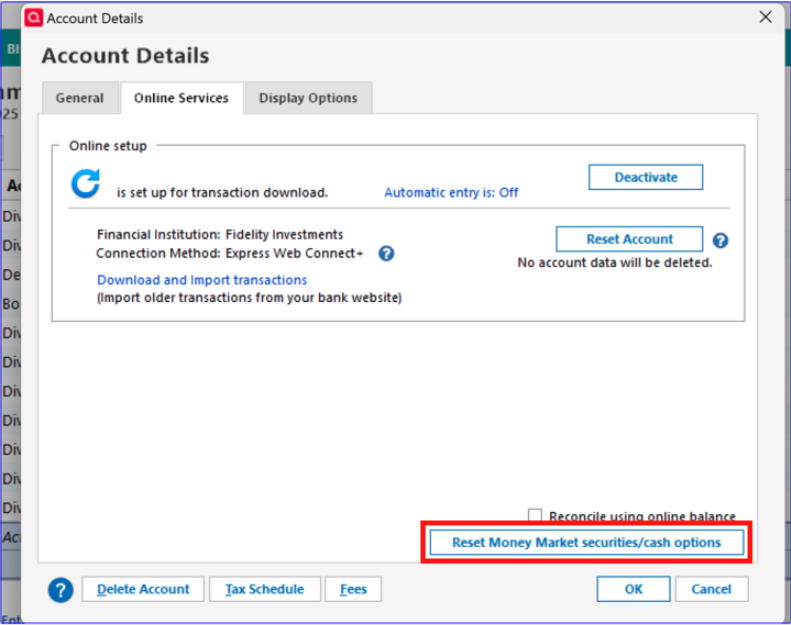
Quicken Windows users may need to change the Money Market representation if they are not prompted. You can do this by clicking the Cash link in the account or in the Account Details>Online Services Tab, the “Reset Money market securities/cash options to trigger the choice of cash or security again. The cash balance will still be the same that Fidelity reported for the one or more money market securities they have.
Note: “Cash Representation” option is only available after switching to Express Web Connect+. Users still on Direct Connect with Fidelity may not see this option.
If I understand this post correctly I have the option to change the Money Market representation from the Cash link or as the balance in the Fidelity SPAXX money market security. Is this correct? I do not have the option available. I am using EWC+. My preference is to show the amount in the security.
Also I have been getting the CC 800 error code for over a week now. Is there a fix available?
[Edited - Readability]
Comments
-
Hello @FEC,
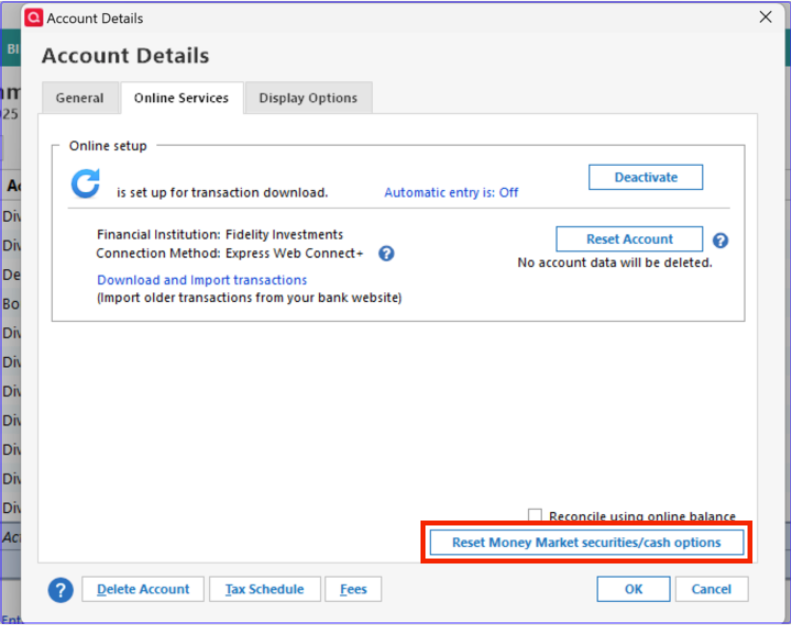
Thank you for reaching out. Yes, in R65.17, you should have the option to reset your cash representation. If you're not seeing the link, then please try going to Tools>Account List, click the Edit button next to the problem account, and click on the Online Services tab. You should see a Reset Money Market securities/cash options button.
CC-800 errors can be triggered by a few different things. The most common cause is if you recently restored a backup, that newly restored file may have CC-800 errors. The errors can sometimes also be triggered by having the same accounts connected in multiple Quicken files, especially if the accounts are connected using Express Web Connect+.
To troubleshoot a CC-800 error, please backup your Quicken file, then follow these steps from our article on CC-800 errors:
First, you'll need to deactivate the affected accounts:
- Select Tools > Account List
- If present, select the Show Hidden Accounts checkbox at the bottom of the Account List
- Select Edit on each account with this error and Deactivate them on the Online Services tab
- When finished, close the Account List.
Second, reactivate the accounts:
- Select Tools > Add Account
- Complete the flow of re-adding the deactivated accounts to Quicken, using your bank login credentials and answering any security questions.
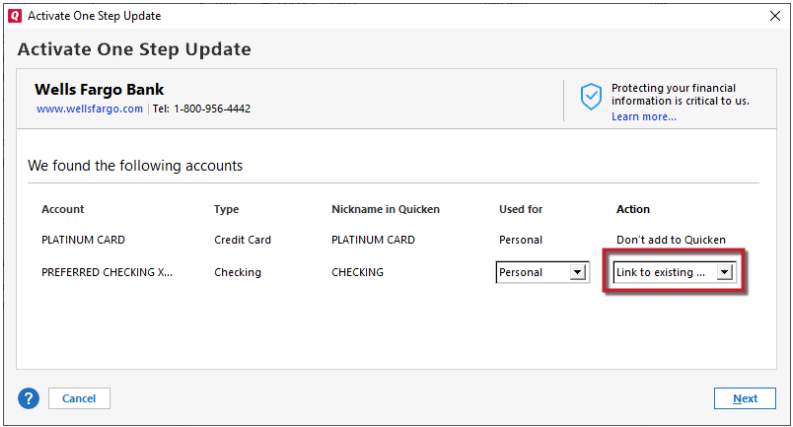
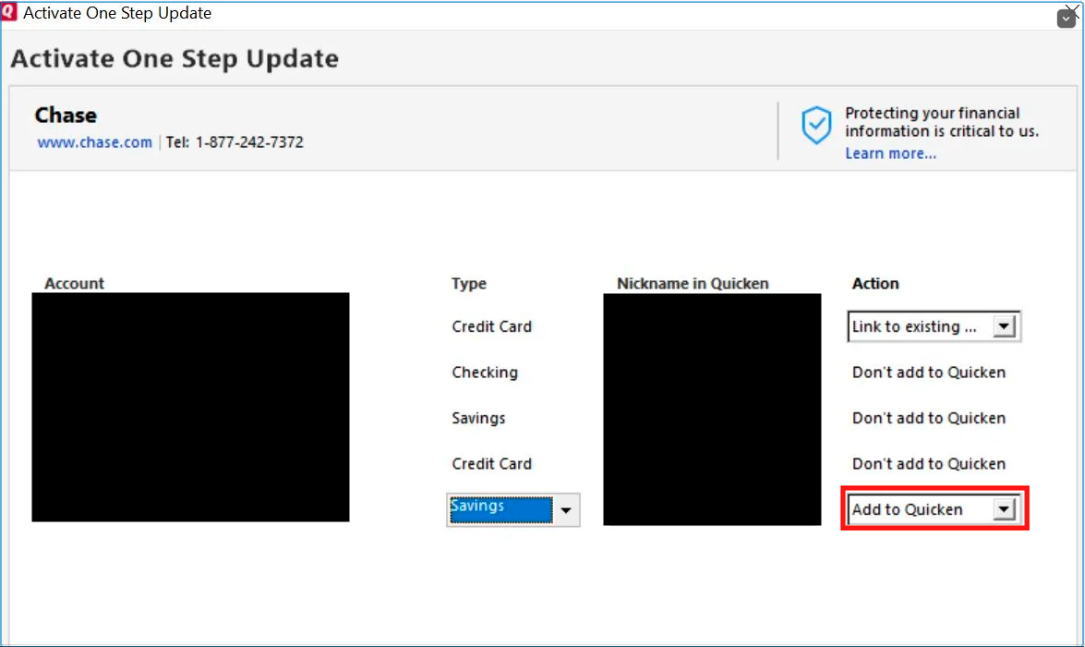
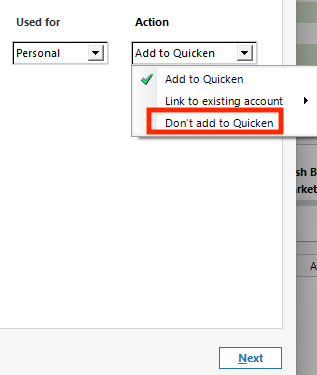
- When you reach the screen listing the accounts discovered at the financial institution, use the Action drop-downs to re-link your accounts:
- For accounts you want to re-link, select Link to existing account and choose the corresponding account to re-link with.
- Select Add to Quicken for new accounts you didn't previously track in Quicken.
- For accounts you don't want to link or add, select Don't add to Quicken.
- For accounts you want to re-link, select Link to existing account and choose the corresponding account to re-link with.
Please let me know how it goes!
Quicken Kristina
Make sure to sign up for the email digest to see a round up of your top posts.
1 -
Windows 11/ V R65.29
Thanks for the response. Just updated to V65.29 thinking that might fix the issue but not so.
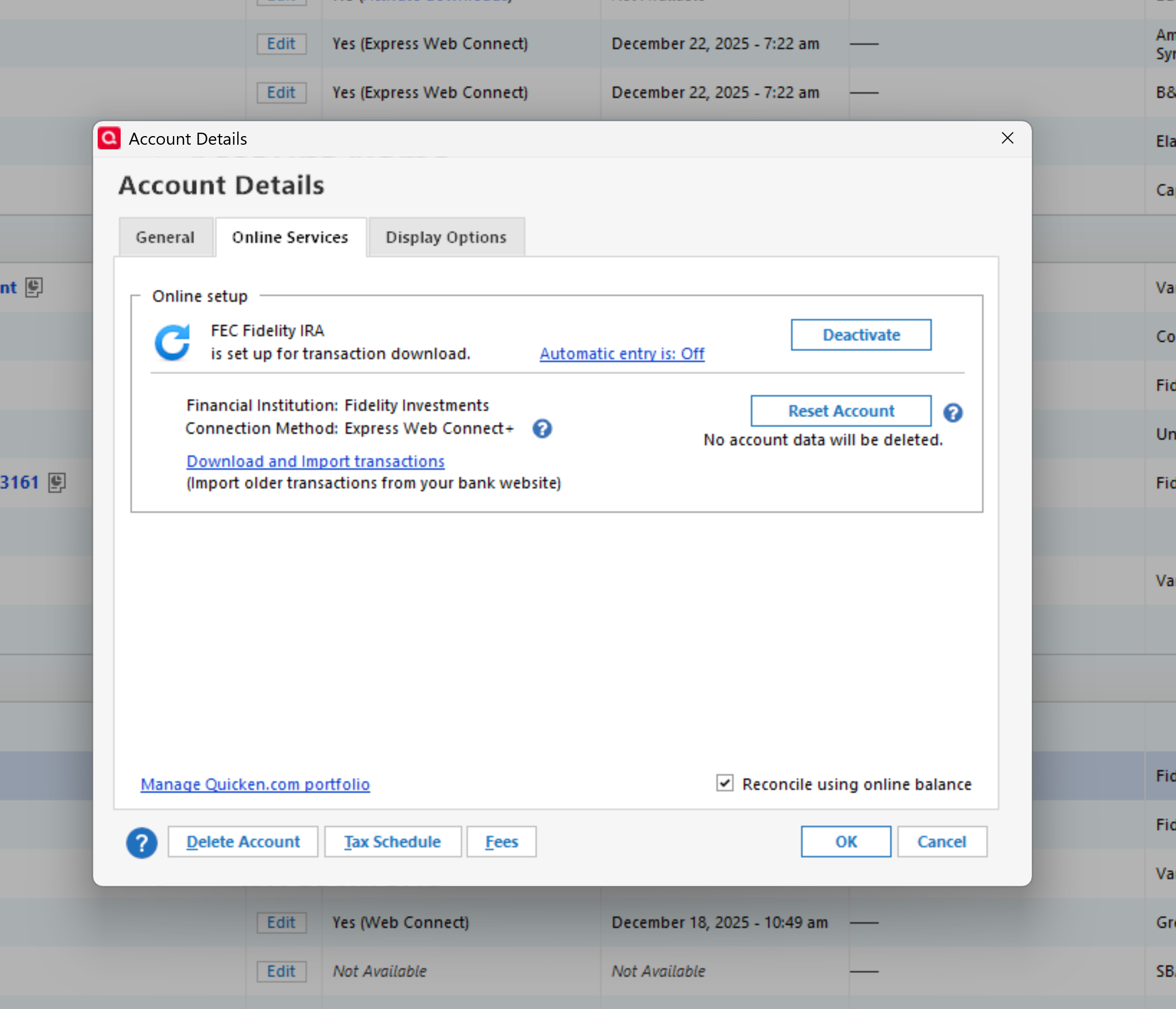
Reset Money Market securities/cash options still not available.
 0
0 -
Thank you for your reply,
Since it is still not giving you the option, to check for possible program issues causing this, please try manually reinstalling the most recent update patch. For instructions on how to do that, please use this article:
If the issue persists after you have manually reinstalled the patch, please try uninstalling and reinstalling Quicken.
I hope this helps!
Quicken Kristina
Make sure to sign up for the email digest to see a round up of your top posts.
0 -
Sorry for the late reply but after uninstalling and re-installing Quicken Deluxe Classic I still have no
"Cash Representation” option available. Any other suggestions?
0 -
Thank you for your reply,
That issue should have been fixed in R65.29. If you are still seeing the issue, I recommend that you contact Quicken Support directly for further assistance, as they have access to tools we can't access on the Community and they're able to escalate the issue as needed. The Quicken Support phone number can be found through this link here. Phone support is available from 5:00 am PT to 5:00 pm PT, Monday through Friday.
I apologize that I could not be of more assistance!
Quicken Kristina
Make sure to sign up for the email digest to see a round up of your top posts.
0 -
Thank you for your support!
0 -
Just spoke with support. Told that option is no longer available.
0 -
Thank you for your reply,
Since the option does still exist, I reviewed your contact with Support to get more context. It appears that the option is available for brokerage type accounts, and the account you're encountering this issue in is an IRA. From what I can see, Support recommended that you reach out to Fidelity for further assistance. Was Fidelity able to help?
Thank you!
Quicken Kristina
Make sure to sign up for the email digest to see a round up of your top posts.
0 -
I did. Fidelity says it should work however there are ongoing known connectivity issues between Quicken and Fidelity. According to Fidelity support all Fidelity accounts are brokerage accounts except crypto accounts and MMA funds should show as securities not cash.
0 -
Thank you for your reply,
Please navigate to Tools>Account List and click the Edit button next to the problem account. On the General tab, near the upper left, it should tell you what account type Quicken sees.
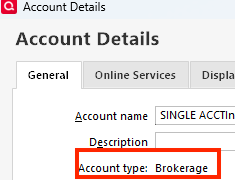
Does the problem account show as a brokerage, or a different account type?
Thank you!
Quicken Kristina
Make sure to sign up for the email digest to see a round up of your top posts.
0 -
Yes the accounts show brokerage. The "Cash Representation” option is not shown.
Thank you for your support.
0 -
The option to switch to cash is not available in any of my Fidelity brokerage accounts either
0 -
Thank you for your reply @proflaw,
If you haven't already, please try manually installing the latest patch. You can use this article to download the patch and for instructions on installing it:
@FEC,
Your earlier screenshot showed one of the problem accounts has IRA in the name. Does that account show as a brokerage on the General tab, or does it show as an IRA?
Thank you!
Quicken Kristina
Make sure to sign up for the email digest to see a round up of your top posts.
0 -
That worked. It was weird because Quicken said it was up to date.
1 -
Thank you for your reply,
I'm glad to hear that updating your Quicken corrected the issue.
New updates are typically released over a few days rather than pushed to everyone at once. That's why your Quicken told you it was up to date, even though a new release is available.
Thank you!
Quicken Kristina
Make sure to sign up for the email digest to see a round up of your top posts.
0 -
Still unavailable after the update.
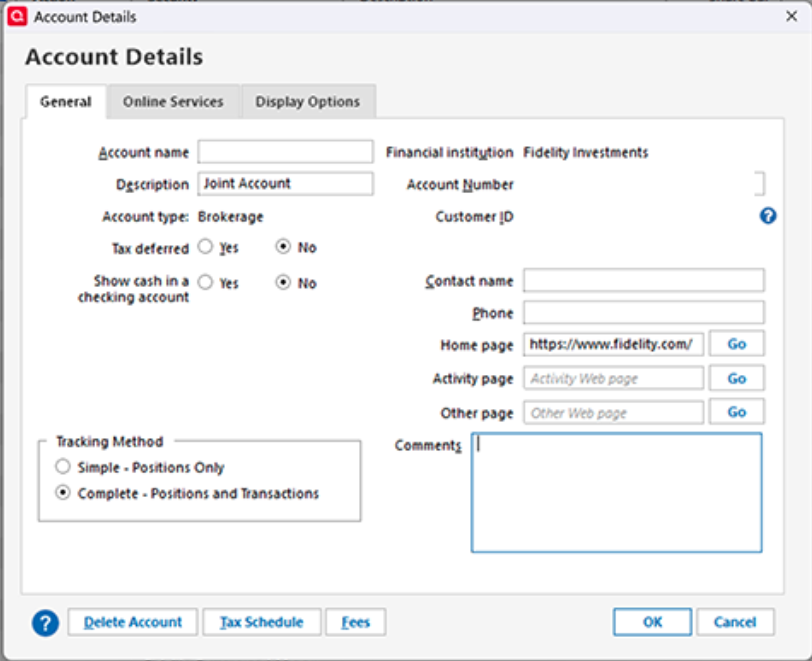
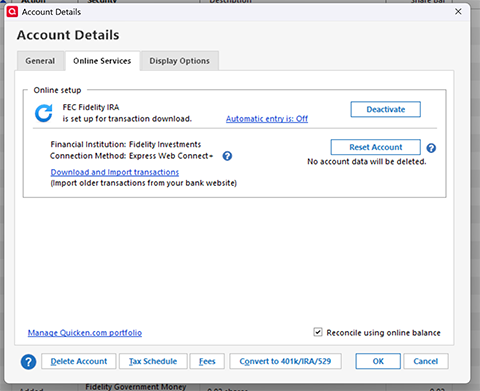
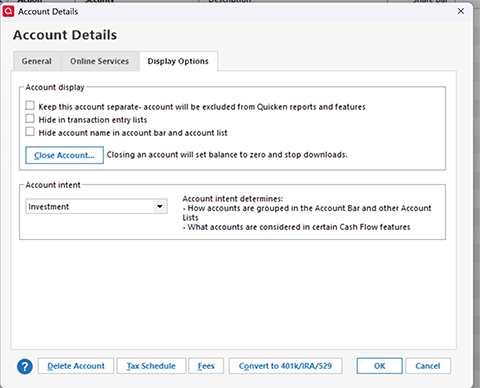
[Edit - Removed Account Number]
0 -
Thank you for your reply,
I can see you reached out to Support also. During your call with Support, they recommended deactivating and reconnecting the problem account. Did that help at all?
If it did not, the next thing I recommend, just in case the issue is file-specific, is backup your file, deactivate the problem account, navigate to Tools>Add Account, follow the prompts, then add the account as new instead of linking to the existing account.
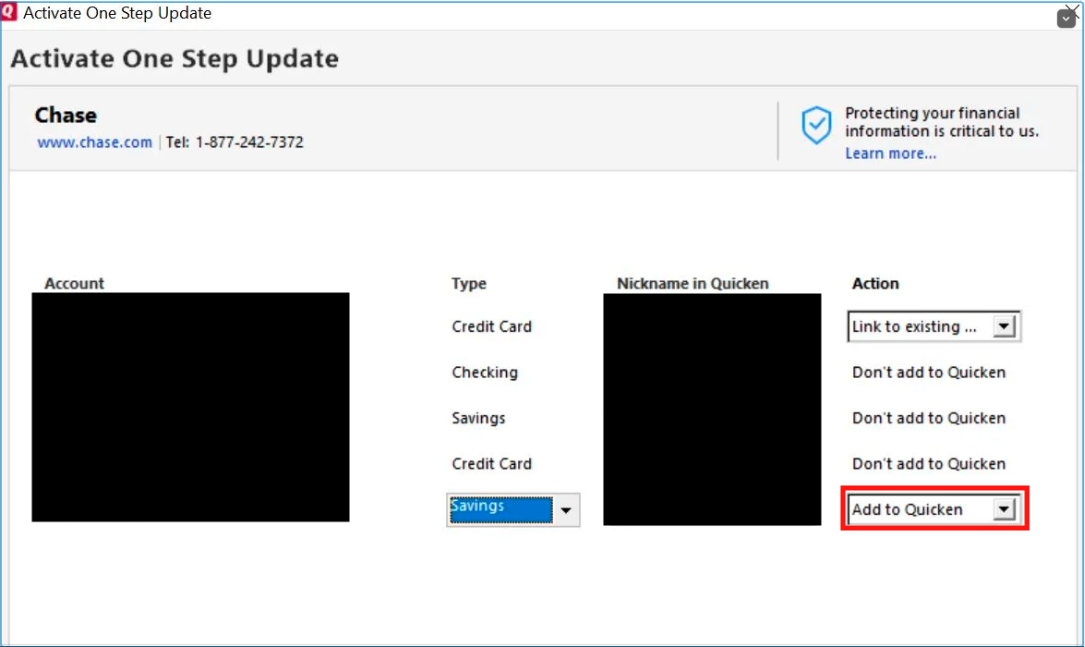
Once the account is added as new, navigate to Tools>Account List, click the Edit button next to the newly added account, select the Online Service tab, and check to see if the Reset Money Market securities/cash options button is present.
Thank you!
Quicken Kristina
Make sure to sign up for the email digest to see a round up of your top posts.
0 -
Hello @FEC,
We haven't heard back from you in a while. Do you still need assistance?
Check back and let us know! Thank you.
Quicken Kristina
Make sure to sign up for the email digest to see a round up of your top posts.
0 -
Hello again,
Checking in once more before this thread is closed.
Let us know if you still need assistance.Thank you!
Quicken Kristina
Make sure to sign up for the email digest to see a round up of your top posts.
0
