Why is one-step update now changing dates of matched transactions in registers?

I am running Quicken Classic for Windows, Version R65.17 on a Windows 11 PC. I do not use Quicken Mobile or Web and I do not sync.
I've noticed that when I run one-step update, get a match to an existing transaction and then accept the transaction, the date in the register now changes to the posted date by the bank or credit card company. I confirmed this by adding Downloaded Posting Date to my checking account register and then accepting downloaded transaction through one step update. See attached file.
This is a problem for several reasons.
- At the end of each year, I write a lot of checks to charities and some medical-related checks. Sometimes those checks don't clear until after the New Year. This year, this will result in incorrect yearly reports I generate to support preparing my income tax return as well as incorrect data imported into TurboTax for itemized deductions.
- I sort my register "By Date/Order Entered". Accepting downloaded screws up the register with no way to correct it.
- If I’m interested in when my bank or credit card company processes the transaction, I can always get to it by displaying the Downloaded Posting Date. Why have two fields have exactly the same data after the transaction is cleared?
I know this was not the normal Quicken behavior last year. I changed the registers for one checking account and two credit card accounts to add the Downloaded Posting Date and looked at past history of transactions. It appears that this behavior started in June or July 2025, when I noticed the transaction dates I entered in the register were not the same as the Downloaded Posting Date in those accounts.
The only way I’ve found to fix this is to manually change the entry status to cleared and then manually delete the transaction from the downloaded transaction list. I did try to install an earlier version of Quicken, but it did not solve the problem.
Is there a way to prevent Quicken from changing the transaction dates in the register when accepting downloaded transactions?
Best Answers
-
Look in the preferences. There is a new one that allows one to have Quicken change the matched transactions to the downloaded posting date or not.
1 -
I have seen this behavior starting about the same time as you did, as well. I reported it and asked if anyone has seen it happen in their file but did not get back any confirmations from anyone. I haven't seen it happen very often anymore but it still sometimes does. When it does happen I just correct the transaction date to show what it should be.
The other thing I've seen is that sometimes the downloaded posting data is really not the posting date but is the transaction date. So, something does not seem to be working correctly.
First, you might want to do as @Chris_QPW suggested and check Edit > Preferences > Downloaded transactions > make sure the box for Use the date from your Financial Institution for matched transactions is not checked.
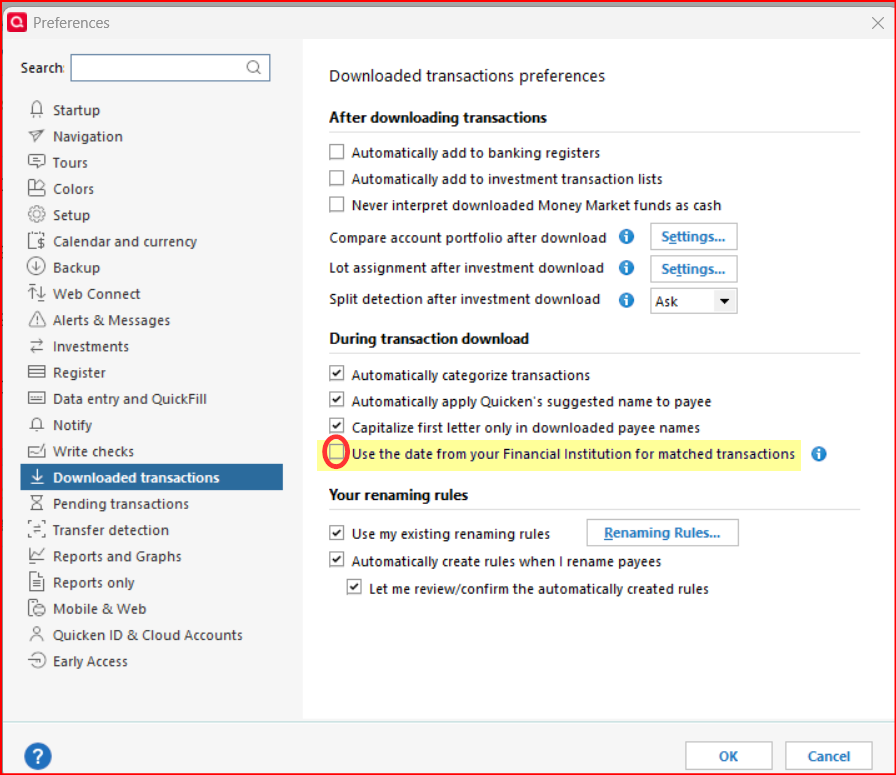
Then if the box is already unchecked I suggest that you report this issue as a bug to Quicken via Help > Report a Problem.
Quicken Classic Premier (US) Subscription: R66.23 on Windows 11 Home
1


Answers
-
Look in the preferences. There is a new one that allows one to have Quicken change the matched transactions to the downloaded posting date or not.
1 -
I have seen this behavior starting about the same time as you did, as well. I reported it and asked if anyone has seen it happen in their file but did not get back any confirmations from anyone. I haven't seen it happen very often anymore but it still sometimes does. When it does happen I just correct the transaction date to show what it should be.
The other thing I've seen is that sometimes the downloaded posting data is really not the posting date but is the transaction date. So, something does not seem to be working correctly.
First, you might want to do as @Chris_QPW suggested and check Edit > Preferences > Downloaded transactions > make sure the box for Use the date from your Financial Institution for matched transactions is not checked.
Then if the box is already unchecked I suggest that you report this issue as a bug to Quicken via Help > Report a Problem.
Quicken Classic Premier (US) Subscription: R66.23 on Windows 11 Home
1 -
If it does it with this option deselected, then I would say it is a bug introduced when they added this option.
0 -
I agree and that is how I described it when I had previously reported it to Quicken.
Quicken Classic Premier (US) Subscription: R66.23 on Windows 11 Home
0
Categories
- All Categories
- 6 Product Ideas
- 34 Announcements
- 249 Alerts, Online Banking & Known Product Issues
- 19 Product Alerts
- 266 Welcome to the Community!
- 301 Before you Buy
- 1.5K Product Ideas
- 55.8K Quicken Classic for Windows
- 16.9K Quicken Classic for Mac
- 1K Quicken Mobile
- 834 Quicken on the Web
- 129 Quicken LifeHub