Future bill payer transactions now being added to the Quicken register

I'm using the Windows 11. Quicken R65.29, Build 27.1.65.29.
Starting on 12/22/2025 when I performed the one step update Quicken downloaded several future transactions that I had set up in my bank billpayer. I've set up future bills for years and never had it do this before. Quicken customer service says this is happening due to my bank sending this information to Quicken. I've used this bank for a few months and this is the first time it's done this.
If this is a feature that can be turned off, I sure would turn it off (I did turn off pending transactions, but it didn't make a difference). The worse problem is that if you've made a transfer in Quicken from let's say your checking to a CC account to pay a future bill and you've set this up in your banks bill payer, it duplicates it and when you delete it, it also deletes the transfer amount in the account you've transferred into. I ended up taking an extra step and adding to, in this case a CC account a separate entry showing the future payment.
Something changed with yesterdays update, yes there was an update yesterday morning that causes this to now happen. I don't like it and it's a pain to manage. You should be able to prevent future bill pay set ups from your bank from down loading into Quicken!
Comments
-
Hello @John2081,
Thank you for letting us know you're seeing this issue. To help troubleshoot, please provide more information. Which financial institution is the account with these unwanted future bill pay transactions with? Are these transactions scheduled via bank bill pay? If they are, is the account in your Quicken connected using Direct Connect? You can check how an account is connected by navigating to Tools>Account List and looking at the Transaction Download column next to the problem account.
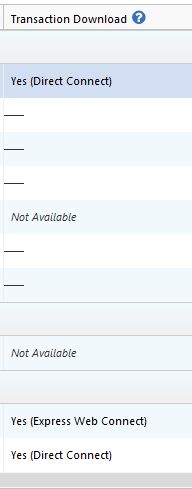
I look forward to your response!
Quicken Kristina
Make sure to sign up for the email digest to see a round up of your top posts.
0 -
The bank is CBI Bank and Trust, using a bill payer through the bank and it is Direct Connect.
Funny thing happened tonight when I ran a one step update. I received several downloaded transactions that were all of the bill payer transactions and all of them started off with a cancel at the front. Quicken wouldn't allow me to delete them, so I accepted them all. Quicken then voided all of these future bill payer transactions. I then went back and removed the voided portion of from the Payee line, added the correct amount back to the payment line and saved them all. I then completed a one step update for CBI and the same transactions downloaded again. I accepted all of them and other than where I had selected Debit which it changed to Sent all my account information stayed the same. I then did another one step and several transactions that had been pending downloaded for me to accept. Long story short, other than in the check # box it saying Sent rather than Debit, it may actually be working okay. Two previous bill payer transactions that went from pending to reconciled have the Sent along with a lighting bolt in the Check # box. I'm assuming that when the transaction is actually sent, that the lighting bolt shows up, but that's a guess.
Thanks for the response, John
0 -
I responded last night saying that I thought Quicken had straighten itself out, but I was wrong. This morning, I completed a one step update and the entries that I have set up in my banks bill payer system had transactions downloaded once again that show a status of Canceled! I tried just deleting them and Quicken will not let me do that. To clear the red flag, I had to accept them all and Quicken removed all of these bill pay transactions from my register! So, I performed another one step update to see what would happen between my bank and Quicken. It downloaded all five of these bill payer transactions with a status of Pmt Changed. The only one of these that I actually changed in the last 24 hours was the one to a credit card that I've routinely changed over the years as I make new charges to it. I clicked on accept all of these downloaded transactions. It accepted them, setting my balance back to were it was prior to the canceled status of downloaded transactions. But, it placed a c in the Clr box by each transaction and did not automatically reconcile this account like it normally does after I've accepted downloaded transactions. So, I completed another one step update to see what would happen. It completed it's one step update and left everything as is, the five entries I made at my banks bill payer are still there and have a c in the Clr box. Just so you know, I do have all of these transactions set up under the Bills & Income tab and I enter them there and enter them prior to being due or paid by the bank bill payer service. I've done this for years with my old institution, a credit union that I no longer use and have done it with this Bank since I switched to them a few months ago without this happening until this week. I wonder what will happen when I have a new transaction that clears my bank and I complete a one step update, and it reconciles the account, like normal. I have two transactions that are set to be paid on 12/26, one is a bill payer transaction and the other is an EFT. Maybe by late on the 26th or on the 27th, we'll see what happens.
Regards, John
0 -
Thank you for your replies,
I recommend that you contact Quicken Support directly for further assistance, since they will likely need to review the logs to help narrow down if this is happening due to a file issue or due to the way the data is being sent to Quicken. They are also able to escalate the issue if needed. The Quicken Support phone number can be found through this link here. Phone support is available from 5:00 am PT to 5:00 pm PT, Monday through Friday.
Considering all these cancelled and changed transactions you mentioned, I also recommend that you check on the financial institution website directly to ensure that any scheduled payments are still showing in the correct status and for the correct amount.
I apologize that I could not be of more assistance!
Quicken Kristina
Make sure to sign up for the email digest to see a round up of your top posts.
0
