How stable is version R65.29

I've been burned by terrible releases so many times in the past that I don't update until I have a really good reason to. I'm still on 64.30 which resolved most of the Fidelity download issues. It's working well except for it drawing little tool tip windows on the wrong monitor (small screen elements outside Quicken's window). There are some interesting new features in the release notes but not sure if they're worth taking the risk.
I looked through posts tagged with "Known Issue", nothing major in the subject lines. How stable has version 65.29 been for you? Thanks!
Comments
-
With the qualifications that I am not a Fidelity customer and don't use "mobile & web" and bill manager, I have not had any problems with R65.29. In fact I am fortunate that new software releases so far have not caused me problems, probably because I generally don't use new features and fixes are to things that don't affect me.
2 -
I updated to R65.29 on 12/23 because it was supposed to fix at least one of the Fidelity issues regarding cash representation of Core Position MMFs…and it did fix it for me. So far it has been very stable with the only issue that I've observed being the ongoing issue (for several version updates, now) where some Tax Planner settings and numbers are changed and need to be reviewed/corrected. That's a nuisance, however, it is not hard to do but it does take a little time to review every Tax Planner section to make sure the settings and numbers are all correct. Once the review and any needed corrections are done they seem to be stable and not return…until perhaps the next version update.
But since you are still running R64.30 then you are also missing out on some other Fidelity and some other important Tax Planner improvements that were included in R65.15 and R65.17. And, BTW, I experienced no issues with either of these versions, as well….except, for that Tax Planner settings/numbers issue mentioned in my previous paragraph.
Since you are a Fidelity customer, IMO, I think you should seriously consider updating to R65.29. Back up your data file first. If you are not happy with the results I can walk you through how to revert to R64.30 if that is what you wish.
Quicken Classic Premier (US) Subscription: R66.23 on Windows 11 Home
3 -
BTW, in case you have not seen the Alert update regarding Fidelity, the latest update is an outstanding update on the documented Fidelity EWC+ issues and resolution status of them:
Quicken Classic Premier (US) Subscription: R66.23 on Windows 11 Home
0 -
Great info, thanks! I don't use the mobile or web either, that sync has been disabled for years because it was so bad, and every time I check the reviews of the Apple & Android apps, they're both unbelievably bad.
0 -
Excellent info, I appreciate it. I have daily file backups & I'm comfortable rolling back to previous versions, so I'll attempt the update later today.
0 -
It would be great if you would post your update observations here. I'm really interested in finding out if my experience is an anomaly or if others experience the same.
Quicken Classic Premier (US) Subscription: R66.23 on Windows 11 Home
0 -
Unfortunately, some of the items listed as fixed are not. In particular, core position FDRXX stills shows as $0.00 downloaded from Fidelity in tne investment account list, but shows the correct amount in the Online Center balances and core position tabs.
Deluxe R66.23, Windows 11 Pro
0 -
Yeah, I've been seeing a few posts about how some R65.29 announced fixes were not fixed for them. That is a not uncommon occurrence with new version updates. Often but not always the issues do resolves after a few days but not all the time. But I am encouraged that I have not seen anyone posting about new issues having been introduced with R65.29.
My remaining Core Position FDRXX $0.00 issues (with 2 accounts) prior to R65.29 were resolved after updating to R65.29. But simply updating to that version did not do it for me.
There was a Moderator post that came out on 12/22, the day before the R65.29 release announcement was made (for some reason I can't find it now), announcing that R65.29 was supposed to fix this issue. It also advised that if after updating to it the issue was not resolved we should go to the Online Services tab of Account Details, click on the Set/Edit button for the MMF cash representation, click on the Customize button, select the MMF (FDRXX) and then accept it.
After doing that the Fidelity reported Cash Balance below the Account Register was immediately corrected to show the correct amount and it has been correctly updated the last few days.
Maybe you could try doing that to see if it resolves the issue for you?
Quicken Classic Premier (US) Subscription: R66.23 on Windows 11 Home
0 -
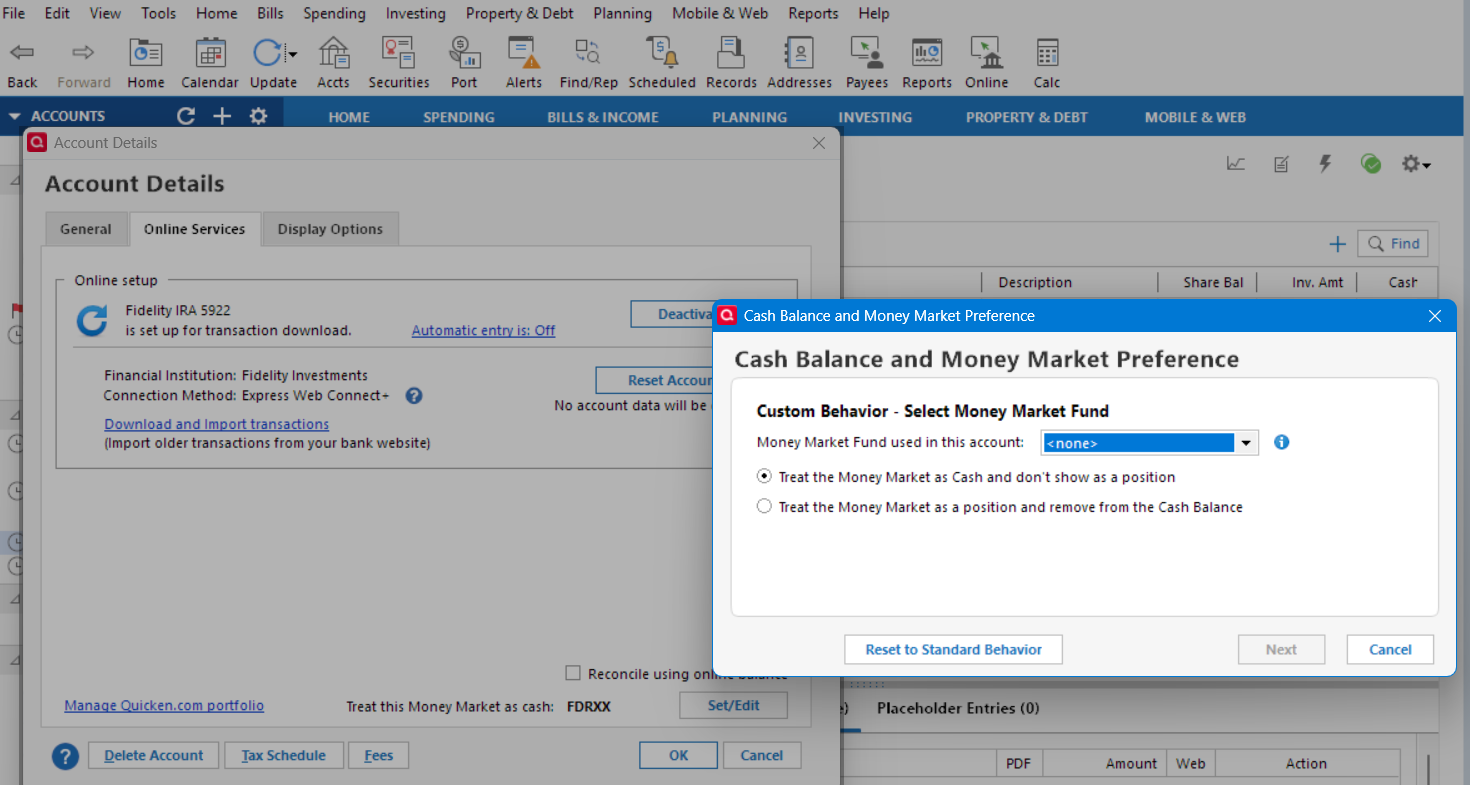
I had set/edit the core position to FDRXX in R65.17 and FDRXX was offered as a selection option. Now <none> is offered after updating to R65.30. Strange.
Deluxe R66.23, Windows 11 Pro
0 -
Okay, it was procedure misstep on my part. I had to Reset to Standard Behavior, perform an Update and then I could Set/Edit the Cash Balance amount and now it shows the value in Fidelity. Thanks.
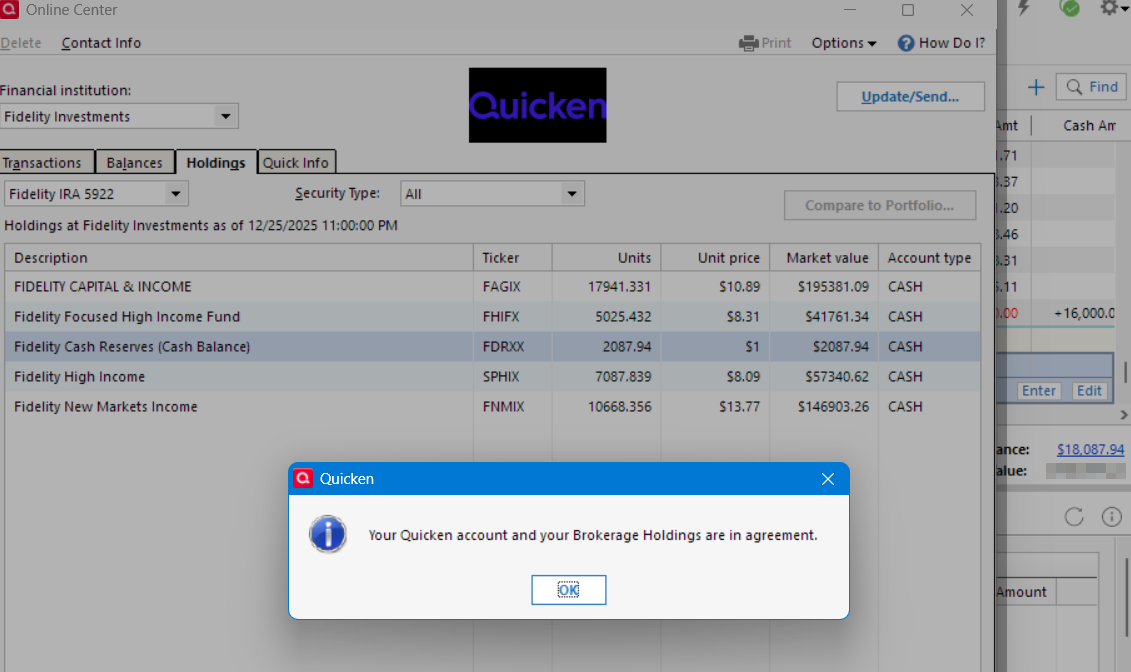
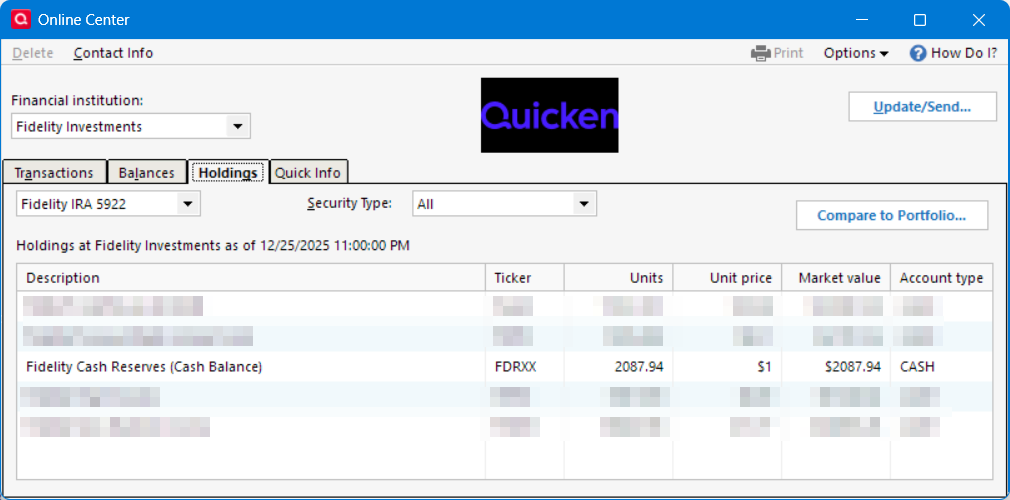
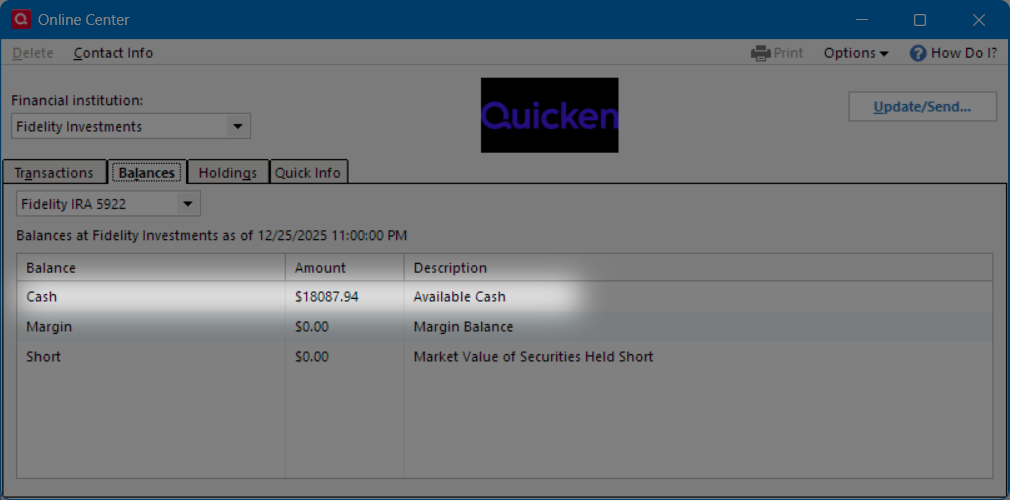
@Boatnmaniac Curious. Does your datafile's Online Center cash balance position equal the Cash Balance for the Investment Account list? Mine no longer matches. In Fidelity, the value of the core position, FDRXX, is 18087.94. In Quicken, the Cash Balance in the Investment List matches 18087.94 but in the Online Center the value has not been updated and remains at 2087.94.
Deluxe R66.23, Windows 11 Pro
0 -
I upgraded to 65.29 and so far have seen no difference EXCEPT now Windows 10 interrupts all the time (e.g. I open tax window or open portfolio window) and says it needs to configure Quicken. Before I can cancel out, it says there are elements open and I should close them before it can configure. What gives with that? I did the update from within Quicken, had backed up before and it said it did a backup as well. Actually, the Tax Planner is virtually unusable due to the constant interruption of Windows wanting to configure Quicken!!
I only see 65.29 available, but someone is showing 65.30? and running Windows 10 Pro here, with Quicken Classic Premier.
0 -
Glad to hear that your Cash Balance in the register is now good.
But your 2nd paragraph regarding the Online Center is certainly odd. I would have expected FRDXX values in all views to match. What do you see on the Balances tab?
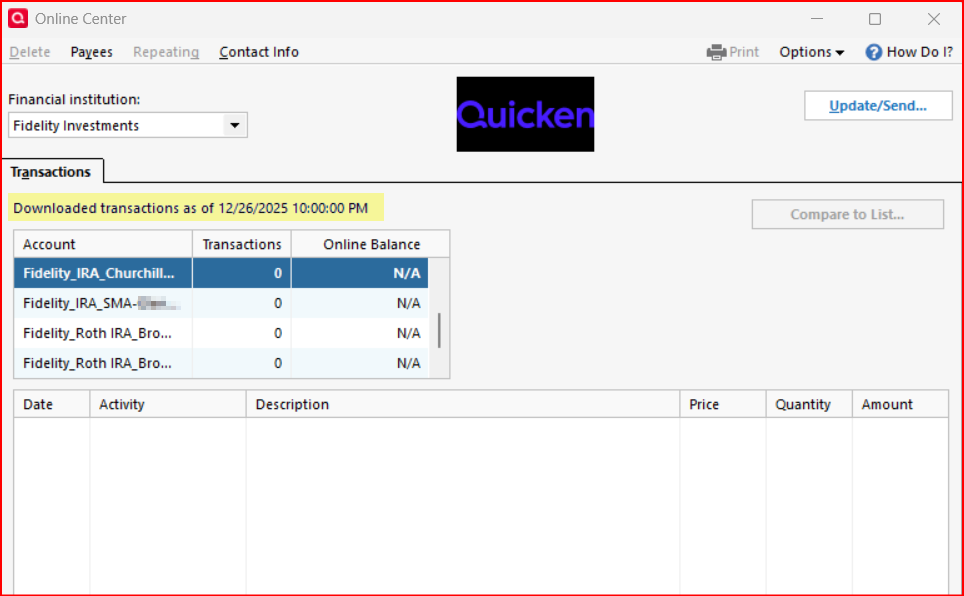
I rarely go to the Online Center, typically only going there when there is some issue that I haven't been able to resolve. Your Online Center layout view is what I'd expected to see when I just now went to the Online Center. But what came up for me is the following….no Balances, Holdings nor Quicken Info tabs, no accounts to select from, no securities, no shares, no costs. I can't remember ever seeing anything like this, have you?:
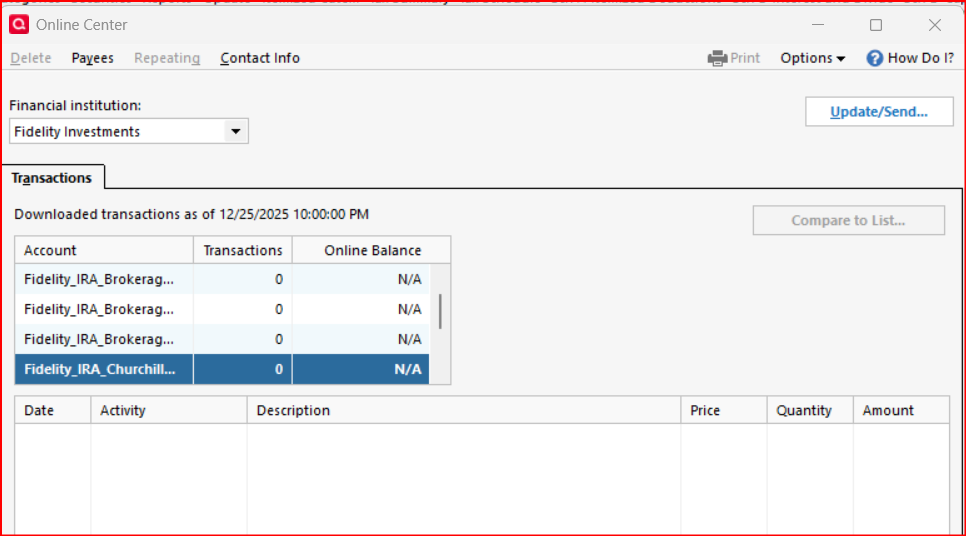
I did get a few transactions (5 total in 2 different accounts) downloaded this morning so that is not the issue. I don't get it.
So, is what you are seeing and what I am seeing just another Fidelity EWC+ issue or is it something else?
Quicken Classic Premier (US) Subscription: R66.23 on Windows 11 Home
0 -
It usually requires an uninstall and reinstall to resolve the configuration issue.
1 -
@Andrew02467 said:
I only see 65.29 available, but someone is showing 65.30?
To the best of my knowledge, R65.29 is the latest version. I'm guessing that R65.30 reference was a typo. Perhaps @leishirsute would confirm this?
Oh, yes, as mentioned by @markus1957, that configuration issue is usually resolved by simply uninstalling and reinstalling the software.
Quicken Classic Premier (US) Subscription: R66.23 on Windows 11 Home
0 -
@Boatnmaniac I'm used to seeing 0 transactions in the Transactions tab in the Online Center and no Online Balance column. Such inconsistent behavior. However, I was referring to the cash balance position under Holdings tab. The core position market value was not updated to match the cash balance. It is the old cash balance. Maybe in a day it will resolve itself. I also rely more on the Cash Balance displayed in the account register.
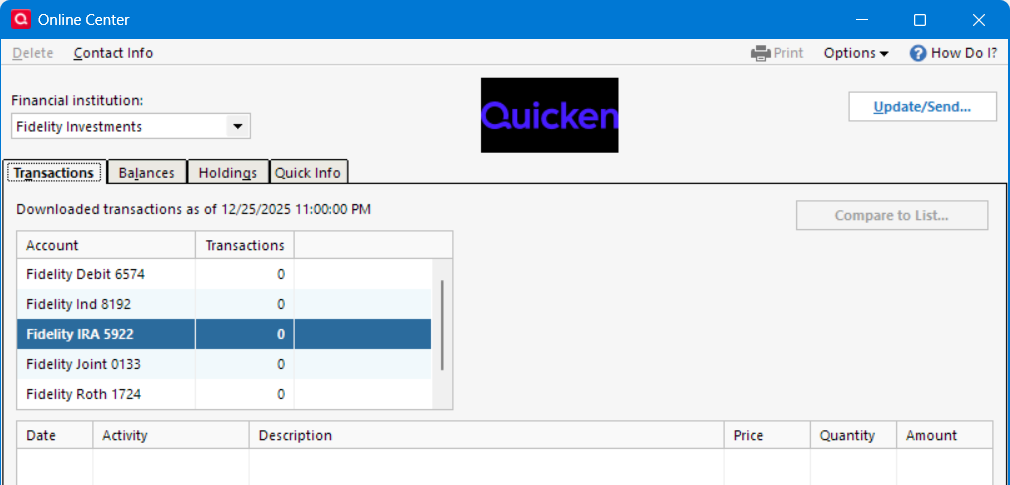
However, the Cash in the Balances tab in the Online Center is correct.
Deluxe R66.23, Windows 11 Pro
0 -
Sorry, it is a typo in my profile signature that is corrected.
Deluxe R66.23, Windows 11 Pro
1 -
OK, so the Cash on the Balances tab is correct, right? And this matches what is shown when clicking on (not just looking at) the blue font Cash Balance beneath the account register? If so, that is good.
The FDRXX Holdings is wrong in Online Center. What do you see when you go to the account register, click on the upper right gear icon and then click on Reconcile Shares? My guess is that you will see this shares discrepancy called out and that will need to be resolved.
Also, if you click on the Holdings button above the account register, does it show the correct balance of FDRXX (which should be 0) or does it show 2087.94 shares?
One last thing: Is the total account value in Quicken correct or is it overstated by $2087.94?
Quicken Classic Premier (US) Subscription: R66.23 on Windows 11 Home
0 -
@Boatnmaniac Good news. The Holdings for the cash balance updated today with the correct amount. I think it was a Christmas day delay. I had changed the cash balance amount on 12/24. All looks good now. Thank you for your help.
Answers to your questions, prior to latest download that corrected the issue:
"OK, so the Cash on the Balances tab is correct, right? And this matches what is shown when clicking on (not just looking at) the blue font Cash Balance beneath the account register? "
Yes. It was correct.
The FDRXX Holdings is wrong in Online Center. What do you see when you go to the account register, click on the upper right gear icon and then click on Reconcile Shares? My guess is that you will see this shares discrepancy called out and that will need to be resolved.
Strangely, even though the discrepancy displayed, the Reconcile Shares stated everything matched. Somehow, Quicken matched the correct core position balance and disregarding the Cash Balance holdings.
Also, if you click on the Holdings button above the account register, does it show the correct balance of FDRXX (which should be 0) or does it show 2087.94 shares?
I had elected to represent the core position MMF as cash, so the Holdings displayed the correct Cash value but no FDRXX.
One last thing: Is the total account value in Quicken correct or is it overstated by $2087.94?
The total account value matched the Fidelity website to within 2 cents.
Deluxe R66.23, Windows 11 Pro
0 -
Great! Yes, it probably was a delay because of the holiday. It is a relatively common thing, not just with Fidelity, that there are delays encountered in issues resolution during holidays and weekends as well as the 1st business day after holidays and weekends. So, I don't let myself get too excited about any downloading or connection issues when they occur on those days.
My Online Center situation for Fidelity, however, has not changed. It still does not include the Holding tab which is just really odd. But it seems to have no adverse effect on the Holdings views in the account registers so I'm not too concerned about it. And since it is still in the post-holiday/weekend window I will wait until next week to see if it resolves by then. If it doesn't I'll likely do Report a Problem then
Quicken Classic Premier (US) Subscription: R66.23 on Windows 11 Home
0 -
Well I decided to take the chance, I updated to 65.29 using the mondo patch and everything looks good. I have a list of steps I do before & after updates so I can compare balances/reports/new categories etc. and everything looks good. I'll start looking into the new features.
It didn't fix the issues I was seeing, but they're minor so not a big deal. Examples:
- Tax Planner settings are changed & need to be corrected like Boatnmaniac mentioned
- Some screens draw updates on a different monitor instead of on Quicken's own window, so things like report tooltips show up as glitches on top of other apps, like in the screenshot)
 1
1 -
@Boatnmaniac I wonder if those missing tabs would appear with different screen resolution or magnification settings. I have had the results screen from OSU omit the download dates if my screen magnification was made 1% larger.
Deluxe R66.23, Windows 11 Pro
0 -
The picture I posted was a screen shot of the Online Center after I had reduced the width view so it really is not so small as it looks in the picture. I frequently do that when I want to post picture from Quicken but the width of the view would make the screen shot too small for many people to be able to read. When that view of Online Center is at normal expansion there is a lot of extra space to for all of the columns to be visible.
I always keep my computer resolution and screen magnification views at the "recommended" settings so I've never had the problem that you mention. But just to be safe I played with the settings some and there was no difference.
Quicken Classic Premier (US) Subscription: R66.23 on Windows 11 Home
0 -
Release 65.29 has changed all of the jobsite addresses on my invoices to the customers' addresses. Restoring doesn't fix it. Neither does "validate and repair file". If I create a new invoice with the correct addresses, it will change them when I save, close and reopen it. I wouldn't update to this release if I had it to do over.
0 -
Have you tried reinstalling the prior version of Quicken and using the unaltered datafile to see if it reverts to the prior behavior?
Deluxe R66.23, Windows 11 Pro
0 -
What about other changes or transactions that you enter? Are they being saved or are they also not present when you close and then reopen the file?
Quicken Classic Premier (US) Subscription: R66.23 on Windows 11 Home
0 -
Sometimes when updating a version the installation does not complete correctly or completely. This is not an issue specific to any particular version. IMO this seems to happen more frequently when letting Quicken do the update.
You might want to consider downloading and installing the Manual Patch Update File for R65.29 from . Run the downloaded file as an Administrator and it will install right over the current installation.
If the initial version update to R65.29 did not install properly the first time, reinstalling it will usually resolve that issue.
Quicken Classic Premier (US) Subscription: R66.23 on Windows 11 Home
0 -
I use Quicken Classic Deluxe. With version 65.29 on a Windows 10 Pro system, I have uninstalled completely (RevoUninstaller followed by QCleanUI) and then done a complete reinstall. I can recreate the issue where Quicken thinks there are missing components of itself (and prompting for installation of same) with the following steps:
- Exit Quicken.
- Go to your 'qdf' folder and rename your 'qdf' file (e.g., 'finance.qdf' to 'finance1.qdf').
- Try to open Quicken by clicking on the newly renamed 'qdf' file. In my case this is enough to cause Quicken to think it is not properly installed. YMMV.
Due to the above, I remain at version 62.16 - imo, the last stable version (I am lucky in that while I do have Fidelity accounts there are not many transactions, so I have chosen to update those accounts manually until the Fidelity issues have been resolved).
- Deluxe R62.16 on Win 10 Pro 22H2. I don't use Bill Pay, Online Backup, Cloud Sync, Mobile & Web.
0 -
@TangledWeb , Like you I have also remained on R62.16 for the very same stability reason and may stay with it for the foreseeable future. Tho I do have a VM with the latest which I test on and it is evident to me that they are less stable.
- Q Win Deluxe user since 2010, US Subscription
- I don't use Cloud Sync, Mobile & Web, Bill Pay0 -
@BK, I do not have the luxury of a VM - my MO is simply to wait (and wait) to see how well (or not) each update is received on this forum. Perhaps you can let me know when you do finally decide to update from 62.16, it will be much appreciated 😀
- Deluxe R62.16 on Win 10 Pro 22H2. I don't use Bill Pay, Online Backup, Cloud Sync, Mobile & Web.
0 -
Will do @TangledWeb and let's stay in touch on this. FYI, If you have the Pro version of Windows, it has a built-in free Hyper-V VM which is what I use. If you don't have the Pro, one can buy a Win11 Pro license in the $12-$20 range using coupons at various legitimate discount software sites.
- Q Win Deluxe user since 2010, US Subscription
- I don't use Cloud Sync, Mobile & Web, Bill Pay1


