Projected Balances multiple account issue

In projected balances, I select "Multiple Accounts" and then pick 2 checking accounts. What displays on the graph are the 2 accounts along with a half-dozen investment accounts that are NOT checked. Any ideas why this happens?
Best Answer
-
When you selected "Multiple Accounts" did you first click on Clear All before you selected the 2 checking accounts?
Quicken Classic Premier (US) Subscription: R66.23 on Windows 11 Home
0

Answers
-
When you selected "Multiple Accounts" did you first click on Clear All before you selected the 2 checking accounts?
Quicken Classic Premier (US) Subscription: R66.23 on Windows 11 Home
0 -
Yes, I did.
0 -
Try going to Multiple Accounts, again. Before clicking on Clear All, uncheck the box for Show Separate Accounts. Then click on Clear All and select the two checking accounts, again.
After completing the accounts selection, do not tab or scroll to get the highlighting off of Multiple Accounts since this will then highlight Spending Accounts which changes the Multiple Accounts selection. Instead, click elsewhere on the screen to get the highlighting off of "Customize".
Does this resolve the issue for you?
Quicken Classic Premier (US) Subscription: R66.23 on Windows 11 Home
0 -
Hi
No, unfortunately the investment accounts still show up on the graph (and the legend). Interestingly, the 4 investment accounts are not even on the list of accounts to include (via the checkboxes).
Still stumped. 😔
0 -
One additional piece of info: the investment accounts are not showing the current balances in each one but are showing transfers to/from the two checking accounts. It's odd since no other transfers to or from the checking accounts are included here (nor do I think they should be on this graph).
0 -
Are the investment accounts taxable accounts or are they retirement accounts?
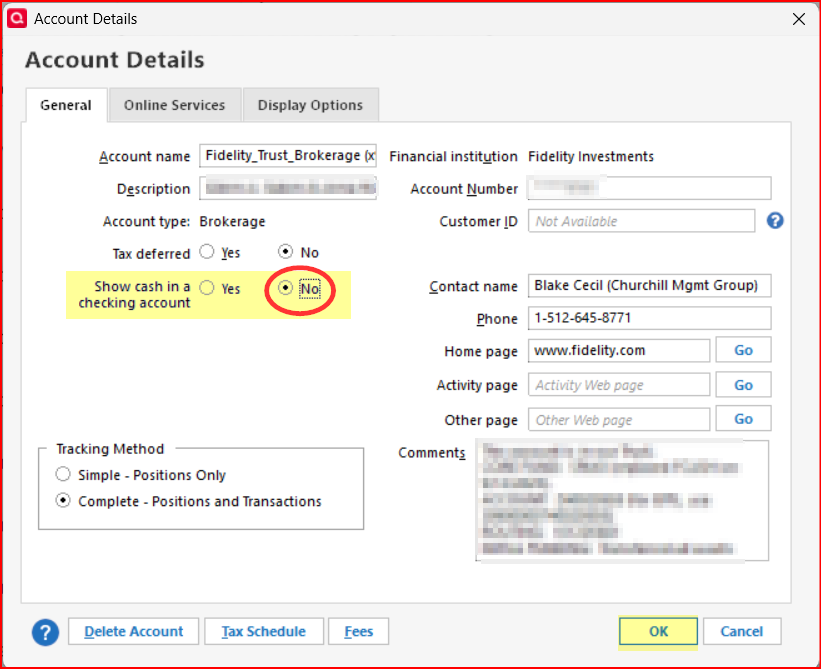
If they are investment accounts, do you have them set up to show cash in separate checking accounts? If so, you might want to try backing up your data file and then changing one of the accounts that is causing the issue to not have cash shown in a separate checking account. Then see if the issue still exists for that one account.
Quicken Classic Premier (US) Subscription: R66.23 on Windows 11 Home
0 -
I checked the accounts and none of them are marked Yes.
0