Reconcile using online balance - not working

I have two Chase accounts setup for download using EWC+. One account correctly reconciles all of my transactions after I hit done. The other account does not. This behavior has been happening ever since I established the new account, which doesn't auto-reconcile. It never has auto-reconciled, but my original account does. Yes, the "Reconcile using online balance" checkbox is checked for both accounts.
Any ideas?
[Edited - Readability]
Comments
-
Hello @rfmoskowitz,
Thank you for reaching out! To help troubleshoot, please provide more information. When did you first notice this issue? What kind of account is the newly added one which has never auto-reconciled (checking, savings, credit card, brokerage, etc.)? Is the account successfully updating? Are you able to reconcile the account by navigating to Tools>Reconcile an Account… or by using the keyboard shortcut Ctrl + R? Have you closed/reopened Quicken since this issue started? Have you restarted your computer since the issue started?
I look forward to your response!
Quicken Kristina
Make sure to sign up for the email digest to see a round up of your top posts.
0 -
This issue has been going on for years - since my first transaction back in 2021 when I opened the account. It's a credit card account. The account successfully updates and everything else seems okay, it just doesnt auto-reconcile like my other Chase account. I do reconcile it manually after I'm done accepting transactions without issue. I just want it to work like the other Chase account. I'm not sure why this one is different.
0 -
There are two settings regarding auto reconcile:
The first setting is in Edit Account Details / Online Services.
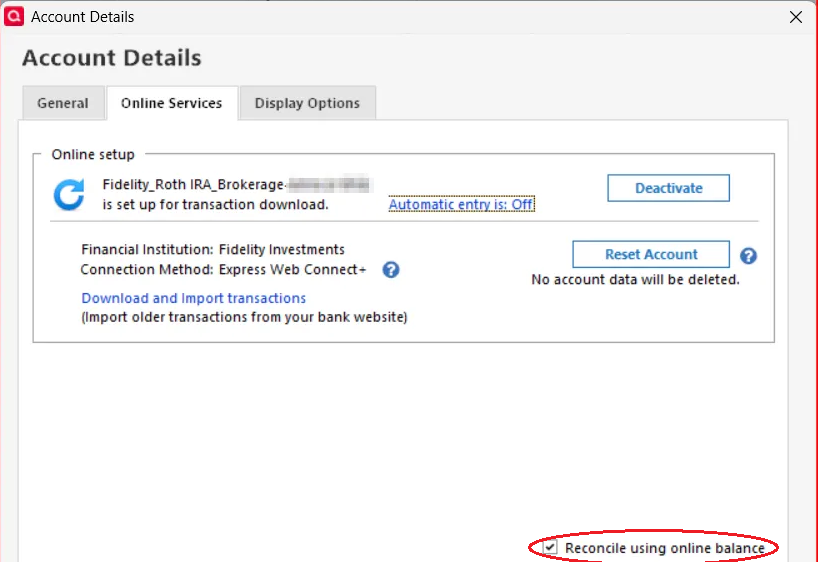
The second setting is in the Reconcile dialog when you start a manual Reconcile.
If you decide to reconcile using online balance, please review the two settings under this selection. You may want to uncheck the setting "Always use online balance … Do not ask me again" to get your prompt back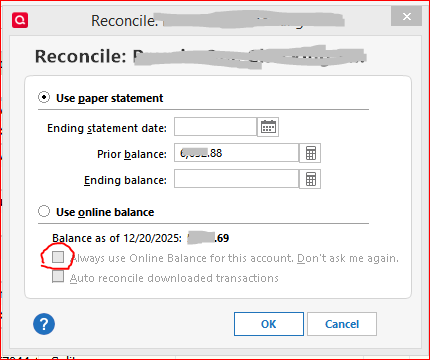 0
0 -
How do I get the second dialog to show up? When I click Reconcile, it automatically goes to the reconcile screen with the transactions on the left and right.
0 -
Thank you for your reply,
To see that second screen, navigate to Tools>Account List, click Edit next to the problem account, then select the Online Services tab. Make sure that "Reconcile using online balance" is not selected, then click OK.
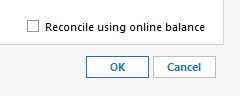
Once that is unselected, when you go to reconcile the account, you should see the dialogue giving you the option to either reconcile against the paper statement or against the online balance.
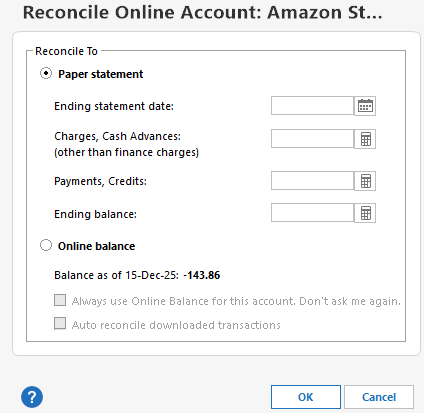
I hope this helps!
Quicken Kristina
Make sure to sign up for the email digest to see a round up of your top posts.
0 -
Thanks! I was able to get the second dialog to come back.. now I just need to better understand the two checkboxes and how they work. I wont be able to fully test it until I am able to download another transaction from the account, though, so I will have to wait a day or two. Thanks for your help!!
0 -
Hey, good news! I tried downloading transactions today and it worked perfectly! Thank you so much! I only wish I had reached out earlier!
0 -
Thank you for the follow-up,
I'm glad to hear that it's working now!
If you need further assistance, please feel free to reach out!
Quicken Kristina
Make sure to sign up for the email digest to see a round up of your top posts.
0

