Update not working

I have a Quicken Home and Business subscription.
The update window comes up and the update starts, but then it seizes and I have to use the task manager to close the window. If I try to just update the investment quotes, it does the same. Appears to be a Quicken thing, not a bank thing.
Comments
-
Hello @Cynian,
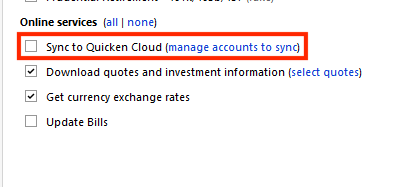
Thank you for reaching out! To help troubleshoot, please provide more information. When did you first notice this issue? Was there anything that happened around the same time, such as a program/computer update or an unexpected program/computer shutdown? Do you keep your Quicken file directly on your local hard drive? Is the file synced with any cloud service, such as OneDrive, iCloud, or Dropbox? How long do you wait for it to complete before you use Task Manager to force the program to close? Is your Quicken set to sync with the Quicken Cloud during One Step Update? If it is, try turning that off and test to see if it makes any difference.
I look forward to your reply!
Quicken Kristina
Make sure to sign up for the email digest to see a round up of your top posts.
0 -
Call support and ended up having to make a new copy. Works now.
0 -
Thank you for the follow-up,
I'm glad to hear that Support was able to help you get it working!
If you need further assistance, please feel free to reach out!
Quicken Kristina
Make sure to sign up for the email digest to see a round up of your top posts.
0
