USAA Checking Transactions Not Downloading

My USAA transactions aren't downloading. The last successful download was on 17.12. No new transactions until 2 days ago, 21.12.
I've had three new transactions, but they aren't downloading, but the online balance is correct.
I noticed after the update I installed today that my PenFed accounts were downloading correctly but that resolved when I reset the accounts.
No such success w/ the USAA checking account. I've completely deactivated the account, deleted the bank information, and then reconnected to USAA as a new account. It still won't download.
Anyone else having the same issue?
[Edited - Readability]
Comments
-
Hello @SpartyRB,
Thank you for letting us know you're seeing this issue. Unfortunately, missing transactions from USAA is a known issue. Please see this Community Alert for more information:
Per the alert, please start troubleshooting by following the steps from this article on missing transactions/transactions not downloading:
Be sure to follow these steps in order:
1. Go to Edit > Preferences > Downloaded Transactions. The option Automatically add to banking registers needs to be unchecked.
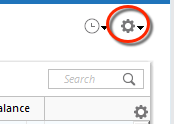
2. Refresh your online account information by clicking the Actions Gear Icon on the upper right of the register, and select Update Now. Follow the on-screen instructions to complete the update.
3. Confirm that the Sort Order in your account is by Date; just click the top of the Date column in your account register. It's possible the transactions are in your register, but not where you thought they'd be.

4. Click the Reset button at the top of the register. This will confirm that there's no filtering in your account register.
5. Try refreshing your login session: To do this, go to Help > Refresh Sign in. After completing the log-in process, trying running a One Step Update again.
6. Go to Actions (Gear Icon) > Register Columns > Check Downloaded Payee in the account register. This allows you to search by Payee to confirm the transactions haven't been renamed unexpectedly.
7. Go to Tools > Account List and check Show Hidden Accounts at the bottom left. Confirm the missing transactions haven't been added to a hidden account by clicking on the name of any account that appears with a check mark in the Hidden column.

If the issue persists after you have followed the troubleshooting steps above, please contact Quicken Support directly for further assistance, as they have access to tools we can't access on the Community and they're able to escalate the issue as needed. The Quicken Support phone number can be found through this link here. Phone support is available from 5:00 am PT to 5:00 pm PT, Monday through Friday.
I hope this helps!
(Ticket #12054304)
Quicken Kristina
Make sure to sign up for the email digest to see a round up of your top posts.
0 -
See my post for the fix. Basically USAA may have 'inactivated' your account if you haven't made any transactions in a year. The account remains open and useable, but you have to call them to have the acccount activated!
1 -
Hello @jschumann888,
Thank you for sharing your experience! Hopefully it will help others encountering similar issues!
Thank you!
Quicken Kristina
Make sure to sign up for the email digest to see a round up of your top posts.
0 -
I had this problem with my credit card since 11/24/2025: the correct balance would download, but transactions would only download a few at a time—about a week behind. Last night (12/30/2025), after 8 PM EST, I tried again, and everything downloaded and reconciled. USAA must have fixed it. For good, I hope.
0 -
Hello @Maddic,
Thank you for sharing! I'm glad to hear it finally started working.
If the issue returns or you need further assistance, please feel free to reach back out!
Quicken Kristina
Make sure to sign up for the email digest to see a round up of your top posts.
0
