Fidelity transaction download issue

Comments
-
Quicken Kristina has been super helpful, pointing me to solutions that work for others and connecting me with support. However, Quicken support has not been able to solve my problems downloading Fidelity Investments transactions.
Since August, I have not consistently been able to download any Fidelity transactions. I have followed all the recommendations I have read on the Quicken Community pages (such as check for hidden Fidelity accounts using the old download method, in Account Details: deactivate transaction download, then delete account number and "Fidelity Investments" and finally, set up download, use Chrome rather than Firefox, create a new Quicken file and add each Fidelity account to this, then set up download, etc.). None of these works, and I am still not able to download new transactions. All of my Fidelity accounts are months out of date.
Please fix these problems and update us users. Quicken is not useful without these downloads. Thank you.
2 -
Hello @TQ,
Thank you for letting us know you're seeing issues with transaction downloads from Fidelity. I can see that your issue with an incorrect balance has been escalated (CTP-15270), but I'm not seeing any other open tickets.
To help troubleshoot, please provide more information about what is happening when you try to download transactions. When I check our internal tools, I'm not seeing any error messages. Are you seeing any error messages/codes on your end? If not, what exactly is happening?
I look forward to your response!
Quicken Kristina
Make sure to sign up for the email digest to see a round up of your top posts.
0 -
Hello Quicken Kristina,
Thank you for your email and for letting me know you don't see any error messages on your end. That's too bad ;-). Here are some of the problems.
- When I add a new Fidelity account, it will download only the cash in the account and not the securities. Sometimes (but not often), I will get a few securities when I do a one-step update. Good news: it does seem that the cash balance does download accurately, now.
- When I do a one-step update, one Fidelity account will update, but the others do not. Several accounts have not updated since 10/31/25, even though I do a one-step update every few days.
- As suggested by Quicken Support, I sometimes deactivate one-step update from all Fidelity accounts and delete their account institution (Fidelity) and account number, and then reauthorize them for one-step update. If I am lucky, one or two accounts will get new transactions, but I get an error that certain active Fidelity accounts are closed.
- Tonight, I got a CC506 error for my Fidelity accounts, and it said there were no transactions for any of them.
Thanks, Quicken Kristina, for following up on this! Hope this info helps.
TQ
0 -
I have been in contact with the President's office at Quicken regarding downloading issues with Fidelity accounts since August. Fidelity managed accounts do not download the cash balance for no apparent reason, making the account impossible to reconcile. The balances can be off by hundreds, even thousands of dollars. They answer that they are working on it. [Removed - Speculation]
0 -
Thank you for your reply @TQ,
Do you have your Fidelity accounts connected in multiple Quicken files? I can see that you contacted Support about the issue with transactions not consistently downloading in October. Has the issue been happening since then? Is it always the same accounts having trouble?
Thank you!
Quicken Kristina
Make sure to sign up for the email digest to see a round up of your top posts.
0 -
Hello Quicken Kristina,
I have read over as many threads as I can find related to the Fidelity Investment issue. I just have a very simple question.
Does the transaction download from Fidelity into Quicken work? Period.
I have tried everything I can find to get it to work but after spending hours today manually putting in transactions trying to get it correct again I have determined I am not willing to do this again. So I have canceled all automate transactions into Fidelity but I also don't want to keep doing it for dividends going forward.
So if this simply can't and won't be fixed, I am just going to transfer all of my assets to somewhere else and hope that one doesn't break one day.
0 -
Hello @CiwJKkan,
Thank you for reaching out with this question! With the exception of Fidelity HSA accounts, yes, transaction download should work. Are your accounts unable to download transactions at all, or are transactions coming in, but missing/incomplete/incorrect?
I look forward to your reply!
Quicken Kristina
Make sure to sign up for the email digest to see a round up of your top posts.
0 -
They just do not download. It says it is updating them but it does not. I have done everything mentioned I can find including revoking at Fidelity but nothing seems to make it download anything. Out of the 6 accounts, 1 of them was for some reason downloading which is how I found out nothing had been updating. Now none of them seem to be at all after deactivating etc.
If I create a new account altogether it will download an initial amount of transactions, it seems to depend on how you add the account if it gives you something like 90 days or 365 days. Regardless, right now it just doesn't do anything on any of the 6 accounts.They are all investment and 1 cash management.
0 -
Thank you for your reply,
To clarify, have you already followed the steps from our article on missing transactions/transactions not downloading listed below?
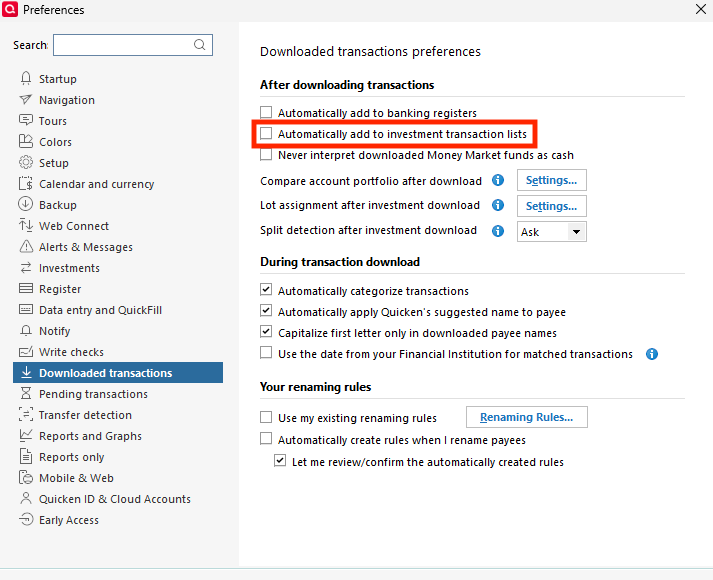
1. Go to Edit > Preferences > Downloaded Transactions. The option Automatically add to investment transaction lists needs to be unchecked.
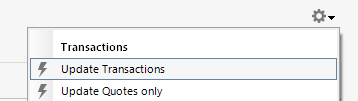
2. Refresh your online account information by clicking the Actions Gear Icon on the upper right of the register, and select Update Transactions. Follow the on-screen instructions to complete the update.
3. Confirm that the Sort Order in your account is by Date; just click the top of the Date column in your account register. It's possible the transactions are in your register, but not where you thought they'd be.

4. Try refreshing your login session: To do this, go to Help > Refresh Sign in. After completing the log-in process, trying running a One Step Update again.
5. Go to Tools > Account List and check Show Hidden Accounts at the bottom left. Confirm the missing transactions haven't been added to a hidden account by clicking on the name of any account that appears with a check mark in the Hidden column.

You mentioned that you've tried adding accounts as new. Have you tested in a completely new file to see if the behavior happens in that new file also (this can help determine if the issue is being caused by a file-specific problem)?
Thank you!
Quicken Kristina
Make sure to sign up for the email digest to see a round up of your top posts.
0 -
I just completed all of those steps and nothing changed. For your last question I added it to this current file to see if it would download at all, it will download an initial number of transactions. Same thing in a new file. Just as new transactions post it will not download them, it seems.
This actually started for me at least back in early December when I added a new investment account, that one was downloading fine but then it stopped the others from working. So deactivation on all of them and adding new didn't do much to help anything.
So last time it downloaded for a single one of the accounts was recent but again it was only downloading for 1 and not the other 5. I do not have any hidden investment accounts linked to Fidelity.
0 -
Here are my answers to your questions. I have two Quicken files that include different Fidelity accounts, so there is no overlap of Fidelity accounts.
I am still not able to get downloads to work on all but two Fidelity accounts.
To try to get downloads to work (as suggested by Quicken Support), I disconnect each account from One Step Update, delete account information, and then reauthorize each account. Then, when I reauthorize them, only a few securities are downloaded, and many are missing. Then, when I updated again, only once did the other securities download.
Those two accounts still don't reliably download transactions.
Thanks for your help, Quicken Kristina!!
0 -
It is a gross exaggeration to say "With the exception of Fidelity HSA accounts, yes, transaction download should work." There are so many exceptions to that statement. Things happen at Fidelity and Quicken shows no activity or incorrect activity. I am reporting as many as I can but it's exhausting.
0 -
Thank you for your replies,
Since the troubleshooting didn't correct the issue and the same problem happens in a new file, I recommend that you contact Quicken Support directly for further assistance, as they have access to tools we can't access on the Community and they're able to escalate the issue as needed. The Quicken Support phone number can be found through this link here. Phone support is available from 5:00 am PT to 5:00 pm PT, Monday through Friday.
I apologize that I could not be of more assistance!
Hello @Quick92,
Thank you for reaching out. What specific issues are you encountering? What troubleshooting have you already done?
Thank you for your reply @TQ,
I sent you a DM. To view it, please check your inbox.

Thank you!
Quicken Kristina
Make sure to sign up for the email digest to see a round up of your top posts.
0 -
Thanks, Quicken Kristina! I appreicate your help and will respond to your private message.
0 -
I still have Quicken/Fidelity problems like this: missing cash-like transactions in brokerage account; missing all transactions in HSA account; misrepresented transactions in 401k account; misrepresented transactions on conversion of IRA to Roth. I think all these problems are captured in the collection of open tickets, but I am trying to report when I get new instances in hopes that they are still being investigated.
0 -
Hello @Quick92,
Thank you for reaching out! The HSA transactions not downloading is a known issue. See this annoucement for more information:
The other issues you mention may be already reported, but I'd need more details to know for sure.
- What do you mean by cash-like?
- What specific kind of transaction is missing?
- How are your 401k transactions being misrepresented?
- What kind of transactions are being misrepresented?
- How are your conversion from IRA to Roth transactions being misrepresented?
I look forward to your reply!
Quicken Kristina
Make sure to sign up for the email digest to see a round up of your top posts.
0 - What do you mean by cash-like?
-
401k withdrawals showed up as cash withdrawals with no shares sold. I had to manually enter all fund sales.
Conversions from Traditional IRA to Roth showed up wrong. I forget the specifics, but I had to ignore/delete downloads and enter everything manually.
"Cash-like" transactions: Transfer of money market shares between accounts shows up as Bought/Sold, with the cash balances then being off (happened today and reported as a bug). And of course, auto liquidation of non-core money market fund is still erroneously ignored by Quicken since some time last fall. Because of Quicken's bug, I no longer allow auto liquidation. It is quite infuriating to have to change my financial management approach because Q can't handle it (and I don't want to do it manually). I want to be able to trust Quicken as an authoritative view of my accounts.
0 -
Thank you for your reply,
With the 401k withdrawals, were those automatic redemptions (funds converted to cash so they could be withdrawn)? Which fund did this happen with?
I'm glad to hear you were able to manually correct the IRA to Roth conversion to get it to reflect properly. Did you take any screenshots of how it looked when the transactions initially downloaded?
When you say the auto-liquidation is ignored in Quicken, do you mean it sees the change in cash balance, but does not reflect the change in the fund that was sold? Which funds is this happening with?
Thank you!
Quicken Kristina
Make sure to sign up for the email digest to see a round up of your top posts.
0 -
With the 401k, it was a partial withdrawal, not automatic. It was a Fidelity non-public S&P 500 fund and other non-public funds.
I don't have and can't reconstruct the details of the Roth conversion bug.
With the auto-liquidation bug, Fidelity sells a fund and the account cash balance increases. In Quicken, the sell transaction never downloads, so the cash balance goes negative, and the share balance is incorrectly high. Easily repeatable bug, so if the developers need me to reproduce it, I will do so if that helps get it fixed.
0 -
Thank you for your reply,
I'm not seeing any open tickets for those issues. For further assistance, I recommend that you contact Quicken Support directly as they have access to tools we can't access on the Community and they're able to escalate the issue as needed. The Quicken Support phone number can be found through this link here. Phone support is available from 5:00 am PT to 5:00 pm PT, Monday through Friday.
I apologize that I could not be of more assistance!
Quicken Kristina
Make sure to sign up for the email digest to see a round up of your top posts.
0 -
The auto-liquidation bug seems to be accurately described in another discussion topic as CTP-15049. Please provide an update on it.
0


