2026 Tax Planner Standard Deduction for Single File seniors is incorrect

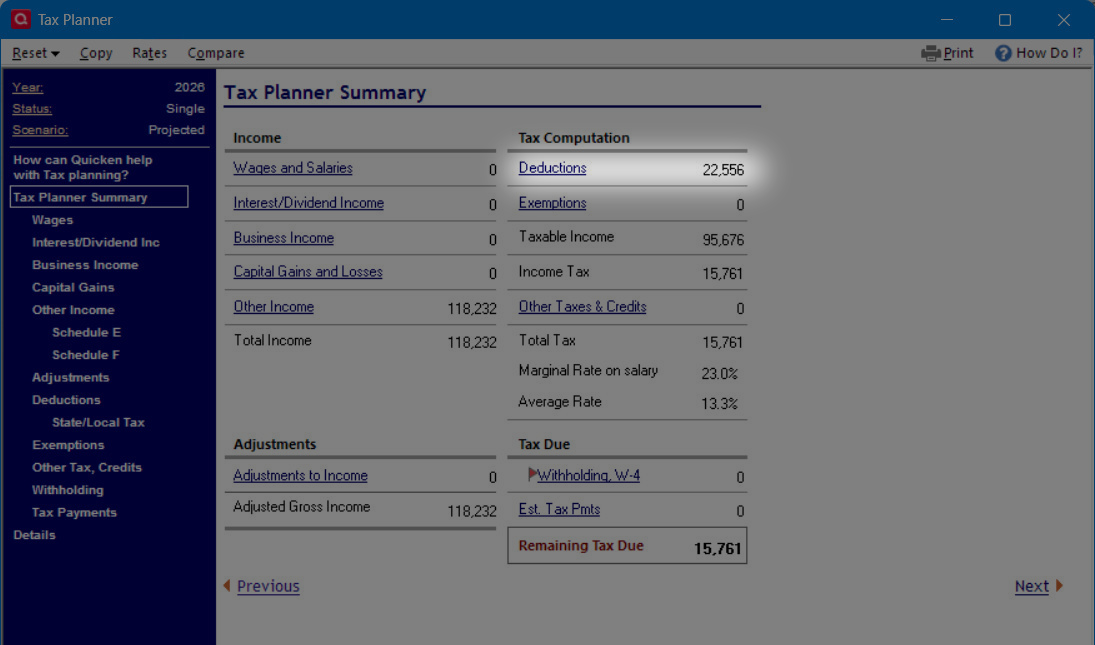
Maybe someone can verify this. For a single filing senior with an income of 118231.86, the total standard deduction calculated by my spreadsheet and chatgpt is $21556.09. However, the Quicken Tax Planner shows it to be $22556.
From chatgpt:
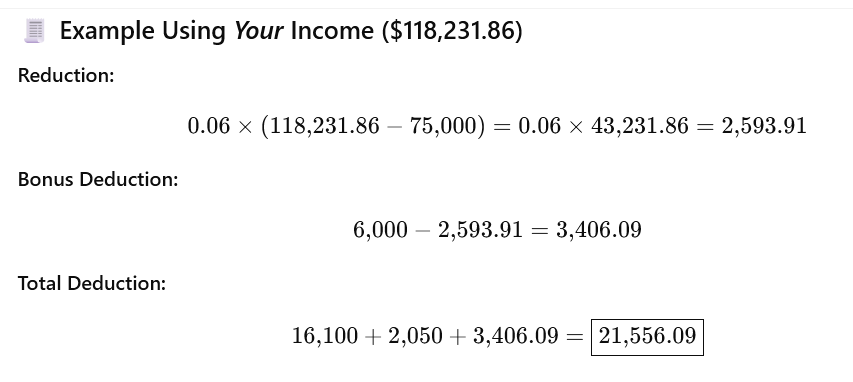
My spreadsheet formula: =16100+2050+(6000-(118231.86-75000)*0.06) =21556.09
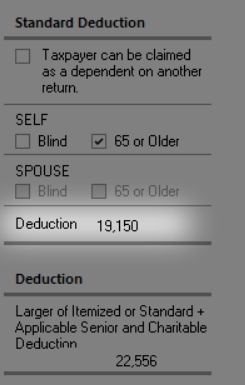
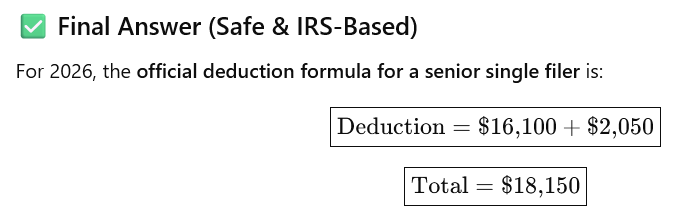
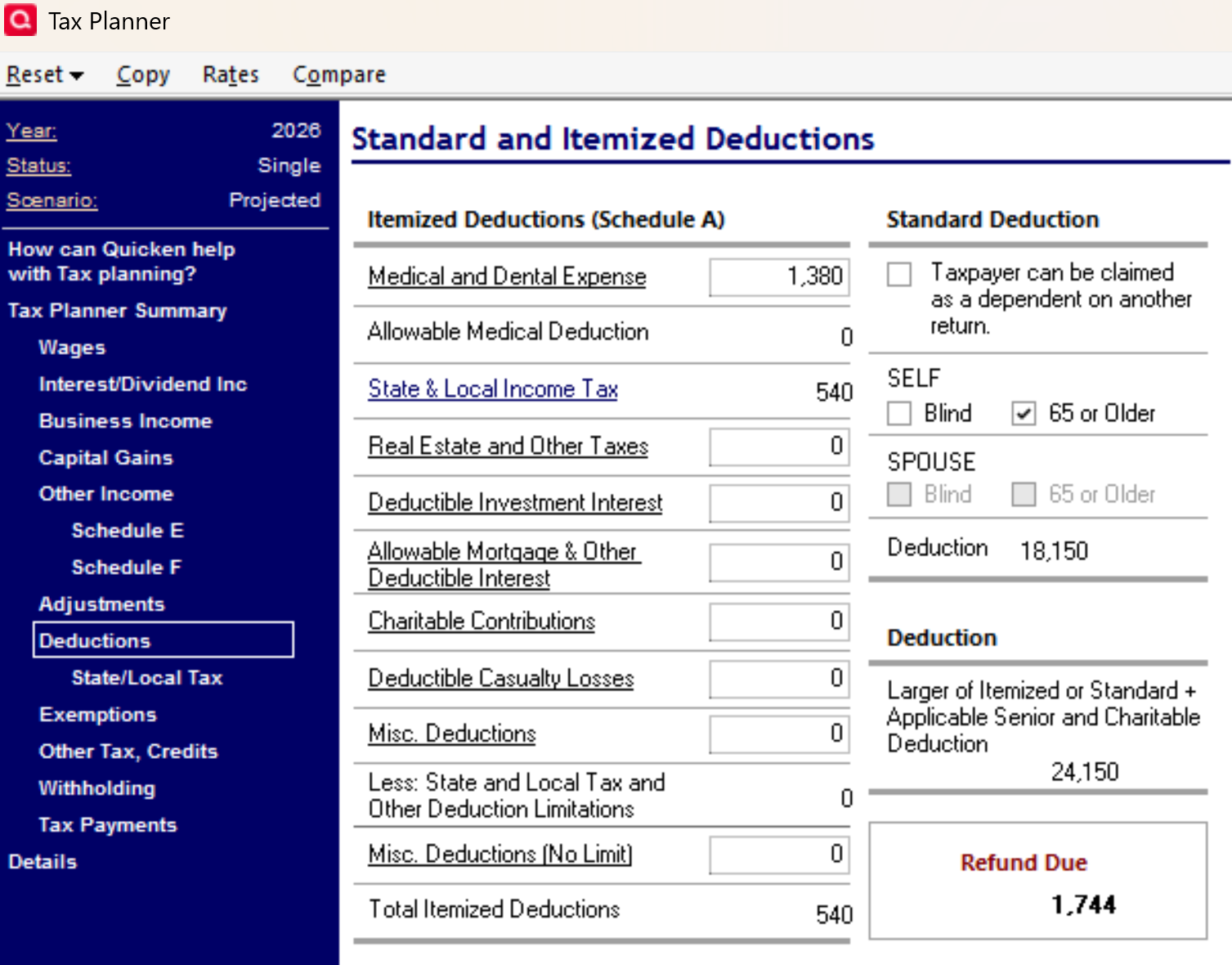
The error occurs because the Tax planner incorrectly states the single filer senior standard deduction is $19150 and it should be $18150.
From Quicken Tax Planner Deduction drilldown:
From chatgpt and my spreadsheet:
I have reported this a a problem.
Deluxe R66.23, Windows 11 Pro
Best Answer
-
in 2026 you also can get a 1,000 charity deduction without itemizing, 2,000 for Joint.
I'm staying on Quicken 2013 Premier for Windows.
2

Answers
-
I use MFJ for my Projected scenario but when I use Scenario 3 for a Single filer over 65 in 2026, it shows $18,150 for the deduction as expected.
Try closing and reopening Quicken. I did get strange behavior when I first encountered 2026 in the planner.
0 -
Good catch. It's the Projected scenario that has the wrong Standard Deduction. Scenario 1 shows the correct Standard Deduction. Still a bug, but at least I can use a different scenario. Restarting Quicken does not fix it.
Well, that didn't work. Once a copy is made to scenario 1,its standard deduction is also incorrect. As a workaround, I changed the Scenario 1 Standard Deduction amount in Tax Planner Rates to $15100 instead of $16100. This, at least, corrects Scenario 1 again, but the Projected Standard Deduction amount is always showing incorrectly.
Deluxe R66.23, Windows 11 Pro
0 -
Married Filing Jointly (MFJ)
I opened my tax testing data file and set it to Single, >65, Projected. It correctly shows a standard deduction of 18,150.
You might try creating a new data file to test if the single filer rate is incorrect in the new file. This "bug" does not affect all data files.
 0
0 -
I had to go through some gyrations of back and forth between changing the Standard Deduction Rates to $15100 for Scenario 1, which then displays the correct Total Standard Deduction and going back to the Tax Center window, which then keeps the correct Standard Deduction for the Projected scenario. However, if I visited the Rates screen under the Projected scenario, the Standard Deduction reverts to the incorrect value. At least, I have a crude procedure for displaying the correct Standard Deduction. Curious, if you visit the Rates screen when in the Projected scenario, does the Standard Deduction amount change in the Tax Planner?
If I restart Quicken, the Tax Center reverts to the incorrect value for Standard Deduction.
Deluxe R66.23, Windows 11 Pro
0 -
My rates window shows the correct value of $16,100 for single filers in 2026. Something is corrupted in the planner screens in your setup.
I'd be inclined to do a file validation and then a clean re-install that includes deleting the Program Data\Quicken folder after the windows uninstall.
The calculation screens for the planner are in that Quicken folder and may be corrupted.
0 -
Yes. My rates also show $16100 for single filer in 2026, but the total standard deduction is incorrect. It should be $16100 + 2050 = $18150. Instead it is $19150. I tried another PC and the error still remains. I also tried a different datafile and the error remains. A file validate did not fix the problem I will try a clean re-install.
UPDATE: A clean reinstall did not fix the problem.
Deluxe R66.23, Windows 11 Pro
0 -
in 2026 you also can get a 1,000 charity deduction without itemizing, 2,000 for Joint.
I'm staying on Quicken 2013 Premier for Windows.
2 -
That is definitely making the difference. When I change Charitable contributions to $0. The correct standard deduction displays. I think you addressed the correct area of confusion. Thank you! I wish Quicken would describe its deduction calculation. Also, I can't get No Project Amount to stick for Charitable Contributions, but at least I can do User Entered.
Chatting with support. If there are no current year transactions, the tax planner reverts to the prior years' data in the Projected scenario. This applies to Interest income and Charitable donations. I got around it by creating $0.00 placeholder transactions for 2026 in Charitable donations and interest income.
Deluxe R66.23, Windows 11 Pro
0 -
………….
0
