monthly budget Roll over balances

Can budget rollover balances be set up to rollover only monthly for the current year? It appears the Quicken program rolls over balances from the previous year to the current year.
Answers
-
Hello @Jerry Pederson,
Thank you for reaching out! Unfortunately, I do not see any way to do that. However, if you do not want the rollover from the previous year to show up in your 2026 budget, you can manually edit the rollover from 2025 to 0. To do that, in your budget on the Planning tab (monthly view), hover your mouse over the number to the left of the rollover icon; it will turn into a blue link. Click on it. In the window that comes up, click the blue Edit link next to Rollover.
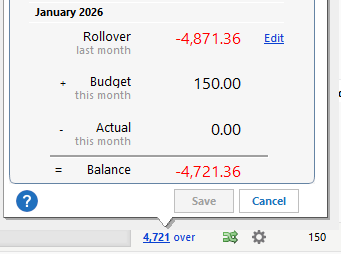
I hope this helps!
Quicken Kristina
Make sure to sign up for the email digest to see a round up of your top posts.
0 -
Hello @Jerry Pederson,
I haven't seen any response from you. Do you still require assistance?
Thank you!
Quicken Kristina
Make sure to sign up for the email digest to see a round up of your top posts.
0 -
This looks like what I have been trying to make happen. I want my month to month rollovers to rollover from 2025 to 2026
0 -
It happens automatically when you create a new year in the same budget. That said, I think it's a snapshot of the moment you create the budget and is not updated as new information is recorded in the previous year. (I may be wrong on that point.)
0
