Transaction counts in update summary are wrong

Most of the times that I do updates, the update summary for most accounts shows that zero transactions were downloaded. But when I go to the registers for those accounts I see that transactions were in fact downloaded. Why the discrepancy?
Comments
-
Hello @Nathaniel Mishkin,
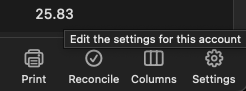
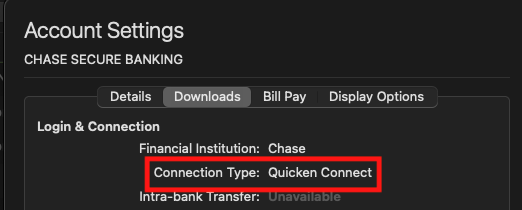
Thank you for reaching out! To help troubleshoot, please provide more information. When did you first notice this behavior? Is it only accounts connected via Direct Connect which show a number for transactions downloaded? You can check how an account is connected by selecting the account, clicking the settings gear near the lower right corner, then in the window that comes up, selecting the Downloads tab.
I look forward to your response!
Quicken Kristina
Make sure to sign up for the email digest to see a round up of your top posts.
0 -
I don't have complete info but I can say this: At least one of the accounts that had an erroneous zero transaction count uses the "Quicken Connect" transaction type and at least one of the accounts that had a non-zero count uses "Direct Connect". Also, it looks like all of my accounts use "Quicken Connect" and had zero counts and the one account that uses "Direct Connect" is the one I see having a non-zero count.
I'm pretty sure I've been seeing this behavior ever since I switched from Quicken for Windows to Quicken for Mac around 6 months ago.
Nat
1 -
Thank you for your reply,
If you haven't already done so, please make a backup of your Quicken file, then deactivate the problem accounts. Once they're deactivated, reconnect them by navigating to Accounts>Add Account… and following the prompts. Once you get to the add/link screen, make sure to carefully link the accounts to the correct account in Quicken.
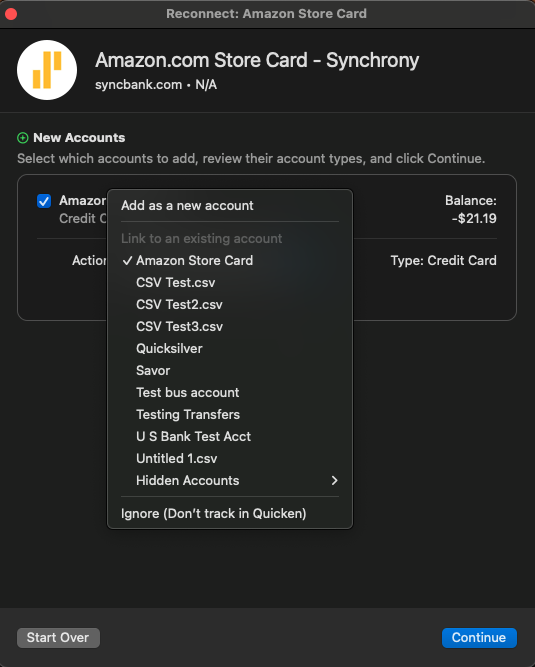
Once that is done, wait for the accounts to have new transactions to download and test to see if the issue is resolved.
Please let me know how it goes!
Quicken Kristina
Make sure to sign up for the email digest to see a round up of your top posts.
0 -
As an experiment I deactivated and then reactivated all of my accounts that are associated with a single financial entity. (Note that I reconnected by going through the "Connect" flow, not the "Accounts>Add Account…" flow you suggested because I wasn't sure I knew what the whole flow you were talking about would do and I didn't want to risk ending up with duplicate accounts.) Then I did an "Update". New transactions appeared in the register but the download count in the "Update Summary" was still zero.
1 -
Thank you for your reply,
I forwarded this issue to the proper channels for further investigation and resolution. I can see that you already sent a problem report with log files attached. While you will not receive a direct response to the problem report, it does help our teams investigate the issue.
Thank you!
(CBT-992)
Quicken Kristina
Make sure to sign up for the email digest to see a round up of your top posts.
1
