Transitions duplicating when editing categories

This is an issue that I have been dealing with for months. I go to edit the category of a transaction, press enter when done, and all of a sudden the transaction below it is overwritten, and I now have two copies of the edited transition. I can fix this in one of two ways.
1.) The easiest way is to click into another account and then go back, the transactions will appear as normal. Unfortunately this only works around 30% of the time.
2.) Completely exit quicken, and reopen. This works 100% of the time, but is a hassle.
This use to only happen occasionally, but now it happens so frequently, it is making using this software a chore. The crazy thing is is that I googled this problem, and there are a number of threads reporting the same thing, but they are all closed without a resolution. The latest one I found was Nov 2025, which is closed without resolution. What's going on here? Where's the update on the progress of fixing this major error with an accounting software?
Comments
-
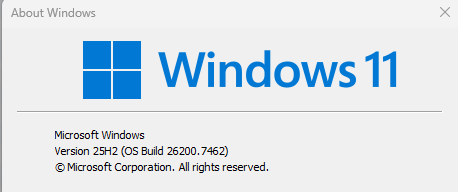
Info:
0 -
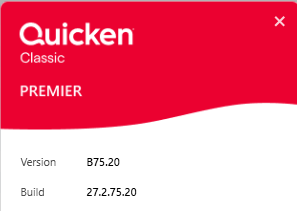
It appears that you are running a Beta version of Quicken.
If you are a Beta user, you should be discussing these issues in the Beta section of the community.
QWin Premier subscription1 -
Thank you for the info Jim,
I was having an issue with quicken not opening and tech support installed this version. I honestly had no idea that this is a beta version. I will go ahead and uninstall this version, and install the current version from the site. I will update this thread with any updates.
0 -
The clue is the B before the version number. The current released version is R65.29.
QWin Premier subscription0 -
@Kazm, I have experienced this issue frequently for months as well, maybe a year, on R62.16 and any of the latest versions. There are other posts about it too. And the solution is the same two methods you described. Obviously a permanent fix is preferred.
- Q Win Deluxe user since 2010, US Subscription
- I don't use Cloud Sync, Mobile & Web, Bill Pay0 -
Ok, I can confirm that using the latest retail version downloaded directly from the site does not resolve this issue. After installing the latest version and verifying there were no updates, I tested by changing a transactions category. In this instance, it overwrote the "Petsmart" transaction with a copy of the "Silver" transaction. Changing accounts did not work, I had to exit the application to get the "Petsmart" transaction back.


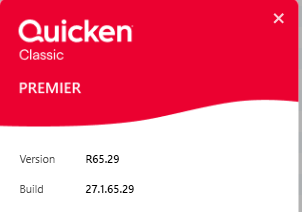
Thanks for the help Jim, but it looks like the problem remains.
1 -
For anyone that is having this issue, after going through around 10 different threads, there may be a temp workaround. User "nancylocke" posted this in Nov 2024:
"Sorting transaction in decending order seems to have resolved that problem. Not sure WHY it suddenly became a problem, I've been a Quicken user for years…very odd."
This seems to be working for me so far as well. Hopefully quicken fixes this, but at least this temp workaround may help someone experiencing this very frustrating bug.
0 -
Yes this appears to be a screen updating issue, not a problem with the underlying data. What works for me is to not hit Enter after making changes in the register, but rather to click on the green Save icon at the right end of the line. I have gotten used to this workaround, but it would sure be nice if Quicken fixed this.
See this discussion from June 2024, tracked as issue CTP-10738. Unfortunately this has been closed.
QWin Premier subscription0 -
@Jim_Harman , for me clicking on the green save icon does not work unfortunately - I know this since I typically click on save instead of enter. I have not tried the descending order method which will be next. I am not able to reproduce it now so it will have to wait.
- Q Win Deluxe user since 2010, US Subscription
- I don't use Cloud Sync, Mobile & Web, Bill Pay0 -
Just want to throw this out there…I had experienced this issue too quite some time ago. I bought a new laptop and, after switching over, never had the issue again. I feel like this may be a memory issue or something with the PC, not necessarily a Quicken issue.
1



Categories
- All Categories
- 6 Product Ideas
- 34 Announcements
- 249 Alerts, Online Banking & Known Product Issues
- 19 Product Alerts
- 266 Welcome to the Community!
- 301 Before you Buy
- 1.5K Product Ideas
- 55.8K Quicken Classic for Windows
- 16.9K Quicken Classic for Mac
- 1K Quicken Mobile
- 834 Quicken on the Web
- 129 Quicken LifeHub