Changing Report Dates - Report Runs Twice

Good day all.
This is a problem that I have had for several years and I thought that I might ask to see if anyone else has experienced this…and arrived at a solution.
I have several reports that I run using toolbar icons. One is a P/L report (income vs expenses). I run YTD reports at the end of every month…most recently 1/1/2025 - 12/31/2025 actual vs 2025 budget.
To prepare for 2026, I changed the dates to 1/1/2026 - 1/31/2026 and the budget from 2025 to 2026…and saved it. I will extend the end date each month.
The issue that I have is not that the report won't run…it will. But it 1st runs the previous setting - i.e. 1/1/2025 - 12/31/2025 - and then runs 1/1/2026 - 1/31/2026. I get my report but, given that I include unrealized gains, it takes a while.
Has anyone else experienced this?
Answers
-
Hello @Snakebit12,
Thank you for letting us know you're seeing this issue. To help troubleshoot, please provide more information. How is the report running twice? For example, is it defaulting to the wrong year, then you have to wait for it to run so you can change to the correct year?
I look forward to your reply!
Quicken Kristina
Make sure to sign up for the email digest to see a round up of your top posts.
0 -
Hi Kristina.
I change the report end date each month.
So, for example, back in May 2025, I ran the report with custom dates of 1/1/25 - 5/31/25. When June rolled around, I ran the report (1/1/25-5/31/25) and, once I had a result, I changed the custom dates to 1/1/25-6/30/25…and saved the report.
Every time I ran the report afterwards, it would generate a 1/1/25-5/31/25 result and then immediately re-run and give me a 1/1/25-6/30/25 result.
I get the proper answer but the path is a bit odd.
It kept doing this all the way through 2025….1/1/25-5/31/25 first and then 1/1/25-whatever I needed.
I completely reconstructed the report for 2026 from scratch and I hope that fixes it. I guess I won't know until I change the end date to 2/28/26 (from it's current 1/31/26).
Make sense?
0 -
Thank you for the additional information,
It does make sense, but it's not normal behavior. If the behavior continues in the new report, please let us know!
Thank you!
Quicken Kristina
Make sure to sign up for the email digest to see a round up of your top posts.
0 -
Kristina,
It happened again when I rolled from 1/1/26-1/31/26 to 1/1/26-2/28/26.
It runs 1/1/26-1/31/26 and then, with no interaction from me, runs 1/1/26-2/28/26. The report runs twice with just different dates.
Do you want me to call into support, give them access to my screen and let them see it in action?
1 -
Thank you for your reply,
Yes, I think contacting Quicken Support directly would be more helpful, since screenshare would allow them to see what is happening and they're able to escalate the issue as needed. The Quicken Support phone number can be found through this link here. Phone support is available from 5:00 am PT to 5:00 pm PT, Monday through Friday.
Thank you!
Quicken Kristina
Make sure to sign up for the email digest to see a round up of your top posts.
0 -
Kristina,
Called support as suggested.
The agent was able to see the report run twice…'Never seen that before". Accordingly, no suggestions on how to correct.
I have rebuilt a new report and it runs correctly…and I think that I have a plan to quickly rebuild should this happen again in the future.
As I told the agent…"Great software but I wanted you to be aware that I could create a report that runs 2X".
Now, Quicken is aware.
Have a great day.
John
1 -
Thank you for the follow-up,
I'm glad to hear that you were able to resolve the issue by rebuilding the report.
Since you mentioned you can create a report that runs twice, is this something you can do on demand with any report you create, or is it an issue unique to that one saved report?
Thank you!
Quicken Kristina
Make sure to sign up for the email digest to see a round up of your top posts.
0 -
Just a WAG. Is the option to show report history turned off and by creating a report for a different date range you are creating another entry in report history?
I have a yearly dividend report where if I use the Date Range drop down in the report to update the year, it creates a new report in the Report History. Each time I run the report, it runs for each year in the Report History.
You can elect to Hide Report List for the history reports.
Quicken user since Q1999. Currently using QW2017.
Questions? Check out the Quicken Windows FAQ list0 -
Kristina - I have had this happen to 2 separate activity reports...both where I run a YTD and change the end date monthly. One report is a budget vs actual report, the other a cashflow report.
I don't do it on demand…and am irritated when it happens, as it then requires a report rebuild. And it doesn't happen every time that I change the end date…maybe twice per year.
To mshiggins…to check the report history on the report in question. There was nothing. I will check if/when it acts up again and see if there is "history". Is there a switch somewhere that turns off this option for all reports? Or is it report-specific?
John
[Edited - Readability]
0 -
Thank you for your reply,
To answer your question about turning off report history, I'm not seeing any preference that toggles it on or off for all reports. According to our article on report history, you should be able to turn it off for individual reports by clicking the save button in the report, and then making sure the Save reports history option (in Advanced settings) is unselected.
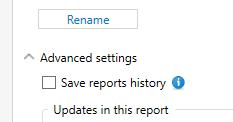
I hope this helps!
Quicken Kristina
Make sure to sign up for the email digest to see a round up of your top posts.
0 -
Hello @Snakebit12,
We haven't heard back from you in a while. Do you still need assistance?
Check back and let us know! Thank you.
Quicken Kristina
Make sure to sign up for the email digest to see a round up of your top posts.
0 -
Hello again,
Checking in once more before this thread is closed.
Let us know if you still need assistance.Thank you!
Quicken Kristina
Make sure to sign up for the email digest to see a round up of your top posts.
0

