Citi Bank Message Error

For the past two months I get the following error message:
"Citi Cards
Citi Cards is reporting connection issues.
The associated accounts can't update right now,
We are investigating the issue."
Except Citi is downloading all transactions accurately. More of an annoyance than a concern, unless it indicates some pending issue. Is anyone else seeing this message?
Answers
-
Hello @allgoodnamestaken,
Thank you for sharing your experience.
Some users have reported that the steps below have resolved this error for them:
- Run One Step Update (OSU) first to see if the issue resolves.
- If the issue persists, close Quicken
- Using Windows File Manager to rename the runtime.dat file located at:
C:\ProgramData\Quicken\Inet\FILENAME\ where FILENAME is the name of your current Quicken data file, e.g. My Quicken Data 2024 as seen in the image below. There usually is an \Inet\… subfolder for each Quicken data file in existence.- (For example, add a 1 at the beginning of the file name so it reads 1runtime.dat.)

- (For example, add a 1 at the beginning of the file name so it reads 1runtime.dat.)
- Start Quicken and run One Step Update again to check if the problem is resolved.
- Close and restart Quicken to ensure changes take effect.
📌 Note: The ProgramData folder is hidden by default. If you need help accessing it, Microsoft's support site has instructions on how to unhide folders.
Thank you!
Quicken Alyssa
Make sure to sign up for the email digest to see a round up of your top posts.
0 -
In a post, specifically this comment, I found an unconventional method or workaround which might help you. I have had this issue since early June, and with the workaround I have been error free for a month now! Good luck and please let us know.
- Q Win Deluxe user since 2010, US Subscription
- I don't use Cloud Sync, Mobile & Web, Bill Pay0 -
Hello @allgoodnamestaken,
We haven't heard back from you in a while. Do you still need assistance?
Thank you!
Quicken Alyssa
Make sure to sign up for the email digest to see a round up of your top posts.
0 -
Checking in once more before this thread is closed.
Let us know if you still need assistance.
Thank you!
Quicken Alyssa
Make sure to sign up for the email digest to see a round up of your top posts.
0 -

I am also getting this message every day, but the transactions seem to download fine.
0 -
The following was suggested as a possible fix in another discussion:
Close Quicken.
Using Windows File Manager delete file C:\ProgramData\Quicken\Inet\your data file name here*\fileInfo.ini
Restart Quicken.
Do another OSU or Update Now for Citi accountsThis "yellow box" error message should now be gone.
* If your data file is named QDATA, delete file C:\ProgramData\Quicken\Inet\QDATA\fileInfo.ini
0 -
I tried that work around. It worked once, and during the next OSU the error came back.
0 -
I've tried everything, it still happens. Please fix this, it's been going on for MONTHS. And it's not like Citi is some small, obscure card company.
0 -
Hello All,
Thank you all for adding to this discussion.
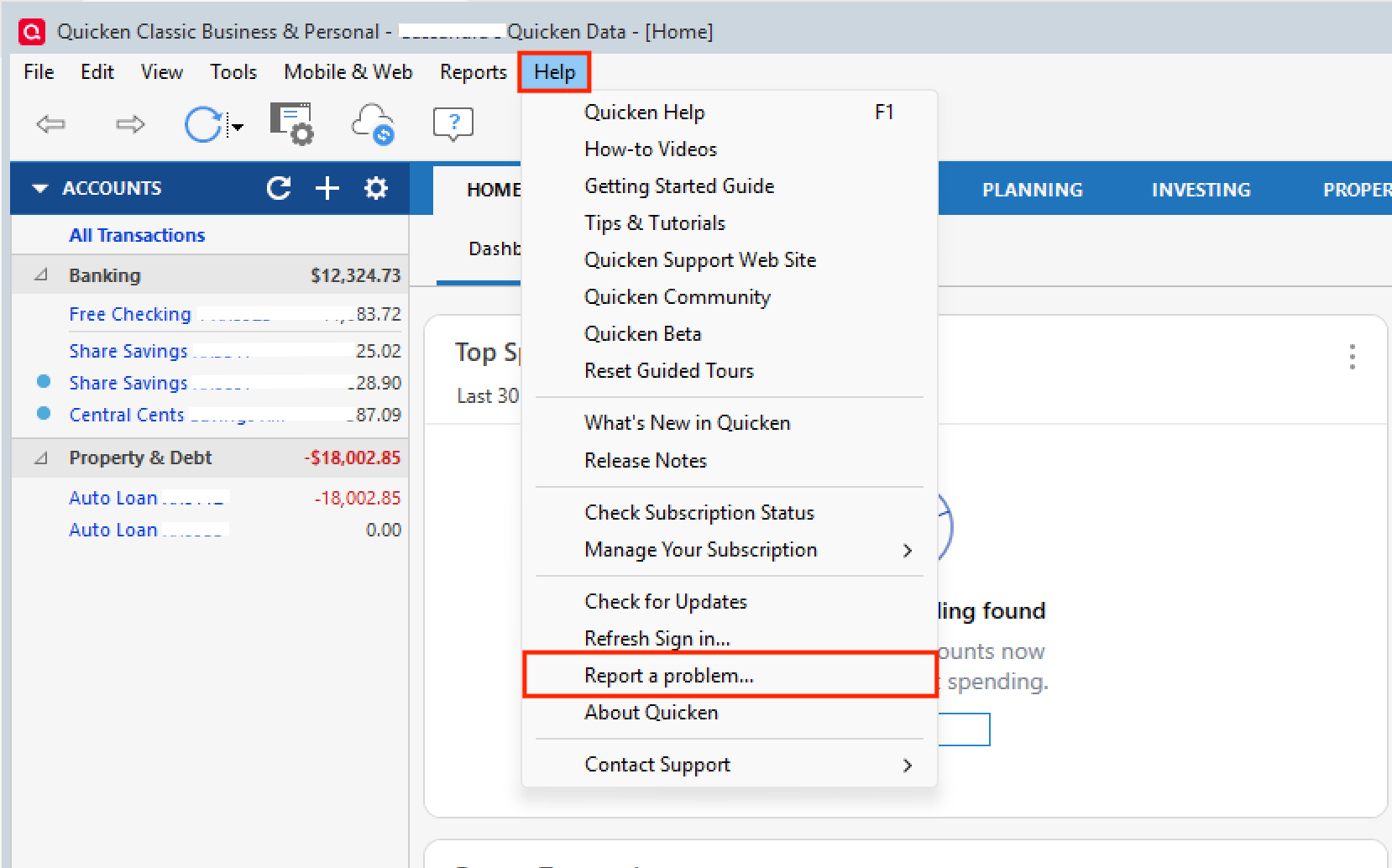
For anyone experiencing this "yellow box" error with Citi Cards, we are asking that you provide log files and screenshots.
To submit Log Files:
- Go to Help>Report a problem>Send to Quicken from within your Quicken software. Including a sanitized data file is not necessary, but is encouraged, as it will aid in the investigation of this issue.
To share screenshots:
Please refer to this Community FAQ for instructions on how to attach a screenshot. Alternatively, you can also drag and drop screenshots to your response if you are not given the option to add attachments.
If you send over log files or anything else, please let us know so we can add it to the escalation ticket.
Are both of you still receiving downloads like @Yaxman, or are you experiencing something else?
Thank you!
[CBT-993]
Quicken Alyssa
Make sure to sign up for the email digest to see a round up of your top posts.
0 -
Yes, I continue to get Citi transactions properly. It's just the error message that won't go away. But there's no error.
0 -
Thank you for following up!
If possible, please submit log files as outlined above so we can submit this issue for escalation.
If you do submit logs, make sure to come back and let us know!
Thanks again!
Quicken Alyssa
Make sure to sign up for the email digest to see a round up of your top posts.
0 -
Hello All,
Just checking in on this issue, as we have not received any log submissions yet.
For anyone experiencing this "yellow box" error with Citi Cards, we are asking that you provide log files and screenshots.
To submit Log Files:
- Go to Help>Report a problem>Send to Quicken from within your Quicken software. Including a sanitized data file is not necessary, but is encouraged, as it will aid in the investigation of this issue.
To share screenshots:
Please refer to this Community FAQ for instructions on how to attach a screenshot. Alternatively, you can also drag and drop screenshots to your response if you are not given the option to add attachments.
If you send over log files or anything else, please let us know so we can add it to the escalation ticket.
Thank you!
Quicken Alyssa
Make sure to sign up for the email digest to see a round up of your top posts.
0


