How to remove datafile from Quicken Cloud

I have been using Quicken for a while and I have turned off the Quicken Mobile & Web sync. However, I have just realized that Quicken still keeps my past datafiles on Quicken Web.
I have a few questions:
- If I leave the datafiles on Quicken Web, will there be security issues? Will my finanical institution credentials (for one-step update) be exposed? Are the credentails stored in the datafiles in Quicken Web? (Currently, I am only using Quicken Classic on my laptop and run the One-step update from my laptop).
- How do I delete the datafiles from Quicken Web. I found this instructions dated back in 2024, but seems like it is not valid anymore.
Below is a screenshot from this article.
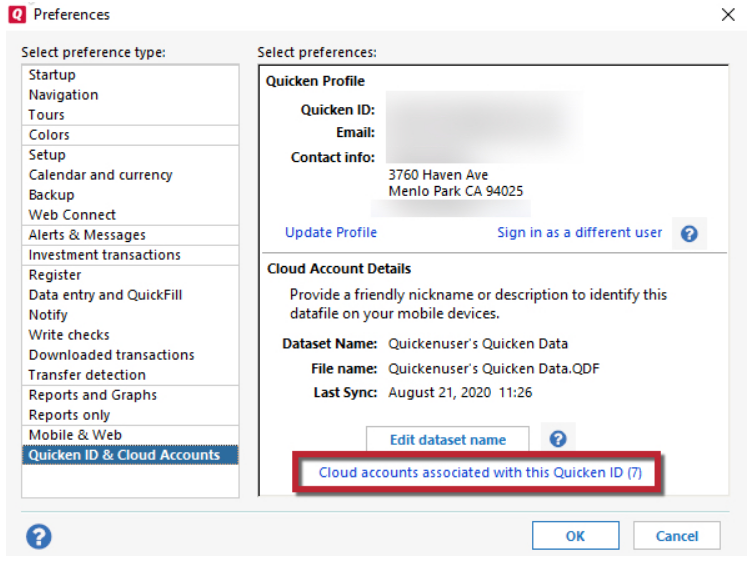
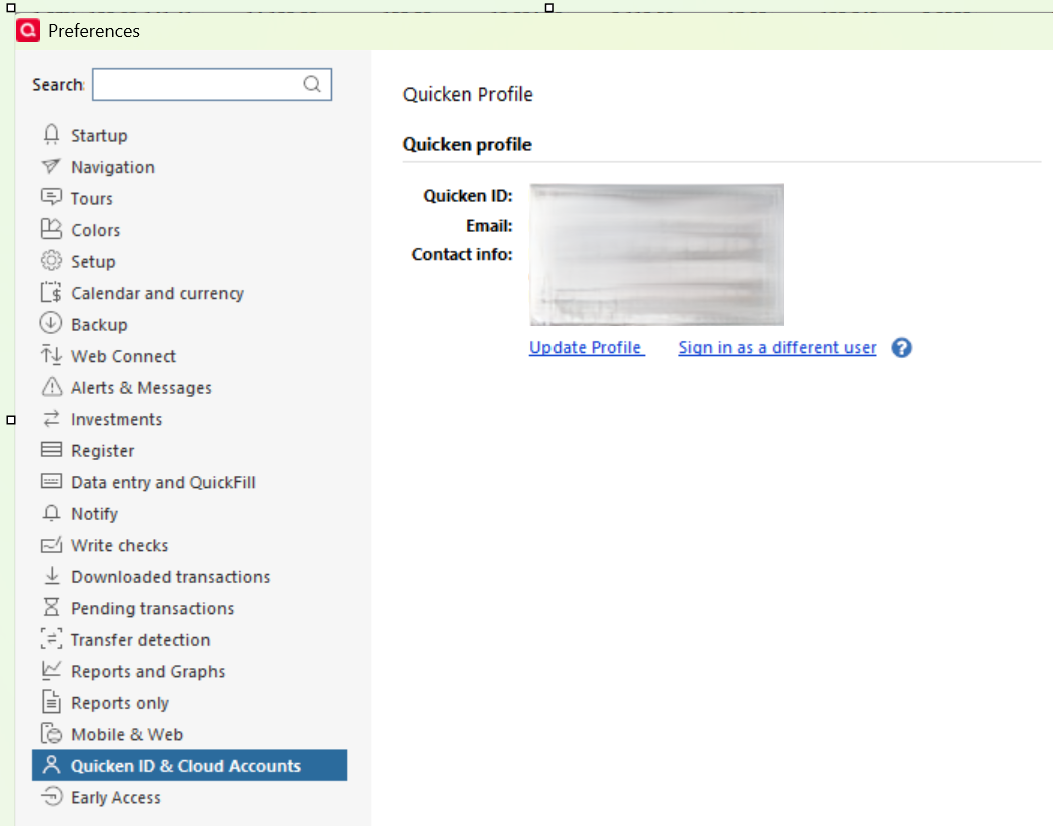
I don't see the lower portion of the right handside of the screenshot on my Quicken for Windows.
3. If I am able to delete the datafiles from the Quicken Web, will I lose all my connections to the financial institutions? Do I need to de-activate and re-activiate each accounts for sync?
Thanks for your help.
[Edited - Enabled Link]
Comments
-
Hello @Lampatrick,
Thank you for reaching out! To answer your questions:
- Leaving files synced with Quicken on the Web should not create and security issues. For more information, please review this article on how Quicken protects your data:
- You can delete files from Quicken on the Web by deleting the associated cloud account. The article you linked is still correct. The reason it didn't work for you is because the link you need is invisible when you have sync turned off. Note: Because some cloud functionality is required, Quicken does require that you have at least one cloud account.
- It depends. Normally, you do not need to reconnect accounts after deleting cloud accounts. However, some customers have reported that if they delete the cloud account for their main file, they did have to reconnect some financial institutions that connect via Express Web Connect/Express Web Connect+.
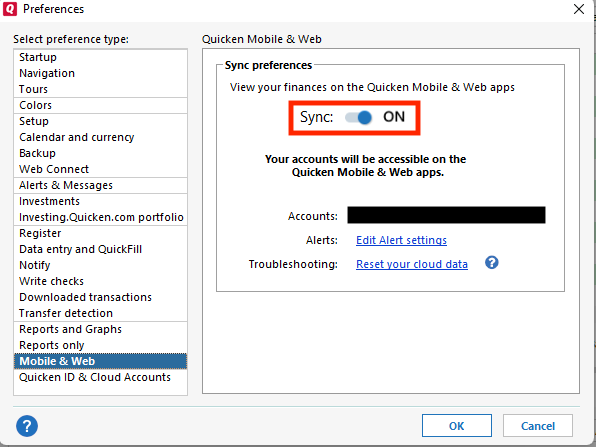
To delete your cloud accounts, either turn sync on in your main file, or switch to a file that still has sync turned on. To turn sync on in your main file, navigate to Edit>Preferences>Mobile & Web, then click the slider so that Sync is On and click OK.
If you prefer to switch to another file, you can find instructions on switching between Quicken files by clicking here.
Once sync is turned on (or you're in a file with sync turned on), navigate to Edit > Preferences > Quicken ID & Cloud Accounts and click the "Cloud accounts associated with this Quicken ID" link.
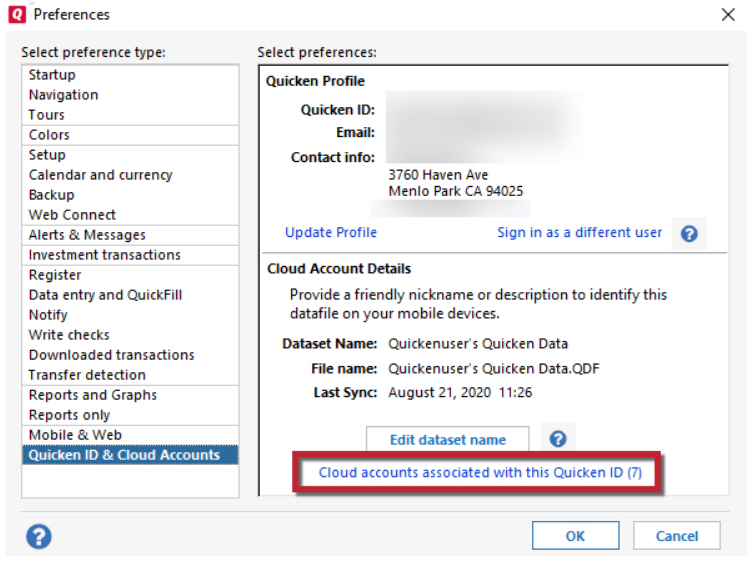
In the window that comes up, click the name of the dataset you want to delete and click the delete button.
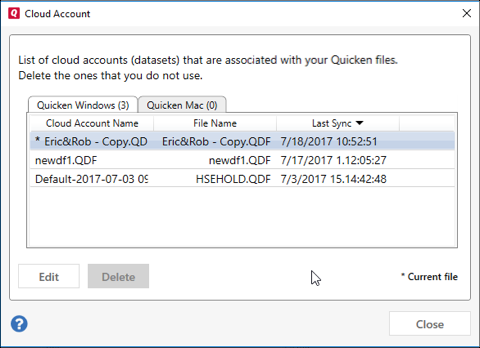
Note - You do need to keep at least one cloud account, since Quicken does require some cloud functionality, even when sync is off.
Warning - If you choose to delete the cloud account associated with your main Quicken file, you might need to reconnect some of your financial institutions that connect using Express Web Connect/Express Web Connect+.
I hope this helps!
Quicken Kristina
Make sure to sign up for the email digest to see a round up of your top posts.
0 -
@Quicken Kristina Thank you for your answers. I just wanted to clarify that I do have ONLY ONE Quicken account, but it shows multiple datafiles. I don't plan to delete my ONLY ONE Quicken account, but just wanted to delete the datafiles. Do you mean I have to keep at least one datafile? Can I delete all datafiles?
BTW, I have been using Quicken since 1998 with windows. Recently, I am exploring Quicken Classic for Mac, and I am running both Quicken Classic for Windows and Quicken Classic for Mac at the same time. In that case, do I need to keep one datafile for Windows and another separate datafile for Mac?
Thank you.
0 -
Thank you for your reply,
To clarify, I am referring to deleting the cloud accounts, not your actual Quicken account. Each Quicken file has a cloud account associated with it unless you had Sync turned off when you created the file.
It's a good idea to hold onto your main data file, some backups (just in case), and any files that you want to retain for historical purposes. It's also a good idea to have some recent backups stored separate from your computer, such as on a removable hard drive or synced with a cloud service like OneDrive, iCloud, or Dropbox. That way, if something happens to the computer, you still have those backups available.
Thank you!
Quicken Kristina
Make sure to sign up for the email digest to see a round up of your top posts.
0
