Quicken STILL crashing on Windows 11 computer.

Issues started back in April 2025 after I bought new computer. No issues for 15 years prior on Windows 10.
Called multiple times. Escalated to LEVEL 2. Shared screen with techs, logs sent, etc. etc. etc.. After approximately $350 worth of long distance calls, I gave up and limped along. No issues on my computer with any other software since.
Now its a new year - 2026. So, I thought maybe they've since introduced an update or patch or something that has remedied the issue. Re-downloaded software, new subscription and tried again. Nope…still craches after about 15 or so entries. 80% of data goes to the correct folder but 20% just randomly gets sent to incorrect ones. All kinds of strange problems.
I have absolutely no faith. I even had 1 entry dated back to a random day/month in 1975. I will try calling customer support one more time tomorrow because I used to really enjoy using the software, but if nothing has changed, I guess I will have no choice but find an alternative. I cant limp through another year. So, very frustrating.
Any thoughts or suggestions?
Comments
-
Hello @clepain,
Thanks for reaching out to tell us about this issue!
To better assist you, could you please provide the following details?
- Where is your Quicken data file stored? Is it on your local hard drive (C: Drive) or a cloud-based/external drive (e.g.: OneDrive, DropBox, USB, etc.)?
- Please provide the exact file path as shown in the example below.

- Please provide the exact file path as shown in the example below.
- Could you please provide which troubleshooting steps you attempted so far?
- You mentioned it crashes after 15 or so entries—Have you noticed any particular pattern as to when the program crashes (e.g.: only while entering transactions, after One Step Update, opening a certain account register, clicking on a certain tab, etc.)?
Looking forward to your response!
-Quicken Anja
Make sure to sign up for the email digest to see a round up of your top posts.0 - Where is your Quicken data file stored? Is it on your local hard drive (C: Drive) or a cloud-based/external drive (e.g.: OneDrive, DropBox, USB, etc.)?
-
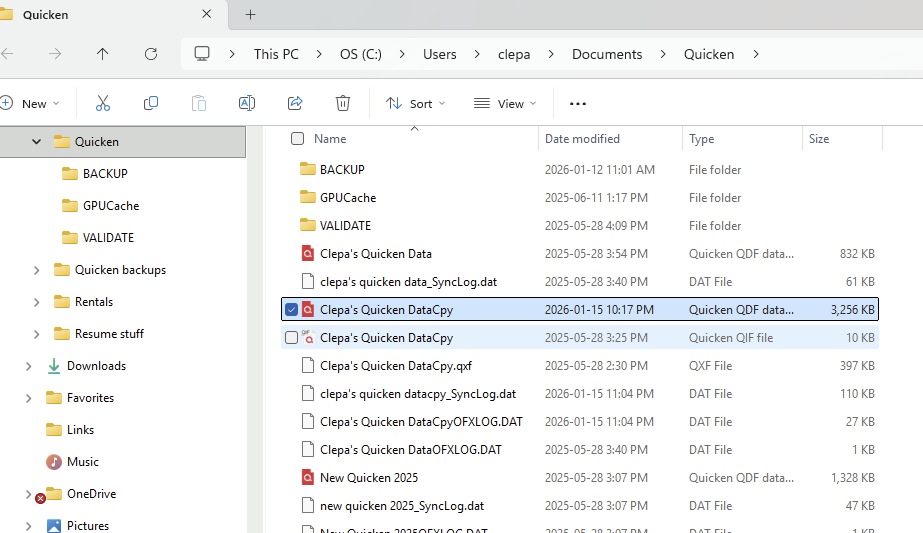
I dont remember everything we did back in the spring. Note that when I got the new computer with Windows 11, I initially didnt import any files. We started with a clean slate and we renamed, validated, and moved a number of different test files to try to get the system to stabilize but nothing worked.. We then pulled in my old files and tried them as well but they crashed too. I quite literally worked with no less than 5 or 6 different techs. Some really put in a real genuine effort, which I wholeheartedly appreciated but it never went anywhere. Perhaps you can just look up my account history?? There should be a lot of notes in there somewhere. I haven't tried much recently. I originally thought that it only crashed when entering data but I just recently realized that is actually after the software is working for maybe 10 minutes or so that it happens. Seems to be maybe time-related or maybe how hard I am working it. Recently, I was simply pulling various reports, tax schedules and such and exporting them when it crashed without my entering any data. It definitely does not matter which accounts at all - not just business, nor just rentals, nor just accounts rec. or payable, customer invoices or anything. It makes no difference.
0 -
same problem even on old windows 10 computer.
Problem started with new window 10 migration'
Aconsidering switching to another app. Is monarch good?
0 -
@johnnewmyer here is what Quicken Inc has to say about the other personal finance app you mentioned:
Quicken user since Q1999. Currently using QW2017.
Questions? Check out the Quicken Windows FAQ list0 -
Since Feb 1, after my transaction downloads my program closes. I have uninstalled and reinstalled and this has not solved the problem. I checked that the Web Connect box was checked in the preferences. This, along with my Barclays Bank problem, is very troubling after over 30 years of Quicken use.
0


Categories
- All Categories
- 18 Product Ideas
- 34 Announcements
- 246 Alerts, Online Banking & Known Product Issues
- 19 Product Alerts
- 518 Welcome to the Community!
- 682 Before you Buy
- 1.5K Product Ideas
- 55.7K Quicken Classic for Windows
- 16.8K Quicken Classic for Mac
- 1K Quicken Mobile
- 834 Quicken on the Web
- 127 Quicken LifeHub