I cannot login Quicken and met oops

When I log in to my Quicken account, I met below error, my password is correct. My version is the latest version, and my internet does not seem slow. I waited 24 hours, but this issue still exists. Why? How to resolve it?
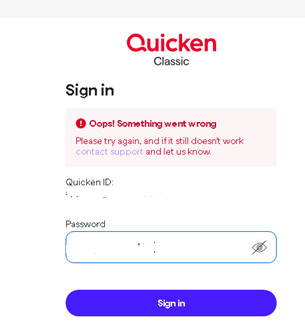
[Edited-Readability]
Answers
-
Hello @ning,
Thank you for sharing your experience. I am happy to help!
After reviewing your login attempts internally, it appears that you are having trouble with the multi-factor authentication code that is being sent to you from Quicken. On our side, it shows failed MFA attempts.
To resolve this, I suggest deleting all of the codes you have received thus far. Once they are deleted, try signing in again, enter the new code you receive, and see if you can now log in without issue.
Let me know how it goes!
Quicken Alyssa
Make sure to sign up for the email digest to see a round up of your top posts.
0 -
Thanks for your quick reply, Thank you in advance.
1 -
I tried again today and met the same issues, how to solve it ?
0 -
Thank you for following up.
I am unable to see your attempts after 1/4/26. I have some follow-up questions for you.
- Are you using a VPN, Firewall, or Antivirus?
- If so, try temporarily disabling it while signing in.
- Where exactly are you signing in?
- Is this the Quicken desktop application?
- Are you in a web browser?
- If you are on the web, please try using a different web browser to see if you have the same problem there.
Please try the following steps from a related Support Article.
Note that the Quicken ID is your email address. If you have multiple email addresses, make sure you're signing in with the one used for your Quicken ID.
To verify you are using the correct password:
1. Type your password into a text application, such as Notepad, WordPad, or another text/word application.
Note: This is a way of confirming you don't have typographical errors in this field.
2. Highlight the "confirmed" password and then copy it (Ctrl + C) and paste it (Ctrl + V) into the appropriate fields in Quicken.
If you are experiencing an issue with the 6-digit verification code

- Make sure you do not close the window you are trying to sign in through.
- Do not request multiple codes be sent. With each new code, the previous one expires.
- When the code is received, it needs to be used immediately or it will expire.
- You can click Email me the code instead to have the code sent via email instead of text. (Shown in the picture above under the Submit button)
- You can also click Call me with a code instead (select this if the number listed is a landline and cannot receive text messages).
Let us know how it goes!
Quicken Alyssa
Make sure to sign up for the email digest to see a round up of your top posts.
0 - Are you using a VPN, Firewall, or Antivirus?
-
I'm having the same problem in Q classic. I'm trying to download my checking from the bank and when I click Update/Send I get the same Quicken login/pw as shown in original posters message. I enter my login (my email address) and the password I used last week, it fails. I never get to the 6-digit code part of the login.
So now I cannot download from the bank.
I've tried what is suggested about copying the password from Notepad and that does not help.
What else can be done? Is there a phone number I can call for Quicken help?
Doug
0 -
Thank you for adding to this discussion.
It looks like you were able to get logged in successfully. Are you still having this issue?
Because you asked, yes, information on contacting Quicken Support can be found here.
Do you still need assistance?
Looking forward to your response!
Quicken Alyssa
Make sure to sign up for the email digest to see a round up of your top posts.
0 -
Hello again,
Checking in once more before this thread is closed.
Let us know if you still need assistance.
Thank you!
Quicken Alyssa
Make sure to sign up for the email digest to see a round up of your top posts.
0 -
Due to the lack of response, I went ahead and closed this post.
If you still require assistance, please feel free to start a new post.
Thank you!
Quicken Alyssa
Make sure to sign up for the email digest to see a round up of your top posts.
0
