Fidelity 401K securities value way off after rebalancing

I rebalanced (part of) my Fidelity 401K and the Quicken reported securities values went down from $99000 to $53500 after importing the exchange records. The entries itself seems to have the correct values, it is the reported total securities value that is $45K off. I corrected it with a dummy entry but that fixes only the total $$, not the securities values itself. Tried to 1) download QIF file: no fix, 2) reactivate: no fix and 3) reload transactions in new account but it says it loaded history of 800 days, but there are no transactions. Is there a way to update the total value of securities? (That is also needed to fix the continuous mismatch between real situation and Quicken balances of my 401K)
Comments
-
Hello @pbmsmit,
Thank you for letting us know you're seeing this issue. To clarify, you are seeing the correct securities and the correct number of securities, but the securities value is incorrect?
If that is what is happening, please provide more information:
- Which securities is this happening with?
- Are these public or non-public securities?
You mentioned that you tried adding it as a new account. Were the values correct, or did you still see the same incorrect securities value in that new account?
I look forward to your reply!
Quicken Kristina
Make sure to sign up for the email digest to see a round up of your top posts.
0 -
I cannot see the number of securities with the automatic load as it only says 'Exchange In' (but numbers Exchange Out differ from manual QIF) But if download the QIF it shows all correct numbers. I have the feeling that the automatic download records mess up the totals [Edited - Language]. I don't want to try deleting them because a restore ruins my other accounts (done that twice and took me 2 days to fix it for 95%).
When loading as a new account, nothing is loaded, although it says it is loading 471 days.
Just for my understanding: how is Quicken calculating the totals: Is it really using the quantity and value or is it using the totals from the account? I guess it is the first otherwise there wouldn't be a difference. How can I see what numbers Quicken is using? (number of items, value of item etc)? It only shows me the total value of securities (and cash).
[Edited - Readability]
0 -
Thank you for your reply,
To clarify, are you using Simple investment tracking or Complete investment tracking? If you're using Simple tracking, then you won't see a transactions tab for the account. You should be able to switch to Complete tracking by going to Tools>Account List, clicking the Edit button next to the problem account, then on the General tab, selecting Complete (If Complete is not supported for that specific connection, then it will be greyed out).
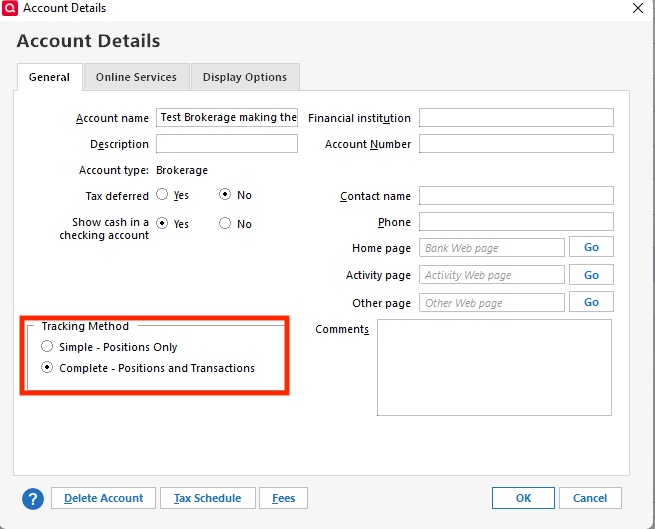
Thank you!
Quicken Kristina
Make sure to sign up for the email digest to see a round up of your top posts.
0 -
Using 'complete' from beginning.
0 -
Thank you for your reply,
Just for my understanding: how is Quicken calculating the totals: Is it really using the quantity and value or is it using the totals from the account? I guess it is the first otherwise there wouldn't be a difference. How can I see what numbers Quicken is using? (number of items, value of item etc)? It only shows me the total value of securities (and cash).
Quicken calculates investment balances based off of the transaction information that downloads, or is entered into the account register. For publicly traded holdings that have a valid ticker symbol, the market value is based on the quoted price per share and the number of shares you hold.
If there are no transactions downloaded/entered into the investment account register, then it would be based off of the information sent to Quicken by the Financial Institution.
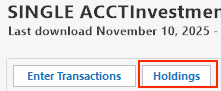
You should be able to click the Holdings button in your account register to see the information on which securities and how many shares Quicken sees.
When loading as a new account, nothing is loaded, although it says it is loading 471 days.
That usually happens when the transactions are already in your register. If Quicken recognizes they're already in your register, it will "see" that they're available for download, but won't download them again since that would flood your register with duplicate transactions.
Thank you!
Quicken Kristina
Make sure to sign up for the email digest to see a round up of your top posts.
0 -
Wow, that holdings view shows me the cause of the difference: it says I have several funds with negative holdings causing the difference in $$. Have to find out if I want to fix that by editing those transactions or creating new 'dummy transactions' to fix it.
Update after trying some fixes:
I tried several options and found out (with a new Quicken file) that adding accounts without issues and gave correct balances. So after making a backup I deleted (in my original Quicken file) the 2 Fidelity accounts I have trouble with (HSA and 401K) and added those accounts again, and…… it fixed the issues for both (!) accounts (although I had to add a one time MISC entry to fix a $440 difference with the cash amount. Don't have time to find out why that happened (it is better than the $45K), I'm happy that I fixed the 401K balance (and the HSA).
1 -
Thank you for the follow-up,
I'm glad to hear you were able to track down the issue and resolve the problem.
If you need further assistance, please feel free to reach out!
Quicken Kristina
Make sure to sign up for the email digest to see a round up of your top posts.
0
