Security price stopped updating... Fidelity

I have Quicken Classic /Windows
Recently been having a multitude of issues and went back to a backup file that was a month or 2 old and everything seems to be working except I have 1 security in my account that the price has not updated since 1/9/26.
I don't know if it matters, but I guess you would call it a "private" security for a company retirement account. It's US Large Cap Stock TD90
Comments
-
Can you help?
Fidelity said to try deactivating and reactivate account, that did nothing.
They said I could try creating
a test file, whatever that is.
0 -
Hello @Tony Luers,
Thank you for the details and screenshot.
To clarify first, when Fidelity mentioned creating a test file, that simply means creating a brand-new, blank Quicken data file and adding the account there to see if the same issue occurs. This helps determine whether the problem is coming from your current data file or from the financial institution connection itself. If you’d like to try that, I can provide step-by-step instructions.
However, I recommend trying the steps in this support article, as this often resolves pricing, reporting, and investment data issues like the one you’re describing.
When a file is restored from an older backup or has gone through multiple updates, small data integrity issues can sometimes prevent security prices from updating correctly even though downloads appear successful.
Specifically, I recommend following the instructions from step 3 in the article forward:
- Copy and Validate your file
- Go to File > Copy or Backup File
- Choose Create a copy or template (do not select Year End Copy).
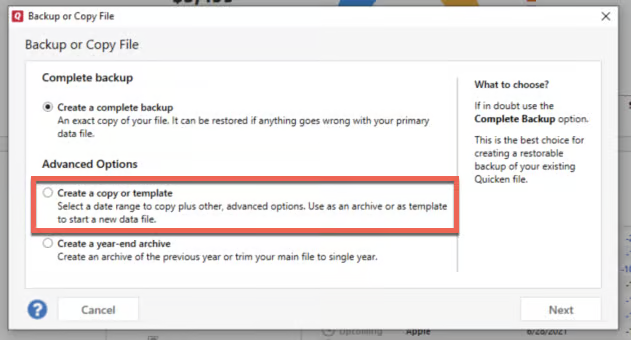
- Leave all settings at default and click Save Copy.
- Open the new copy when prompted.
- Note that creating the copy will disconnect all online services in the copied file and you will need to sign back in with your Quicken ID and reconnect all of your online accounts, online billers, Quicken Bill Manager services, etc if you plan to use that copied file going forward. The reason for this is that the new copy also creates a new and separate dataset ID.
- In the new copy, go to File > Validate and Repair File.
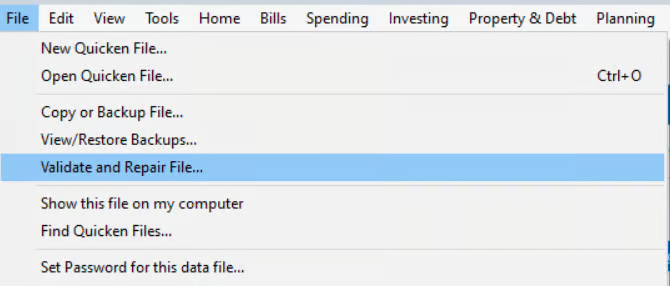
- Check:
- Validate file
- Rebuild Lots (since this is an investment account issue)
- Click OK and allow the process to complete.
- Review the Data_Log
- When finished, a Data_Log.txt will open showing any issues found and instructions if action is needed.
After completing this, please check whether the security price begins updating again. If the issue remains, please feel free to switch back to your original data file or restore a backup.
Let us know how it goes!
-Quicken Anja
Make sure to sign up for the email digest to see a round up of your top posts.0 - Copy and Validate your file

