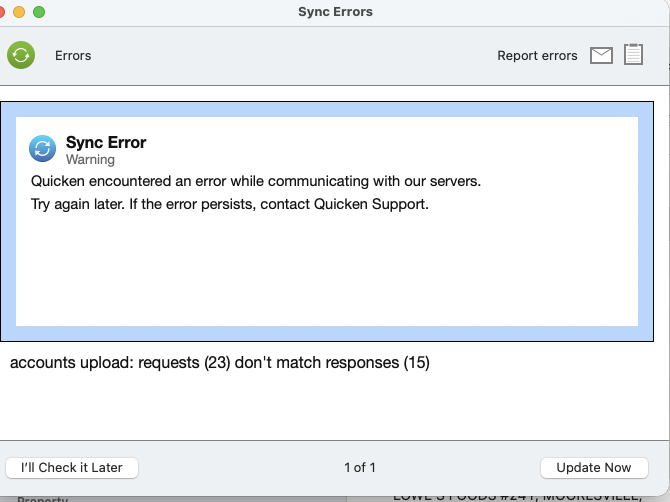
Why am I still getting a "Sync Error" warning with Quicken servers?

Why am I still getting a "Sync Error" warning with Quicken servers?
Answers
-
Hello @Garda,
Thank you for reporting the issues you are seeing!
This is a known issue. To track the status of the issue, please bookmark this Community Alert:
To help us investigate the ongoing issue, please navigate to Help>Report a Problem and send a problem report with log files attached.
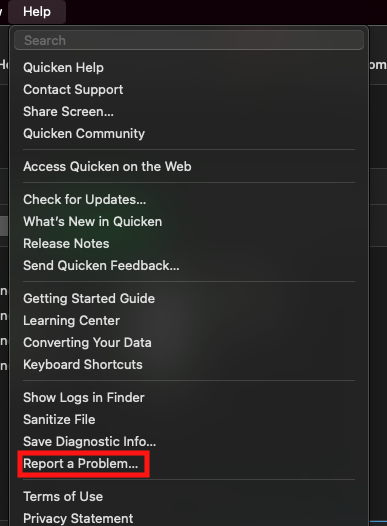
If you do submit logs, let us know so we can get them added to the escalation ticket.
To troubleshoot, if you are seeing an "accounts upload: requests number:(#) don't match responses number: (#)" error, try the following steps:
- Steps for the error "accounts upload: requests number:(#) don't match responses number: (#)":
- Click on "Quicken" in the top left corner
- Select "Settings"
- Go to "Mobile, Web & Alerts"
- Click on "Accounts"
- Take note of the accounts that are Sync'd.
- Click on the "none" button to uncheck all accounts
- Click on "Update" or Run an update to check if the error persists
- If the error no longer appears, you can re-select the desired cloud sync accounts. You should no longer encounter this error after re-syncing
- If the error persists, leave all accounts unselected for Cloud Sync and check again after 24-48 hours.
- You can re-enable your desired accounts for sync after an update does not present the error.
Thank you!
(Ticket#9173985/CTP-16031)
Quicken Alyssa
Make sure to sign up for the email digest to see a round up of your top posts.
0 - Steps for the error "accounts upload: requests number:(#) don't match responses number: (#)":
-
What if you have SYNC off because you don't want your accounts etc… in the quicken cloud? Then your instructions don't match up.
0 -
Sync is turned off on my iMac and has always been off. I don't use Quicken Mobile and don't want to start using it. Do you have any suggestion for me to fix this problem?
0 -
I am getting the same error even though i also don't have sync enabled. my visa account is still syncing, but none of my others
0 -
Having same issue, none of my accounts update, last time worked was 1/16/26. Quicken please remedy this!
0 -
I too have the same issue with Quicken Classic premier version 8.4.2 on Mac. Difficult to beleive this is not solved yet. Any Qucken support watching this forum?
0 -
I am getting the same error with the same environment as others here: I do not sync anything with Quicken Cloud.
On another thread someone suggested going to Settings → Cloud and Services (funnily enough, for cloud services I do not use) and clicking "Reset" (on cloud services I do not use). Then I ran update as usual. That fixed it for me.
Hope this helps someone else. Clearly a bug in the latest release.
2 -
^^^Tribbiani's trick worked for me. Except with my version I went to Settings → Connected Services. Then clicked on "Reset" under Cloud Account. I also do not use any of the cloud services.
1 -
Tribbiani's trick worked for me too. ("Settings → Connected Services. Then clicked on "Reset" under Cloud Account")
Quicken Classic Deluxe Version 8.4.2 (Build 804.59835.100), macOS 15.7.3
Thanks to everyone.
0 -
Thanks to Tribbiani. That also fixed the problem for me.
0 -
worked for me too. thanks!
0 -
Hello All,
Thank you for adding to this discussion.
Strange that the cloud sync would be causing an issue while turned off. I am glad to hear that resetting the cloud resolved the issue.
Is there anyone who was not able to resolve this by resetting the cloud?
Looking forward to your response!
Quicken Alyssa
Make sure to sign up for the email digest to see a round up of your top posts.
0 -
I also had cloud sync off, experienced this problem, and the reset seems to have resolved it. [Removed-Speculation]
0 -
Tribbiani's trick worked for me too. ("Settings → Connected Services. Then clicked on "Reset" under Cloud Account")
Quicken Classic Deluxe Version 8.4.2 (Build 804.59835.100), macOS 26.2 Tahoe
Thanks to everyone.
1 -
Hello All,
Thank you for adding to this discussion and letting us know how you resolved the issue!
If you need more help, don't hesitate to reach back out.
Thanks again!
Quicken Alyssa
Make sure to sign up for the email digest to see a round up of your top posts.
0


Categories
- All Categories
- 53 Product Ideas
- 34 Announcements
- 248 Alerts, Online Banking & Known Product Issues
- 20 Product Alerts
- 516 Welcome to the Community!
- 680 Before you Buy
- 1.5K Product Ideas
- 55.6K Quicken Classic for Windows
- 16.8K Quicken Classic for Mac
- 1K Quicken Mobile
- 834 Quicken on the Web
- 127 Quicken LifeHub