Entering bill reminder attempts to mattch to other transactions

Windows 11 Enterprise
Quicken Classic Business and Personal R65.29
Issue started after updating to above version
Data file became corrupted, validate and super validate failed. Restored backups had problems as well. I was forced to export the data file and reload it into a new file. Many problems with that including closed accounts now had balances, paycheck issues etc but I have worked through these.
However, bill reminders keep trying to match to older transactions. Reminders have all been used for years.
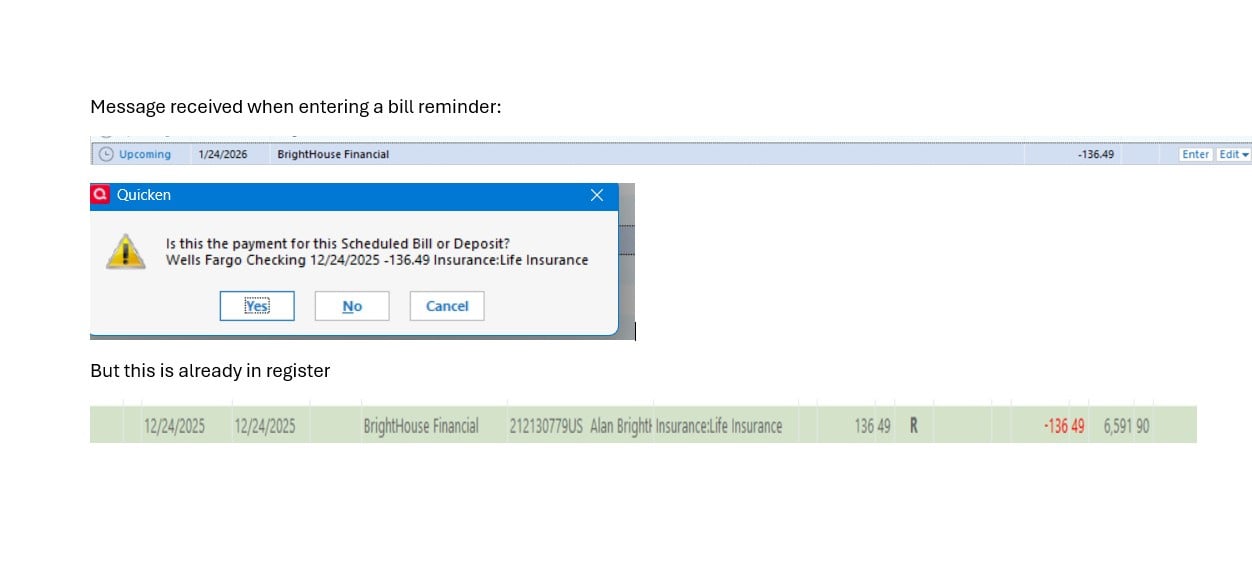
Any ideas what can be done? Just answer yes? No does not resolve the problem.
Answers
-
Hello @dashoffa,
Thanks for reaching out to tell us about this issue!
To better assist you, could you please provide the following details?
- Where is your Quicken data file stored? Is it on your local hard drive (C: Drive) or a cloud-based/external drive (e.g.: OneDrive, DropBox, USB, etc.)?
- Please provide the exact file path as shown in the example below.

- Please provide the exact file path as shown in the example below.
- Also, could you please clarify how you exported and rebuilt the data file?
- Specifically, did you use:
- File > File Export > Quicken Transfer Format (.QXF), or
- File > Copy or Backup File > Create a copy or template
- Specifically, did you use:
Looking forward to your response!
-Quicken Anja
Make sure to sign up for the email digest to see a round up of your top posts.0 - Where is your Quicken data file stored? Is it on your local hard drive (C: Drive) or a cloud-based/external drive (e.g.: OneDrive, DropBox, USB, etc.)?
-
The file is stored locally on c:\quicken. I have tried deleting the reminder and recreating then entry but it does not fix the problem.
0 -
Last night Quicken made me reconnect the downloads for all accounts. Annoying but not major. BUT it changed the opening balances in several accounts. I only caught it because it should be zero. What is going on? Have a host of new bugs been introduced? Is there a list of open, unfixed issues?
0 -
Anja, this is what I have figured out - -
Most of the problems come from the dump and load of the QFX file to recreate the entire file new. The linking of scheduled transactions incorrectly may have to be answered Yes more than one time. I needed to watch the date it 'matched' to in case it was not the last.
The beginning balance issue comes from re-linking the online accounts and is a known bug.
The paycheck problem (being 0) may be the error introduced in the recent update or not but it looks like just editing the paycheck fixes the problem.
The other issues (invoice format, preferences) etc comes from the fact that the QFX is a rightfully a financial file. If there is another option that dumps everything else, I have not found it. So if someone else decides to dump and load the data, make notes on your preferences and invoice formats or just use the opportunity to start anew.
My only request at this time would be to create a true knowledge base which includes known issues with versions and solutions to problems which include dates, times, versions effected and corrected etc. in a consistent format and represents the final answer rather than looking through multiple recommendations in the community. Basically using the existing community format to learn about the problems and work through them but have final answers in one spot as the first place to look. Progress (https://community.progress.com/s/) is a good examples.
If you would like, this issue can be closed.
Alan
0 -
Sorry, one more observation - the dump and load file is approximately 30mbs smaller and overall performance is greatly improved. Now that I am aware of the issues, I may consider doing this again in a few years.
Take care,
Alan
0 -
Hello @dashoffa,
Thank you for taking the time to circle back and share such a detailed breakdown of what you uncovered. This is incredibly helpful—not just for us, but for other users who may run into similar issues after a rebuild.
I’m glad to hear that overall performance has improved after the rebuild, and that you now feel more confident navigating the trade-offs if you decide to do this again in the future.
This thread has been closed as requested. If anything new comes up or you’d like assistance with another topic, please don’t hesitate to start a new discussion.
Thanks again for sharing your experience, and take care!
-Quicken Anja
Make sure to sign up for the email digest to see a round up of your top posts.0

