Lax Security with Quicken Classic

I am amazed that the log-in process only requires a username and password. Many sites have updated the security to include 2FA at a minimum. Passkeys much better, but UN and PW only is unacceptable.
If one were to use Quicken on the web where all your financial information is kept and displayed after logging in with only UN ad PW, would you feel safe and protected?
When logging into Quicken Lifehub as 2FA is part of the security, why not with Quicken Classic?
I would like to suggest that the Quicken team update their security, sooner than later.
Comments
-
When logging into Quicken Lifehub as 2FA is part of the security, …why not with Quicken Classic?
Quicken Classic is an application that resides on your local drive, not on the Web. I know of no resident application that requires 2FA because it would mean that you would need to be both sending the 2FA request to yourself and would then be receiving the 2FA response from yourself.
BTW, Quicken.com, Quicken Simplify, Quicken on the Web and as you noted Quicken Lifeweb all are Web-based and all utilize 2FA already.
If you are instead referring to the One Step Update download connection methods: Quicken already supports 2FA but the 2FA request must originate from the Financial Institution (FI), just like what happens when you try to log into the FI websites over the Internet. When the FI sends the 2FA request, Quicken Classic will then prompt you to enter it before the access is granted. Quicken Classic cannot initiate the 2FA request for the FI because the FI is the entity, not Quicken, that sets the security requirements for access to their system. If you think you should be getting 2FA requests from your FIs you should contact them to make the request.
Or am I misunderstanding that your Idea is about? If so, please provide more clarifying details on what it is that you would like to see.
Quicken Classic Premier (US) Subscription: R66.23 on Windows 11 Home
1 -
I can't speak to what the OP meant, but I can say that with a Quicken subscription, I am prompted to log in via the desktop software periodically, presumably to associate the subscription with the desktop application. The account credentials are the same ones I use to get to quicken.com in my web browser, so I would not mind seeing 2FA there.
quicken user since 199<mumble>, currently qwin via parallels
0 -
My understanding of what you said you would like to see: You would like to get 2FA prompts when you log into your account on Quicken.com in your browser. Is this correct?
If so, that already exists. While I do see a means to change which method I would like to get the 2FA prompt I see no way to turn it off. Every time I log into my Quicken.com account I get a texted 2FA code that I need to enter before I can access my Quicken.com account. You are not getting that? Maybe check your Quicken.com account settings for Sign-In & Security?
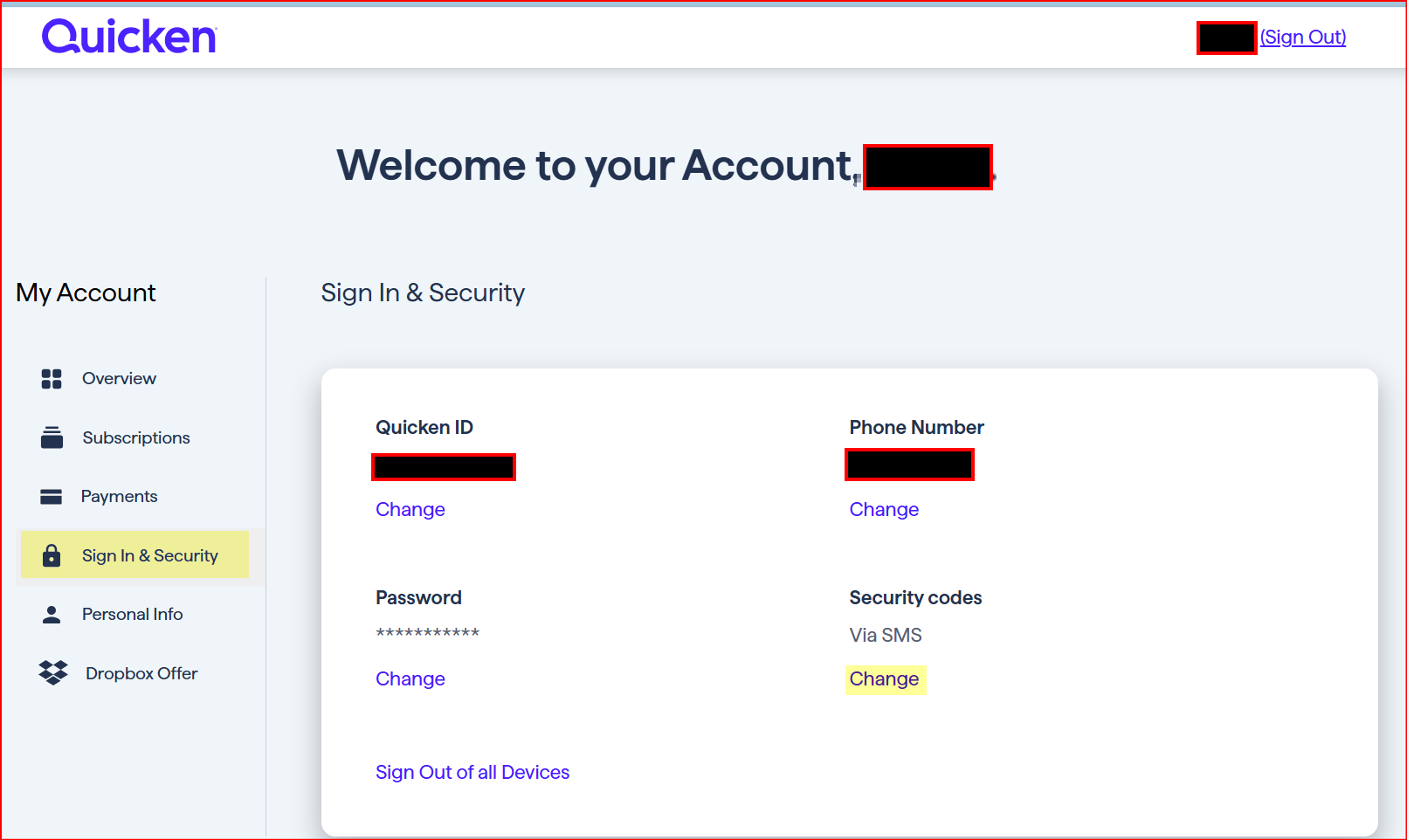
If you are talking about getting a 2FA prompt when opening a data file with the installed software: I don't see how that could work. Quicken Classic might be a subscription service but the software resides on the local drive, not on a Quicken server. We can enter PW protection for the data file and occasionally Quicken will prompt for the Quicken ID and PW to revalidate/sync the software with the Account Cloud and the online account. But 2FA? I don't see there being any logic to it just like I have never gotten a 2FA request for any resident software that I use. Not even MS requires that….unless I am trying to log into my online MS account. But MS does not require 2FA for any of the many different MS apps that reside on my computer's local drive.
Quicken Classic Premier (US) Subscription: R66.23 on Windows 11 Home
0 -
@Boatnmaniac , I can see @fdragan 's point.
Not talking about the data file password rather when I logout of my Quicken desktop and log back in, it temporarily accesses my Quicken.com account to authenticate my credentials as well as my subscription validity. This is where the 2FA could [optionally] come in.
This may be an overkill but it is just a discussion for now. Given that most users do not log out frequently, it is not a major inconvenience to optionally have a 2FA at this stage. If the OP was worded like this, I would've voted for it but as is it is unclear.
I do have two desktop installed resident programs (one free and other paid subscription) which have the 2FA option that I have enabled on both. They are similar to Quicken where my login needs to be verified against their servers and then I am presented to enter the 2FA code. The free one maintains my login like Quicken and no 2FA unless I logout. The paid one I have to enter my password + 2FA EVERY time I launch the program.
- Q Win Deluxe user since 2010, US Subscription
- I don't use Cloud Sync, Mobile & Web, Bill Pay1 -
When signing into the app there is a connection being established (not just an initial temporary connection) between the app and the Quicken server, mainly to validate the software license, the subscription (status and edition), version (current or needing to be updated), etc. All pretty benign functions that really does not have any personally ID, financial data nor financial institutions security info.
But I suppose perhaps when signing into the app it might be possible (I do not know if it would be possible) to add a 2FA requirement but I'm not sure that I understand the need for it because the app itself has no personal information nor financial data nor financial institutions security information in it. There is also no Cloud Account at this point (that I know of) so no one has any access to our online Quicken accounts.
The app only has access to that kind of personal, financial and security data after a data file has been created and/or is opened. The data file has a unique ID that is linked to (and only to) a single Cloud Account that has a unique ID. This link prevents any other data file from accessing this Cloud Account or vice versa in any way.
So would not setting up PW protection to the data file (something that IMO everyone should always do with every single data file they have except for possibly some test files) in essence provide that 2nd level of sign-in security that is desired? To me it appears that it does.
And I keep coming back to the fact that I have no other resident applications that I am prompted for 2FA when opening the app nor when opening my locally saved data file. Why should Quicken be the outlier on this?
Quicken Classic Premier (US) Subscription: R66.23 on Windows 11 Home
0 -
- Somehow I got bullet points, and I can't seem to get rid of them. Apologies for the strange formatting. I don't seem to be able to delete my comment and try again, either.
The credentials are the same. I use the same credentials to log into quicken.com in a browser as I do to log into the data file. The former emails me a 2FA code, the latter does not. Since they are the same credentials, my credentials' use is not actually protected by 2FA, because 2FA is not required everywhere the credentials are used. It is what's known as "security theater". This is what I assumed the OP was referring to, but I may have misinterpreted.
Quicken is less and less a "resident application" and more and more a portal to web servers, much like phone apps. If you don't think so, try signing out of your file, turning off your internet access and signing in again.
Many newer pieces of software I download ask for a login first thing. I was searching for a kind of app recently to see what was available, and at least half of them wanted logins, so I don't think it's outlier behavior anymore. I am, however, on a Mac, so I can't speak to windows software in general.
quicken user since 199<mumble>, currently qwin via parallels
0 - Somehow I got bullet points, and I can't seem to get rid of them. Apologies for the strange formatting. I don't seem to be able to delete my comment and try again, either.
-
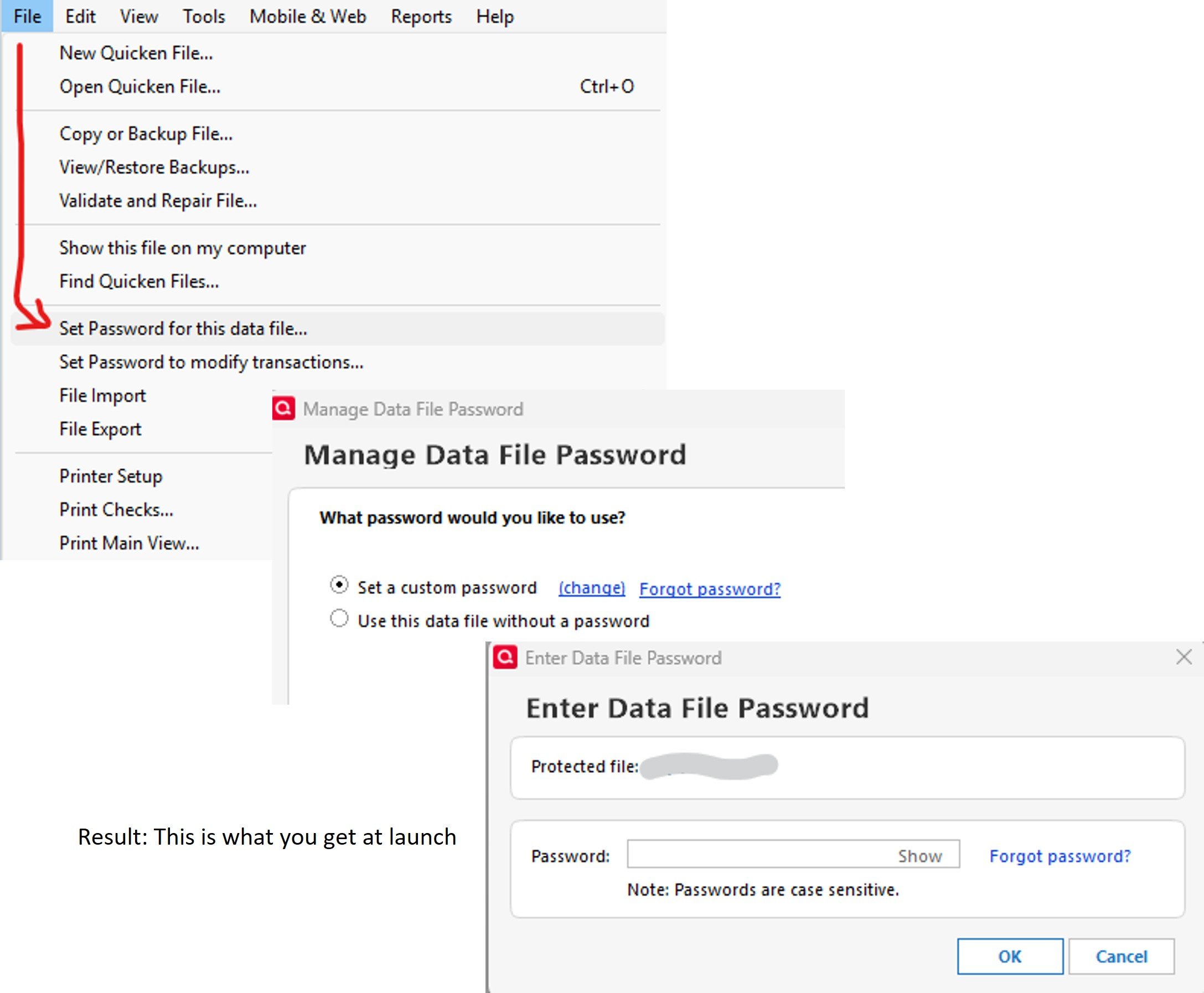
@fdragan , Doesn't Q Mac have a data file password option that you can enable? Doing so every time you launch Quicken it asks your for the password. (that password can be anything you want, and preferably different from Quicken's password). Here is how to set it on Windows:
- Q Win Deluxe user since 2010, US Subscription
- I don't use Cloud Sync, Mobile & Web, Bill Pay0 -
Sure. That's off topic though, from my read of the topic anyway.
I guess they could implement passkeys there, but 2FA wouldn't make sense for that one.
quicken user since 199<mumble>, currently qwin via parallels
1 -
Agreed, was just making sure.
- Q Win Deluxe user since 2010, US Subscription
- I don't use Cloud Sync, Mobile & Web, Bill Pay0

