Can't load OFX data from my bank - runs but no items loaded

I download data from Amegy Bank to my PC and load it into my accounts, in this case loading 2025 data. I have 4 accounts (different LLCs) and 3 of the loads worked fine. The fourth one runs but loads 0 transactions - even though there are more than 80 in the bank file. I have a few 2025 transactions that were there already from early last year, would that prevent it from loading new 2025 data? If so how do I fix that? Thanks much!
Answers
-
Hello @ralbritton777,
Thanks for reaching out!
Have you always used QFX files to downoads transactions with this account?
Since it appears the transactions are not being imported when importing the QFX file, you may need to deactivate the account first and then try to import the file to see if it will go through successfully after deactivation. However, we do recommend saving a backup first (just in case). Then, please follow the instructions provided below.
First, deactivate the account in question:
- Open the Account List (Ctrl + A).
- Click Edit next to the account in question.
- Go to the Online Services tab and click Deactivate.
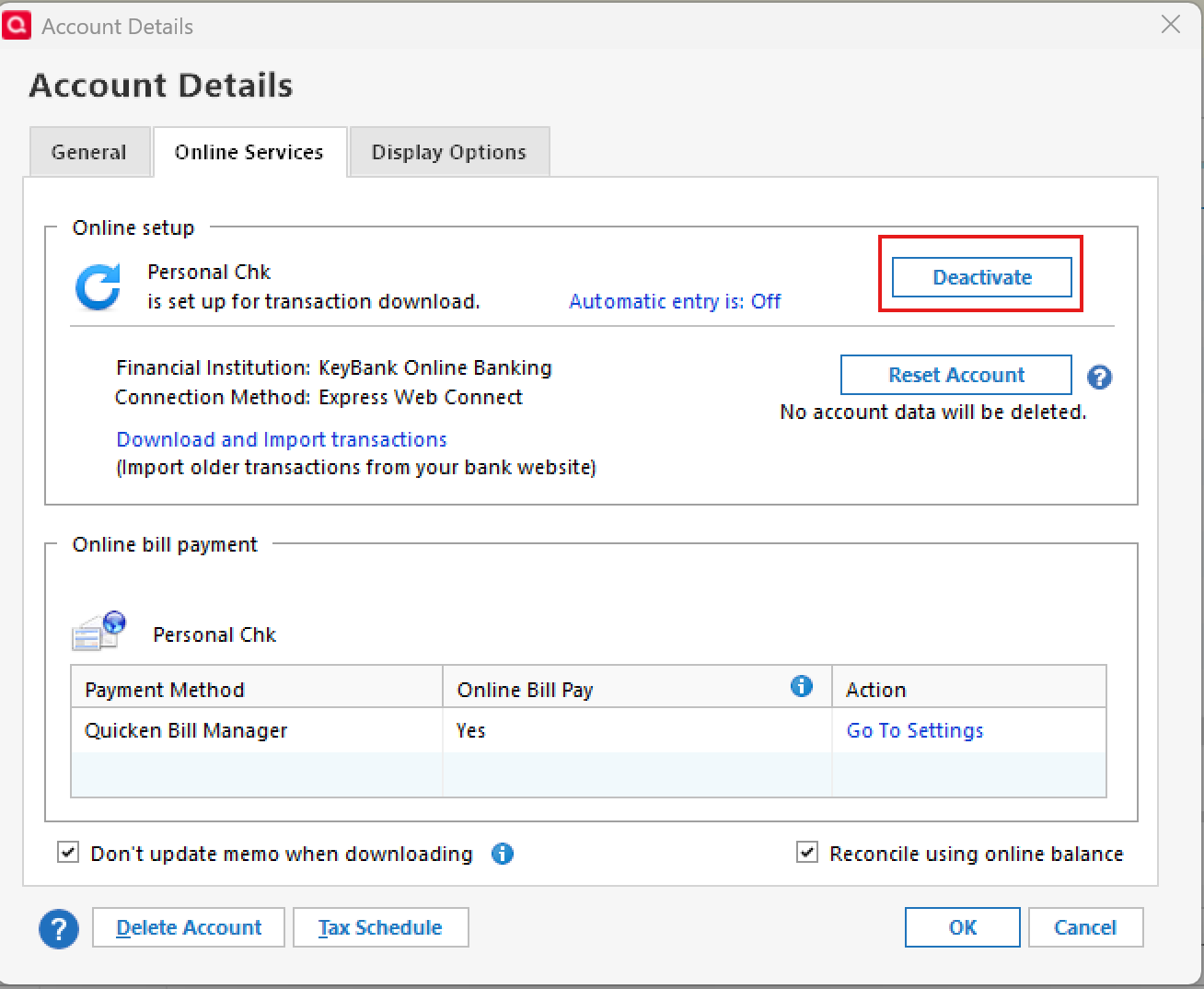
Next, set up and download transaction history for the accounts via Web Connect (.qfx):
- Visit and login into your account at the financial institution's online banking website.
- Download the Web Connect (.qfx) file (please refer to this support article and review the information found under the section titled Locate the correct file to download for guidance on finding the correct file to download at your financial institution website)
- Once downloaded, click Open, if prompted (or open your Quicken program and navigate to File > File Import > Web Connect (.QFX) File...)
- Click Link to an existing account, then choose the account nickname from the drop-down menu.

- Click Import
I hope this helps!
-Quicken Anja
Make sure to sign up for the email digest to see a round up of your top posts.0 -
Hi Anja -
Yes I have always used QFX files to transfer the data. I tried your directions and it still doesn't work. Here's what I did:
- Deactivated the account
- Created the Web Connect QFX file.
- Opened Quicken, went to account where the transactions needed to be loaded.
- Clicked File/File Import/WebConnect - highlighted file to load - clicked "Open"
- A Pop-up was displayed to Activate One Step Update
- Said NO
- Nothing happened - no data loaded
- Tried YES - it asked for bank information to link, cancelled this process.
Any ideas? Should I reactivate the bank link?
Thanks!
0 -
Same problem over the weekend here too…but it turned out that the bank systems were unattended due to hazardous weather. I would have thought the process was clock driven, but apparently there's still some banks that require humans. A.I. hasn't taken over completely yet…
0
