Cant' Connect Walmart OnePay Cash Rewards Synchrony Bank With Quicken
Answers
-
Hello All,
If you are among those in this thread who still have not been able to connect, can you please provide us with the URL that you use to view/access these accounts outside of Quicken, from the bank's website?
I know some have already been mentioned:
Are there others I am missing?
Thank you for following up with that information.
Looking forward to your responses!
Quicken Alyssa
Make sure to sign up for the email digest to see a round up of your top posts.
0 -
Alyssa,
All that shows when I log in is https://www.synchrony.com/accounts/
1 -
To login: https://id.synchrony.com/idp/en
Once logged in: https://www.synchrony.com/accounts/
1 -
@Mark Torpey & @23-yrQuickUser,
Thank you both for providing that information.
I have passed it along to the team working on this issue.
Thanks again!
Quicken Alyssa
Make sure to sign up for the email digest to see a round up of your top posts.
0 -
I went to the synchrony.com site and created an account for the new account manager feature they have. My Amazon store card was already there and I added the OnePay card. (I also have a Lowes in Quicken, but that was not showing and my password is different in Quicken for that and Amazon, anyway.) I then went back to Quicken and used the Amazon store card to add an account. It brought up the Amazon store card that was already there and the OnePay card. I added it and also added the bill using the Amazon store card. All my transactions downloaded and the bill that was coming up also downloaded.
2 -
Thank you for adding to this discussion and letting us know what worked for you.
This information might be helpful to others. We appreciate your contribution.
Thanks again!
Quicken Alyssa
Make sure to sign up for the email digest to see a round up of your top posts.
0 -
Hello All,
Thank you for continuing to update the discussion.
Can I have any of you who have not been able to connect your OnePay cards try again? Do let us know your results.
Thank you!
Quicken Alyssa
Make sure to sign up for the email digest to see a round up of your top posts.
0 -
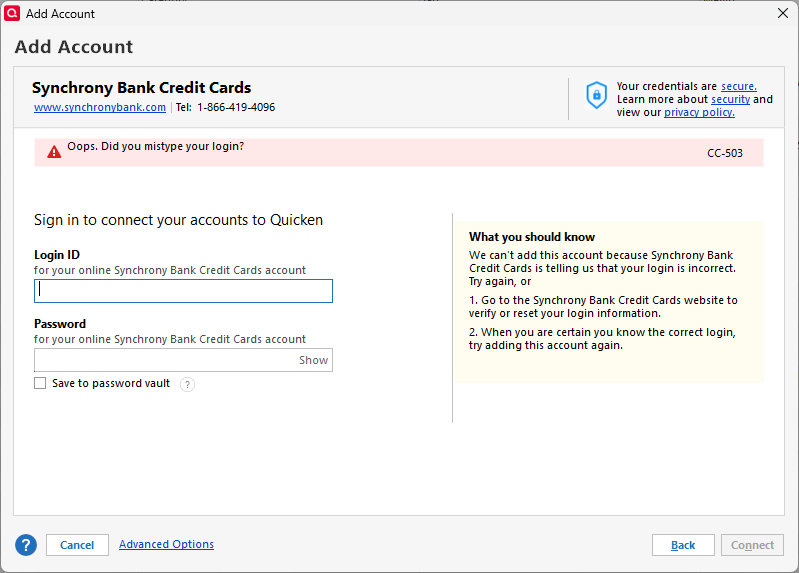
I tried once again. There is no branded link for Walmart OnePay as there is for Amazon, BP, Lowe's, etc. I selected the generic Synchrony Credit Cards option and entered my user ID & password. After checking, I received the following error message. Still no joy here.
 1
1 -
Here is some info that might be helpful for the team working on this:
- I received an email after I activated my physical card. The email has a big button on the bottom that says LOG IN NOW and directs to . At this url, we can view/access our accounts outside of Quicken. This answers the question you asked on your Dec 14th at 2:05pm post.
- There is a similarly named product offered by Walmart called "OnePay Cash". While it has a similar name, IT IS DIFFERENT. "OnePay Cash" are Banking Services provided by Coastal Community Bank. "OnePay CashRewards Card" is a credit card provided by Synchrony Bank. Most (all?) of us want to connect the credit card to Quicken, not the banking services. This distinction might be helpful for the team working on this issue so they don't go down the wrong rabbit hole. Again, please focus on OnePay CashRewards Card (credit card offered through Synchrony Bank), not OnePay Cash (banking offered through Costal Community Bank).
Like one user said, this is the credit card being pushed by the largest retailer in the world. That fact, combined with the fact that it gives 3% or 5% cash back to its customers, means that I'm sure a lot of Quicken users will be attempting to use this card. So Walmart, Quicken, and Synchrony can satisfy a lot of people by getting these systems to sync.
Thank you again for all your work on this matter. I hope for a solution soon! Let me know if there is anything else I can help with. If you still need logfiles, let me know and I'll send mine.
2 -
An update on my end…
I do not have - nor have I ever had - any other Synchrony Credit Cards, so I don't have the option to connect the login to one of my other cards like some of the other users have done.
- I received my physical Walmart OnePay CashRewards Credit Card recently.
- Per the email they sent me, I created/activated an account via web.onepay.com. This worked and I am able to access my account, transactions, statements, etc.
- Then, today, I went to id.synchrony.com/idp/en and created an account there. This worked and I am able access my account, transactions, statements, etc. (I don't know if this is important but when logging in the URL changes from id.synchrony.com to www.synchrony.com)
- I tried syncing with Quicken using the following options:
- Amazon.com Store Card - Synchrony
- Synchrony Bank Credit Cards
- Value City Furniture Credit Card
- Synchrony Mastercard
- Synchrony Financial Mastercard
None of these options worked. Please help!
3 -
My opinion is that the OnePay site/area that you describe is not where Quicken should be connecting. It is limited in scope. The real banking site behind that "bubble" has this login page…
"https://id.synchrony.com/idp/en" The site has all the transactions, etc. Quicken needs to add a dropdown to connect to it.
1 -
I have had a Walmart One Pay card activated for a month now. I registered it on Synchrony. I have no other Synchrony CC's and have tried the same actions as damon92345 (post on 1/16) and Quicken will not connect to my Synchrony account as well.
2 -
I have had an identical experience to @Braun. Fortunately I only have 3-5 transactions a month so manually balancing that account isn't super painful, but I hope Quicken is able to work with either OnePay or Synchrony so we can start tracking this card automatically.
1 -
Hello All,
Thank you for continuing to add to this discussion.
This ticket is still open and is being worked on. We appreciate your patience and understanding while we work!
I have sent you a direct message. Please navigate to the inbox in the top right-hand corner of the Community page and check your inbox.

Thank you!
Quicken Alyssa
Make sure to sign up for the email digest to see a round up of your top posts.
0 -
How to Connect a Synchrony One Pay Card to Quicken (Working Solution)
If you have a Synchrony One Pay credit card and can’t get it to connect in Quicken, try this — it does work, but the connection name is misleading.
✅ What finally worked:
When adding the account in Quicken, do NOT choose “Synchrony Bank”.
Instead:
- Go to Tools → Add Account → Credit Card
- In the financial institution search box, type Synchrony
- Select Amazon - Synchrony
- Sign in using your Amazon/Synchrony login (the same credentials you use on the Amazon Synchrony site)
- Quicken will then show all eligible Synchrony accounts tied to that login, including:
- Amazon Store Card
- Synchrony One Pay card (even if it’s not Amazon-branded)
Once selected, the account links and downloads normally.
💡 Why this matters:
- Synchrony issues many cards under different “brands”
- One Pay cards often won’t appear under generic Synchrony listings
- The Amazon–Synchrony connection is the correct gateway if your One Pay card is tied to that login
I spent a long time trying different Synchrony options before finding this. Hopefully this saves someone else the headache.
-1 -
Your solution won't work for many of us because not everyone (including me) has an Amazon Synchrony account.
"4. Sign in using your Amazon/Synchrony login…" One cannot login to an account that doesn't exist.
1 -
I tried and same results as @griesheimer. Maybe the "solution" is to get an Amazon Credit card. I do have a Belk card via Synchrony and those credentials did not work either.
0 -
FYI - Linked a TJ Maxx synchrony credit card also works to pull in the OnePay WalMart card.
0 -
Unfortunately, if the only Synchrony Card you have is OnePay Cash Rewards WalMart Card, the Synchrony trick does not work.
0 -
If you go with the Amazon "solution", be careful. I have an Amazon credit card, which is serviced by Chase. (And that is no help here.) It is the Amazon store card that is serviced by Synchrony.
1 -
Hello All,
Thank you all for continuing to update this discussion!
Our team has determined that the problem is on the provider's end and is collaborating with the provider to resolve it. However, they do not have an ETA for when it will be resolved.
In the meantime, you can try adding these accounts periodically.
We apologize for any inconvenience.
Quicken Alyssa
Make sure to sign up for the email digest to see a round up of your top posts.
2 -
Been having this problem for four months or so. Contact customer several times with the first time being on 11/2. Was giving the below link on 12/29 and at one point the link showed the issue was resolved, now link now available and this isn't working. Like others, have a Synchrony, OnePay Walmart Credit card. I have tried Amazon.com, Synchrony Bank Credit cards, Value City Furniture (which has the correct URL listed), Carecredit (was advised my one agent to use this), and always get "oops. Did you mistype your login?" Login is correct and have no issue with the www.onepay.com or www.synchrony.com/signin the sites, both URLs use the same login information. This is getting old Quicken.
https://community.quicken.com/discussion/7969223/new-12-15-25-synchrony-bank-cc-503-103/p1?new=1
0 -
Thank you for adding to this discussion.
I am sorry you have been affected by this issue. This was escalated internally, and our team determined that the problem is on the provider's end. They are collaborating with the provider for a resolution.
Hope this helps!
Quicken Alyssa
Make sure to sign up for the email digest to see a round up of your top posts.
1 -
Will you let us know when they get the resolution finalized and rolled out? Thanks!
0 -
Thank you for posing this question.
If/when the team handling this reaches out with an update, yes I will post it here.
Thanks again!
Quicken Alyssa
Make sure to sign up for the email digest to see a round up of your top posts.
0 -
I tried this method and was also successful in connecting to my OnePay credit card. Because my Sam's Club credit card is serviced by Synchrony Bank as well, I suspect that the connector for that account would also work. It was listed in available accounts when using the Lowe’s Consumer Card connector.
1 -
Thank you for adding to this discussion and letting us know what works for you.
These details may be helpful to others trying to connect these accounts.
Thanks again!
Quicken Alyssa
Make sure to sign up for the email digest to see a round up of your top posts.
0

