Issues creating a year-end copy [Edited]

I am running Quicken Classic Deluxe R65.20 Build 27.1.65.20 Edition Canada. When I run a YearEnd Backup I am unsuccessful in creating a new (smaller) file commencing on a date of my choosing (ie 2015-01-01). My current file dates back to 1995.
All of the data remains, everything remains in the new file and the new file and the old file are identical in size. My filesize is about 950,000 KB. My laptop has 32 GB ram. Is this considered a large file?
Validating and Repairing the file didn't indicate any problems, nor were subsequent backup efforts successful.
I hope there is a solution out there.
Answers
-
Hello @John%%,
Thank you for reaching out! To help troubleshoot, please provide more information:
- Are you trying to create a year end archive, a copy of your file, or just make a backup of your file?
- Are you seeing any error messages when you try to do this?
- Are you running into any problems that make you want to reduce your Quicken file size?
I look forward to your reply!
Quicken Kristina
Make sure to sign up for the email digest to see a round up of your top posts.
0 -
I have already archived and backed up all of my data - 1995 until now. I am trying to reduce my file size by eliminating data pre-2010 as shown in the attached screenshot.
No error message is generated.
The only problem I'm experiencing is that transaction entries seem slow, and I'm trying to speed things up by reducing my filesize.
Your thoughts??
 0
0 -
Have you opened the new Current file, after YEC, to see if, for example, regular banking register transactions prior to the cutoff date have been removed?
Are you aware of the fact that, during YEC, only reconciled, non-investment, non-transfer transactions will be removed? Non-reconciled transactions in certain account types (e.g., Accounts receivables, Accounts payables and a few others) will remain.
After running YEC, the Current File will not necessarily shrink in physical file size. Deleted transactions, if any, continue to occupy physical file space. This "gas" space can only be recovered by creating a "template copy".
Please show us an image snapshot of the File Information block of the After-YEC Current file. This is created by clicking Help, then holding Shift while clicking About Quicken. It will tell us a little more about the contents of your data file.
There are some suggestions about improving performance of banking register transactions as well as investment register transactions. I'll get into that after reviewing the File Information. OK?
0 -
Many thanks for your response !
Yes. I have checked the transactions in multiple accounts, and none of them have been altered - the Current File and the Yearend Copy are identical in content - no transactions have be screened.
There are no unreconciled transactions - I'm rigorous in reconciling all accounts monthly.
I've attached the requested screenshot. Clicking the "More Info" button produces much more information, but I don't see any way to record/file it to send to you.
Looking forward to your response !
john
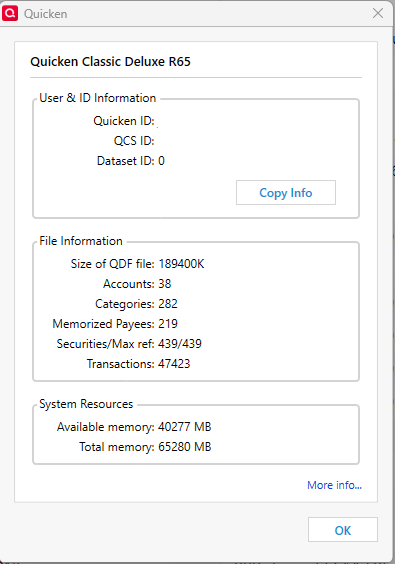
[Edited - Removed Personal Information]
0 -
Thank you for your reply,
I recommend that you reach out to Quicken Support directly for further assistance with this issue. They have access to tools we can't access on the Community and they're able to escalate the issue as needed. The Quicken Support phone number can be found through this link here. Phone support is available from 5:00 am PT to 5:00 pm PT, Monday through Friday.
I apologize that I could not be of more assistance!
Quicken Kristina
Make sure to sign up for the email digest to see a round up of your top posts.
0 -
No worries. Thank you for trying.
One thing that DID work is that the new file totally loses online connectivity / linkage to my banks, etc. Have to re-pair every account. No accounts were truncated, nor transactions archived, but still had to set up all my online updates again. Somewhat frustrating. Hopefully Quicken will be able to help. Thanks for your efforts !!
John
0

