Teachers Retirement System of GA - FDP-106.

I have not been able to update our Teachers Retirement System of Georgia account for over a week. I have been receiving a Care Code: FDP-106.
Details: ACCOUNT_MISMATCH
Account not found. No accounts returned - case 106.
I have disconnected the account. Deleted the Uid/PWD entry in my Keychain, and I still get a Care Code: FDP-106.
Does anyone know what is going on with this institution?
Thanks
Tom
[Edited-Readability]
Comments
-
Hello @TQue,
Thank you for sharing your experience and reporting the issues you are having.
After reviewing your connections internally, I can confirm you are getting an FDP-106 error. The FDP-106 error occurs if you (or your bank) changed the account name at your bank's website or if your bank switched to a new account for you (such as for lost or stolen accounts). Some of the suggested troubleshooting steps you mentioned having already done, but let's do them all in the order listed below to ensure we don't miss anything.
To fix this Issue
Step 1: Deactivate the account(s)
- Go to the Accounts menu and choose Hide and Show Accounts.
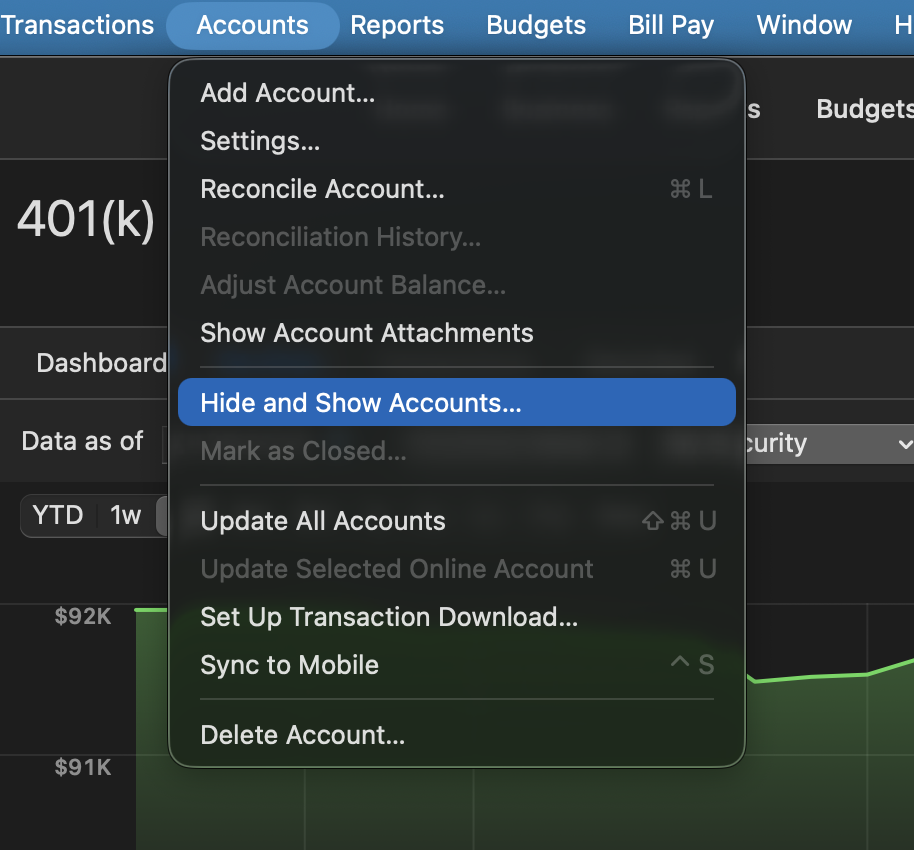
- Uncheck any accounts with this specific financial institution (FI) that are hidden in Lists.
- When complete, click on the account name for your account(s) in the Accounts toolbar in Quicken.
- Click the Settings icon in the bottom right corner of the screen.
- Select the Downloads tab.
- Click on Disconnect Account.
- Click Done. Do this on each account with this FI.
- Quit Quicken.
Step 2: Reactivate and link the account(s)
- Reopen Quicken.
- Go to Accounts > Add Account.
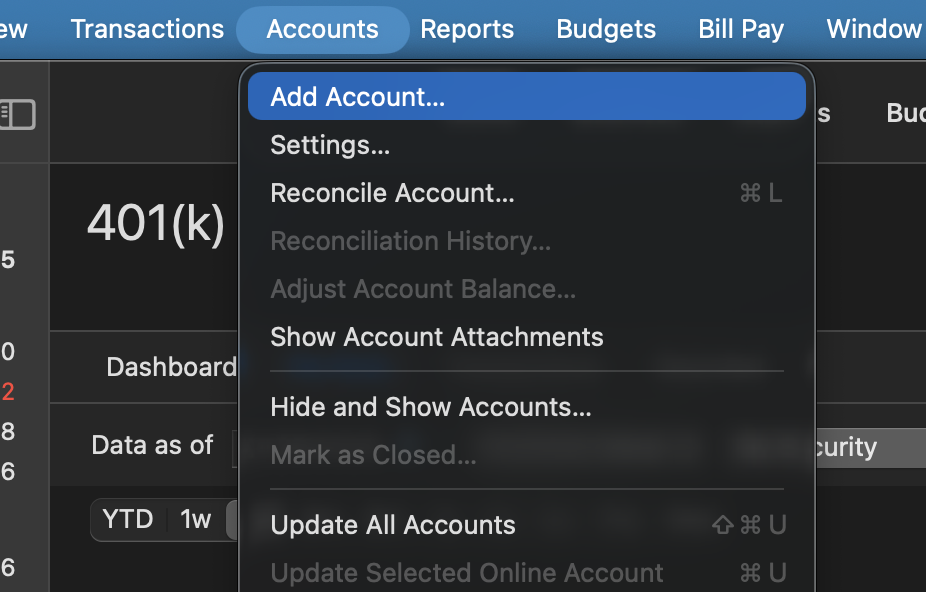
- Type the name of the financial institution, make the appropriate selection, then click Continue.
- Enter your login credentials and click Continue.
- When Quicken has returned all accounts discovered for this FI, very carefully LINK each of the found accounts to the appropriate account you already have set up in Quicken.
NOTE: This process will download 90 to 200 days of transactions, depending on your bank. If you find duplicate transactions in your account(s), you can delete these transactions from the account register.
If the issue persists after following the steps above, please contact Quicken Support directly. Further investigation and possible escalation may be necessary.
Thank you!
Quicken Alyssa
Make sure to sign up for the email digest to see a round up of your top posts.
0 - Go to the Accounts menu and choose Hide and Show Accounts.
-
Thanks for the response and instructions. Unfortunately this process did not work and I am still receiving the FDP-106 Error. Before I attempted these steps I ensured my credentials were correct and the URL was correct. I successfully logged in to the FI with my credentials. Then I copied/pasted the UID and Pwd into Quicken so I know they are correct. I'll call suppport to see if they can assist.
Thanks
Tom
0 -
Thank you for following up with additional details.
I hope support can help get this resolved and/or escalated for you.
Let us know how it goes!
Quicken Alyssa
Make sure to sign up for the email digest to see a round up of your top posts.
0 -
Any updates on the fix to allow up to login and get updates on the Teachers Retirement System of Georgia?
0 -
Thank you for following up.
It looks like this issue was marked as resolved. If you are still experiencing this, please contact Quicken Support directly.
Thanks again!
Quicken Alyssa
Make sure to sign up for the email digest to see a round up of your top posts.
0 -
Alyssa,
This issue does not appear to be resolved. I just tried to update the account and received the Care Code: FDP-106 again.
Tom
1 -
Thank you for reporting that this issue is not resolved from your end.
Please contact Quicken Support so they can take a closer look at what could be causing this issue and reopen your escalation ticket if needed.
Thanks again!
[Ticket#:12192726]
Quicken Alyssa
Make sure to sign up for the email digest to see a round up of your top posts.
0
